

Arturia MiniLab 3 Manual
PDF manual · 34 Pages
English



Quick check
Incorrect answer, please try again.
Chat with your Arturia MiniLab 3 manual using AI
Get instant AI answers from your Arturia MiniLab 3 manual
Ask anything about the Arturia MiniLab 3. Answers come from this manual, with the pages they are based on.
Ask a Question
Do you recommend MiniLab 3?
Yes NoFrequently Asked Questions
Download and install MIDI Control Center. Select your device under Device, click the firmware revision box, and upgrade using the latest file from the Arturia website.
Is this answer helpful?
MiniLab 3 supports Ableton Live, Logic Pro, Bitwig Studio, and FL Studio natively. Others can support through Mackie Control Universal protocol.
Is this answer helpful?
You receive Analog Lab Intro, Ableton Live Lite, the Gentleman piano, UVI Model D, and subscriptions to Loopcloud and Melodics.
Is this answer helpful?
Yes, the rear panel has a 1/4-inch TRS input that accepts a sustain pedal, footswitch, or expression controller.
Is this answer helpful?
Hold Shift and press Pad 1 to turn the arpeggiator on or off. You can enter Edit mode by long-pressing the pad while holding Shift.
Is this answer helpful?
Yes, the device is powered efficiently via USB-C and supports operation with an iPad for mobile music production.
Is this answer helpful?
Unplug USB-C, hold Octave minus and Plus, then plug USB-C back in until pads turn on and display Factory Reset.
Is this answer helpful?
Advantages and Disadvantages
Advantages

- Compact design with 25 velocity-sensitive keys and 8 RGB pads suitable for travel
- Includes valuable software bundle with Analog Lab Intro and Ableton Live Lite
- Features eight endless encoder knobs and four faders for real-time control
- Auto-recognition of popular DAWs simplifies setup and workflow integration
- OLED display provides clear feedback on parameters and status
Disadvantages

- Twenty-five keys may limit playing range compared to full-size keyboards
- USB-C connection required which may need adapters for older computers
- Some advanced customization requires third-party software like MIDI Control Center
Product Specification
Type
MIDI Keyboard
Keys
25
Pads
8, Aftertouch
Rotary Knobs
16
Fader
4
Additional Controllers
Modulation (Touch), Pitch Bend (Touch)
Connections
USB-C, MIDI Out, Sustain Pedal
Features
Arpeggiator, Chord Mode
Dimensions
13.98x1.97x8.66 in (WxHxD)
Weight
3.31 lbs
Product Description
Arturia MiniLab 3 Creative Workflow
Discovering the power of mobile music creation starts here. The Arturia MiniLab 3 is a compact MIDI keyboard controller designed for maximum flexibility in studio or live settings. Whether you are a producer, performer, or sound explorer, this device integrates tightly with your digital audio workstation software and plugins. To fully utilize this hardware, many users refer to the Arturia MiniLab 3 Manual to understand the extensive customization options available within the device.
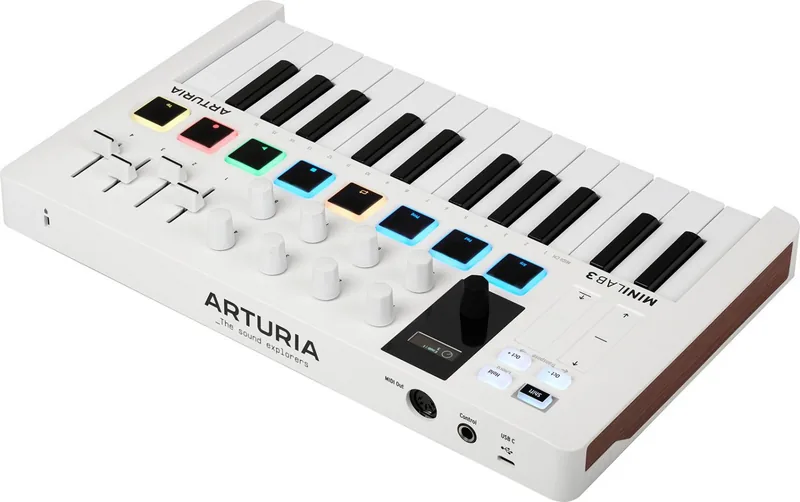
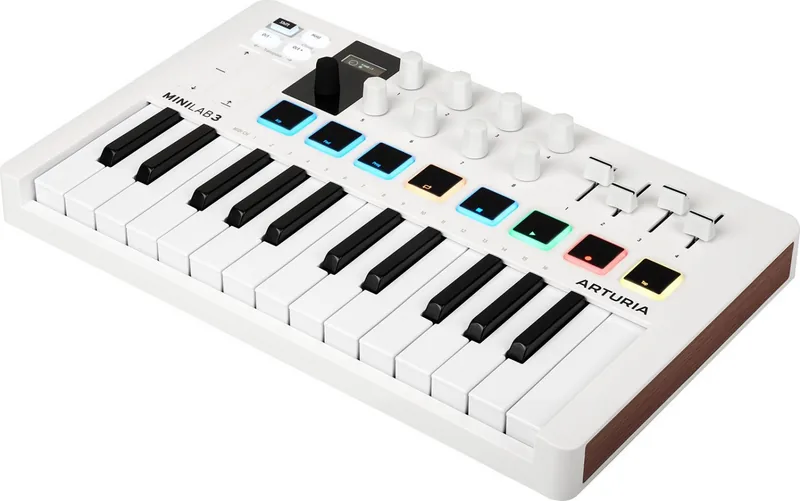
This controller features a slim-key twenty-five note keyboard with velocity sensitivity. It also includes eight backlit performance pads that sense both velocity and aftertouch. The user interface has been rethought with eight endless encoder knobs joined by four faders. A bright OLED display sits above the main encoder, providing visibility of values even under bright light. Two low-profile touch strips manage pitch and modulation tasks efficiently. The main encoder is dented and clickable for navigation through presets. This layout is designed to speed up workflow significantly.
Out of the box, MiniLab 3 comes pre-integrated with Analog Lab software. This allows seamless browsing of presets and parameter adjustment without reaching for a mouse. It automatically recognizes popular DAWs like Ableton Live, Logic Pro, and Bitwig Studio. You can control transport functions using pads and tweak plug-in parameters via the knobs and faders. Additionally, the device includes specific software licenses such as Ableton Live Lite, Native Instruments The Gentleman piano, and UVI Model D. There are also subscriptions for Loopcloud and Melodics included.
Advanced features include an onboard arpeggiator similar to classic synths. You can adjust speed, range, mode, and swing settings directly from the hardware. You can also engage Hold Mode for hands-free sustain or Chord Mode to play memorized chords from a single key. The MIDI Control Center software enables deep customization of parameters. You can map controls to software differently or create user programs. Registration is required to access updates and an exclusive software bundle. This ensures your creative process remains streamlined regardless of your environment.
The device is powered via USB-C port which also communicates data. It includes a standard 5-pin MIDI output for hardware modules. A 1/4-inch TRS input accepts sustain pedals or expression controllers. It supports Mackie Control Universal protocol for enhanced DAW integration. Firmware updates are managed through the companion app to add new functions. This product supports iPad power requirements making it fully portable. For musicians needing to squeeze into crowded DJ booths or home studios with limited space, this unit is ideal. It acts as a bridge between physical performance and digital sound design. The hardware build quality is robust for travel. The OLED screen shows control values visually when touched. Pads have secondary functions accessible with the shift button. You can tap tempo for internal clock sync. Vegas Mode activates after inactivity to save display life. A Kensington lock port secures the unit in public spaces. Factory reset is possible via buttons without software. The software license agreement protects against unlawful copying. Support is available through registration.
Search for 67,706 Manuals online


Type-in Brand or Model