


Arturia KeyLab MkII Manual
PDF manual · 88 Pages
English



Quick check
Incorrect answer, please try again.
Chat with your Arturia KeyLab MkII manual using AI
Get instant AI answers from your Arturia KeyLab MkII manual
Ask anything about the Arturia KeyLab MkII. Answers come from this manual, with the pages they are based on.
Ask a Question
Do you recommend KeyLab MkII?
Yes NoFrequently Asked Questions
It is best used as a hands-on MIDI controller for playing software instruments, controlling DAWs, browsing presets, and integrating with external hardware or modular synths. It suits both studio production and live performance.
Is this answer helpful?
Yes. With an optional 9-12V DC power supply, it can control external MIDI devices and modular gear without a computer. Its MIDI Out and CV/Gate/Mod connections make standalone use possible.
Is this answer helpful?
Analog Lab mode gives direct control over preset browsing, filter selection, macros, and sound shaping in Analog Lab 3. It helps users find sounds quickly and adjust them without leaving the keyboard.
Is this answer helpful?
Yes. It includes dedicated DAW presets for Ableton Live, Logic Pro X, Pro Tools, Cubase, Studio One, Reaper, plus standard MCU and HUI modes for broader compatibility.
Is this answer helpful?
No. The pads can trigger drums, launch MIDI notes, play chords, send MIDI CC data, and even handle program changes depending on the selected mode and customization settings.
Is this answer helpful?
They let the KeyLab MkII communicate with modular synthesizers and analog gear. This allows it to trigger pitch, gate, and modulation signals, making it useful in hybrid synth setups.
Is this answer helpful?
Advantages and Disadvantages
Advantages

- Expressive keybed with velocity, pressure sensitivity, and channel aftertouch for dynamic playing.
- Deep integration with Analog Lab 3 for fast preset browsing and easy sound shaping.
- Strong DAW control with transport, track, and mixer functions for common studio workflows.
- Useful CV, Gate, and MIDI connections for modular rigs and external hardware setups.
Disadvantages

- The many modes and shortcuts create a learning curve for first-time users.
- Some assignments and color options are easier to manage in the MIDI Control Center than on the panel.
- Best results depend on compatible software and proper DAW preset selection.
- Factory reset clears all user presets, so backups are important before changes.
Product Specification
Type
MIDI Keyboard
Pads
16, Aftertouch
Knobs
9
Faders
9
Other Controllers
Modulation, Pitch-Bend, Transport Keys
Product Description
Arturia KeyLab MkII: Creative Control for Modern Music Making
The Arturia KeyLab MkII Manual introduces a keyboard controller designed to bridge performance, sound design, and studio workflow in one highly flexible instrument. At its core, the KeyLab MkII is a class-compliant MIDI controller built for players who want expressive control without losing time to menu diving or complicated setup. It is made to work smoothly with software instruments, DAWs, and even modular hardware, giving producers a practical centerpiece for both composition and live use.
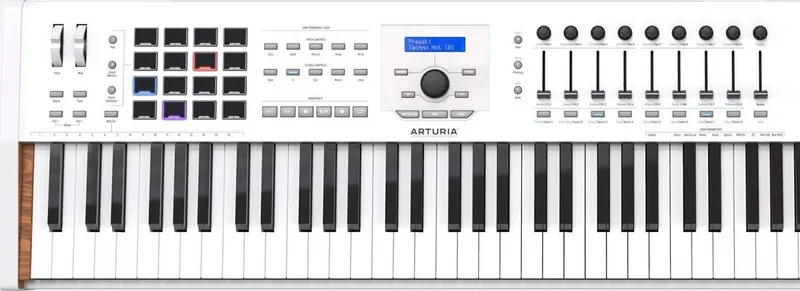
What stands out immediately is how much the controller does beyond basic note input. The semi-weighted keys are velocity- and pressure-sensitive, while the pitch and modulation wheels add classic performance nuance. Sixteen RGB pads expand the experience further, letting users trigger drums, play chords, or launch MIDI messages with velocity and polyphonic aftertouch. Combined with the faders, encoders, transport section, and display, the KeyLab MkII feels built for hands-on music creation rather than passive editing.
One of its strongest advantages is the tight relationship with Analog Lab 3. Browsing thousands of presets becomes much faster thanks to category filters, preset navigation, and the dedicated Live controls for macros and layered sounds. This makes the keyboard especially appealing to musicians who want instant access to inspiring tones instead of scrolling endlessly through software menus. The ability to build multis, split sounds across the keyboard, and customize control banks adds even more depth.
DAW integration is another major strength. The KeyLab MkII supports popular workflows with dedicated presets for Ableton Live, Logic Pro X, Pro Tools, Cubase, Studio One, Reaper, and standard MCU/HUI modes. Track controls, global commands, transport buttons, and mixing controls are all placed for fast access, helping users stay focused on recording and arranging rather than clicking around the screen.
Beyond software, the rear panel shows that this controller is equally comfortable in hybrid and hardware setups. MIDI In/Out, pedal inputs, CV input, and multiple CV/Gate/Mod outputs make it suitable for modular synthesis and external gear. For producers searching for a versatile performance hub, the KeyLab MkII offers a thoughtful balance of expression, routing, and customization.
Notes
- Registering the unit unlocks bundled software and extra owner benefits.
- The MIDI Control Center expands editing options and saves custom mappings.
- Some advanced functions may require time to learn, but they reward detailed setup.
- An anti ground loop adapter is included for certain studio configurations.
Search for 67,706 Manuals online


Type-in Brand or Model