

Arturia KeyLab Essential Manual
PDF manual · 29 Pages
English



Quick check
Incorrect answer, please try again.
Chat with your Arturia KeyLab Essential manual using AI
Get instant AI answers from your Arturia KeyLab Essential manual
Ask anything about the Arturia KeyLab Essential. Answers come from this manual, with the pages they are based on.
KeyLab Essential Maintenance Schedule
Always disconnect the USB cable before cleaning the instrument to ensure safety.
Use only a soft, dry or slightly damp cloth. Do not use gasoline, alcohol, acetone, turpentine, liquid cleaners, or sprays.
Ask a Question
Do you recommend KeyLab Essential?
Yes NoFrequently Asked Questions
It is a universal MIDI controller for software instruments, DAWs, and compatible external MIDI hardware. It offers keyboard performance, mixer control, transport commands, preset browsing, pads, and configurable MIDI assignments.
Is this answer helpful?
No. It is a class-compliant USB MIDI device, so it can connect to a computer without a separate driver installation. USB also supplies power while transmitting MIDI data and controller commands.
Is this answer helpful?
The included package features Analog Lab 2, Ableton Live Lite, and UVI Grand Piano Model D. Registration and activation are required to access the bundled software licenses.
Is this answer helpful?
Yes. The eight pads can send MIDI notes, switched CC controls, patch changes, or MIDI Machine Control commands. Their MIDI channel, color, note or CC assignment, and gate or toggle behavior can be edited in MIDI Control Center.
Is this answer helpful?
Hold the Chord button and enter up to ten notes to store a chord shape. Afterward, pressing one key plays the saved structure transposed from that key, making chord performance and composition faster.
Is this answer helpful?
Yes. Its 5-pin MIDI Out can send data to external MIDI sound modules and synthesizers. For computer-free use, power the controller with a compatible USB supply or an optional 9V DC adapter.
Is this answer helpful?
Advantages and Disadvantages
Advantages

- Integrated Analog Lab browsing and display speed up preset discovery and sound selection.
- Nine encoders, nine faders, pads, transport controls, and wheels provide broad hands-on control.
- Six user maps support deep MIDI customization through Arturia MIDI Control Center.
- USB class-compliant operation avoids separate driver installation and supports simple setup.
- MIDI Out and external power options allow standalone control of hardware synthesizers.
Disadvantages

- DAW transport compatibility depends on how each DAW implements MCU or HUI protocols.
- DAW Command Center buttons, pitch wheel, and modulation wheel cannot be freely reassigned.
- Factory reset removes all internal user maps unless they are backed up first.
- Standalone operation requires a separate compatible USB power source or optional 9V adapter.
- The included Analog Lab 2 integration reflects the product generation and may differ from newer software releases.
Product Specification
Type
MIDI keyboard
Pads
8, aftertouch
Rotary knobs
9
Faders
9
Additional controllers
Modulation, pitch bend, transport buttons
Connections
USB-B (USB to Host), MIDI Out, sustain pedal
Product Description
Arturia KeyLab Essential Manual: A Practical MIDI Controller for Modern Music Creation
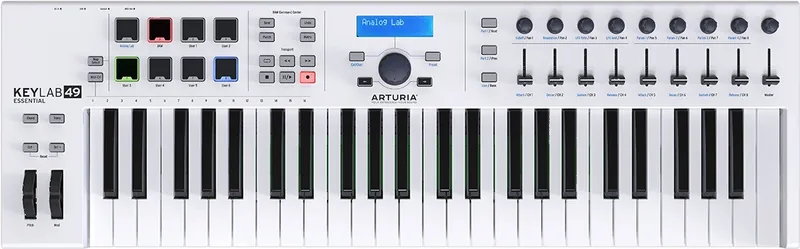
The Arturia KeyLab Essential is a versatile MIDI controller keyboard designed to keep musicians focused on creating rather than constantly switching between an instrument, mouse, and computer keyboard. Built for software instruments, digital audio workstations, and external MIDI hardware, it combines expressive playing controls with hands-on mixing, browsing, and transport functions.
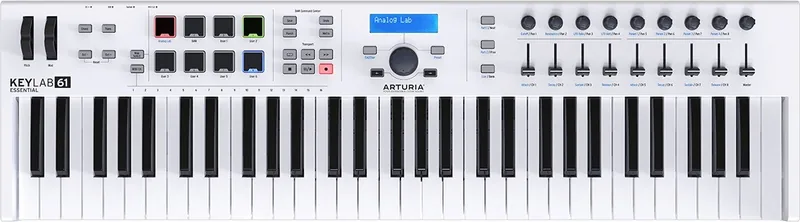
Available with 49 or 61 velocity-sensitive keys, plus an 88-key semi-weighted version, KeyLab Essential suits a range of playing styles and studio setups. The keyboard includes pitch and modulation wheels for expressive performance, octave controls for extending the playable range, and semitone transposition for adapting quickly to different song keys. Its Chord mode also lets players trigger stored chords with a single key, supporting faster songwriting and live performance ideas.
Hands-On Control for Instruments and DAWs
Nine endless encoders and nine faders provide direct control over sound parameters, track panning, and channel levels. In DAW mode, the faders control eight mixer channels plus the master channel, while the encoders adjust panning. Dedicated Part controls make it easy to move through track groups or select sections in Analog Lab multi-instrument setups.
The Arturia KeyLab Essential Manual highlights a dedicated DAW Command Center for common production tasks. Transport controls handle play, stop, record, looping, rewind, and fast-forward, while additional buttons support save, undo, metronome, and punch-in functions. The controller uses Mackie MCU or HUI protocols, offering practical compatibility with DAWs that support these standards.
Built for Analog Lab and Flexible MIDI Workflows
KeyLab Essential is optimized for Arturia Analog Lab 2, with integrated preset browsing through a central jog wheel, navigation buttons, and a two-line display. Users can filter large sound libraries by category, character, bank, or instrument type, then load presets directly from the controller. This makes sound selection feel more immediate during composition.
Eight velocity- and pressure-sensitive performance pads can trigger drum sounds, samples, MIDI notes, control changes, program changes, or MIDI Machine Control commands. Six user maps can be customized with Arturia MIDI Control Center, allowing pads, encoders, faders, keyboard settings, and sustain pedal behavior to match individual software or hardware workflows.
USB provides power and MIDI connectivity without requiring a separate driver. For standalone use, the MIDI output can control external synthesizers when powered by a compatible USB supply or optional 9V DC adapter. Included software includes Analog Lab 2, Ableton Live Lite, and UVI Grand Piano Model D.
Notes
- Register the controller to activate included software and access support.
- Back up user maps before performing a factory reset.
- Use moderate monitoring levels to protect your hearing.
Search for 67,706 Manuals online


Type-in Brand or Model