

Aquatlantis Luminus Smart LED Controller Manual
PDF manual · 68 Pages
English



Quick check
Incorrect answer, please try again.
Chat with your Aquatlantis Luminus Smart LED Controller manual using AI
Get instant AI answers from your Aquatlantis Luminus Smart LED Controller manual
Ask anything about the Aquatlantis Luminus Smart LED Controller. Answers come from this manual, with the pages they are based on.
Ask a Question
Do you recommend Luminus Smart LED Controller?
Yes NoFrequently Asked Questions
The controller operates on a direct current voltage between twelve volts and twenty-four volts. Ensure your power supply matches this range for proper operation.
Is this answer helpful?
No, the controller is not waterproof. Do not install it above the aquarium or where it might fall into water. Use a drip loop on cables to prevent water contact.
Is this answer helpful?
The unit features two independent channels. Each channel can handle a maximum of five amperes to support your lighting lamps safely.
Is this answer helpful?
Yes, the storm simulation function is only available through the Luminus mobile app on Android or iOS devices. It cannot be activated manually on the console.
Is this answer helpful?
If the power is lost for more than twenty-four hours, the device will reset the time only. All other programmed parameters are retained if the outage is shorter.
Is this answer helpful?
Yes, there is a twenty-four-month warranty from the date of purchase covering manufacturing defects. Damage from misuse is not covered.
Is this answer helpful?
You can adjust light intensity from zero to one hundred percent for each interval. This allows for realistic sunrises and sunsets in your tank.
Is this answer helpful?
Advantages and Disadvantages
Advantages

- Two independent channels with max 5A per channel
- Compatible with EASY LED and EASY LED 2.0 lamps
- Variable fade-in and fade-out times from 10 to 90 minutes
- Storm simulation function via mobile app
- Parameter memory saves settings if power is lost under 24 hours
Disadvantages

- Controller is not waterproof and cannot be above water
- Storm function requires mobile app to activate
- Reset function deletes all user profile data
- Clock resets after power loss exceeds 24 hours
- Transformer must match total lamp current exactly
Product Specification
Type
Lighting Control
Application
universal
Features
WiFi, App Support (Android, iOS)
Product Description
Aquatlantis Luminus Smart LED Controller
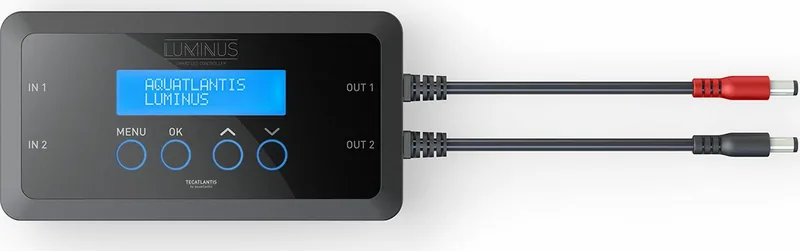
Elevate your aquarium lighting experience with the Aquatlantis Luminus Smart LED Controller Lighting Control with Weather/Daylight Simulation for all EASY LED/EASY LED 2.0 Lamps. This intelligent device offers precise control over your water tank environment to match daily cycles. Users gain the ability to simulate natural weather and daylight conditions. This significantly enhances the well-being of aquatic life within your aquarium setup. Customizing light schedules is easier than ever with the onboard logic.
Advanced Lighting Features
The controller features two independent channels. Each channel supports a maximum current of five amperes. You can configure up to four intervals per channel. These intervals allow for the creation of sunrise, sunset, and moonlight phases. You have full control over light intensity ranging from zero to one hundred percent. The fade-in and fade-out times are adjustable. Settings vary between ten and ninety minutes for smooth transitions. This prevents sudden changes that might stress the fish or corals in your system. The interface includes menu keys for direct manual operation without a phone.
Mobile Application Integration
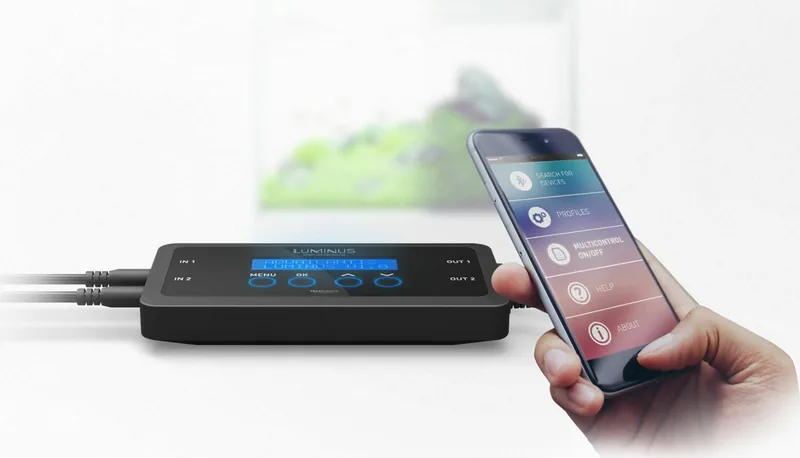
Full functionality requires the Luminus App available for Android and iOS devices. The app simplifies configuration and updates remotely. It also enables specific features such as storm simulation not found on the console. This mode mimics stormy weather with three distinct phases. It includes darkening, pseudo-random flashes, and a return to normality. Activating this mode during water changes may encourage breeding behaviors in species. Note that this function causes flashing lights which may affect photosensitive individuals. Always update your mobile software for the best experience.
Installation and Safety
Proper installation ensures safety and longevity of your equipment. The controller requires a voltage between twelve and twenty-four volts DC. It is not waterproof so keep it dry. Do not install the unit above the aquarium where it could fall into water. Create a drip loop with the cable to prevent water flow. Always disconnect power before maintenance. The device includes parameter memory to save your hard work. Lost power for less than twenty-four hours will not erase settings. Longer outages reset the clock only. Clean the unit with a soft damp cloth only.
Technical Setup
The manual provides detailed instructions for wiring. Input and output sockets are clearly marked for each channel. You must match transformer capacity to your lamps. For example, if using two lamps at 2.5 amperes each, a 5A transformer is needed. Do not disassemble the unit as it invalidates the warranty. Reset functions clear all profile data, so be careful during testing.
Warranty and Support
Aquatlantis provides a twenty-four month warranty on this product. It covers manufacturing defects but excludes damage from misuse. Contact support for replacement parts if needed. Keep your purchase receipt for claims. Ensure compatibility with all Tecatlantis products before ordering. This ensures a seamless integration into your existing system. Experience reliable lighting control today.
Search for 67,706 Manuals online


Type-in Brand or Model