
APA Lithium Powerpack Manual
PDF manual · 24 Pages
English



Quick check
Incorrect answer, please try again.
Chat with your APA Lithium Powerpack manual using AI
Get instant AI answers from your APA Lithium Powerpack manual
Ask anything about the APA Lithium Powerpack. Answers come from this manual, with the pages they are based on.
Lithium Powerpack Maintenance Schedule
When the Powerpack is not in use, recharge it once it reaches a battery capacity of 25%.
Always disconnect the jump lead from the Powerpack before storage to prevent short circuits between terminal clamps.
Clean the Powerpack only with a soft cloth. Do not use aggressive cleaning agents or solvents and never allow liquids to enter the housing.
Ask a Question
Do you recommend Lithium Powerpack?
Yes NoDo you recommend Lithium Powerpack?
Yes NoFrequently Asked Questions
It can charge mobile phones, smartphones, tablets, MP3 players and similar USB-powered devices via the USB-A output or USB-C cable. Use a compatible cable for your device and monitor the display for voltage and current.
Is this answer helpful?
Ensure the Powerpack is at least 75% charged. Connect the Smartbox to the Powerpack, attach the red clamp to the vehicle’s positive pole and black clamp to the negative pole. Wait for the Smartbox to show a steady green indicator and a single beep, then start the engine—limit starter use to 3 seconds per attempt and wait at least two minutes between attempts.
Is this answer helpful?
Using a 2 A USB charger (not included), the Powerpack charges to full in approximately 4 hours. The display shows charging progress in percent; disconnect charger first, then unplug the cable from the Powerpack after charging.
Is this answer helpful?
The operating temperature range is -20 °C to 65 °C. Avoid exposing the unit to moisture, oil, dust, strong vibration or mechanical stress. Never attempt jump-starting if the vehicle battery is frozen due to explosion risk.
Is this answer helpful?
Do not wear metal jewelry when handling batteries. Clean battery terminals if corroded, ensure firm clamp contact, store with clamps disconnected to avoid short circuits, and follow the Smartbox indicators. If starting fails after three attempts, stop and inspect the vehicle.
Is this answer helpful?
Clean only with a soft cloth; do not use aggressive cleaners or solvents and avoid liquid ingress. Store in a dry place, remove the jump-lead before storage, and recharge the unit when its battery falls to about 25% capacity.
Is this answer helpful?
Do not throw the unit or batteries in household waste. Separate removable batteries if possible and deliver electronic devices and batteries to designated collection or recycling points per local regulations to ensure safe and environmentally compliant disposal.
Is this answer helpful?
Advantages and Disadvantages
Advantages

- Compact 10,000 mAh capacity with 37 Wh energy in a pocketable 160 x 79 x 28 mm housing.
- Dual functionality: charges USB devices and provides 12 V jump-start assistance (400 A continuous, 800 A peak).
- Smartbox safety: LED status indicators and lockout logic to prevent improper jump-start connections.
- USB-C input and USB-A output allow convenient charging and device compatibility.
- Built-in LED light with steady, flashing and SOS modes for emergency illumination.
Disadvantages

- Not suitable to replace a dead, deeply discharged, or defective vehicle battery.
- Requires a separate 2 A USB charger for fastest recharge (charger not included).
- Limited peak jump-start capacity may be insufficient for larger engines or very low batteries.
- Not intended for commercial use; warranty/liability excludes improper or non-intended use.
- Internal battery non-replaceable — end-of-life requires whole-unit disposal per local rules.
Product Specification
Battery Type
Lithium-Ion
Capacity
10,000mAh (37Wh)
Output
1x USB-A (Socket, 10.5W)
Input
1x USB-C (Socket, 10W), max. 10W
Special Features
Charge level indicator (numeric), Flashlight, Car jump start function
Color
black, red
Dimensions
6.30x3.15x0.98 in
Weight
0.71 lb
Volume
19.54 in^3
Product Description
APA Lithium Powerpack 10000mAh Manual
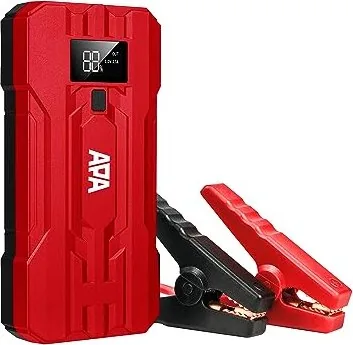
The APA Lithium Powerpack 10000mAh is a compact, multi-purpose portable battery pack designed for everyday mobile charging and emergency vehicle jump-starts. With a slim profile (approx. 160 x 79 x 28 mm) and a weight around 320 g, it packs a 10,000 mAh (37 Wh) lithium battery that supports USB charging for phones, tablets and other USB-powered devices, plus an EC5 12 V jump-start output for cars. The unit features a USB-C charging input (5 V, 2.0 A) and a USB-A output (5 V, up to 2.1 A) for device charging. For jump-starting, the Powerpack delivers up to 400 A continuous (800 A peak) and includes a Smartbox cable with LED status indicators and safety logic to ensure proper connection before enabling the starter current.
Key features and usage
Compact and portable, the Powerpack charges in about 4 hours using a 2 A USB charger (not included). Its front display shows the battery percentage and real-time voltage/current while charging or supplying power. The LED lamp offers steady, flashing and SOS modes for illumination or signaling. For vehicle assistance, follow the manual: ensure the pack is at least 75% charged, connect the Smartbox, attach red clamp to positive and black to negative battery terminals, wait for the Smartbox to indicate green, then start the engine (max 3 seconds per attempt). If starting fails after three tries, stop and inspect the vehicle.
Safety and maintenance
The Powerpack is intended for household and personal use, not commercial applications, and must be kept away from children and untrained users. Do not disassemble the unit or expose it to moisture, extreme heat, or strong mechanical stress. During charging place it on a fireproof surface and never use a damaged charger. Clean only with a soft cloth. Store in a dry place with the jump-lead disconnected; recharge when capacity falls to around 25% to preserve battery health. Dispose of the device and removable batteries according to local electronic waste regulations.
Design notes
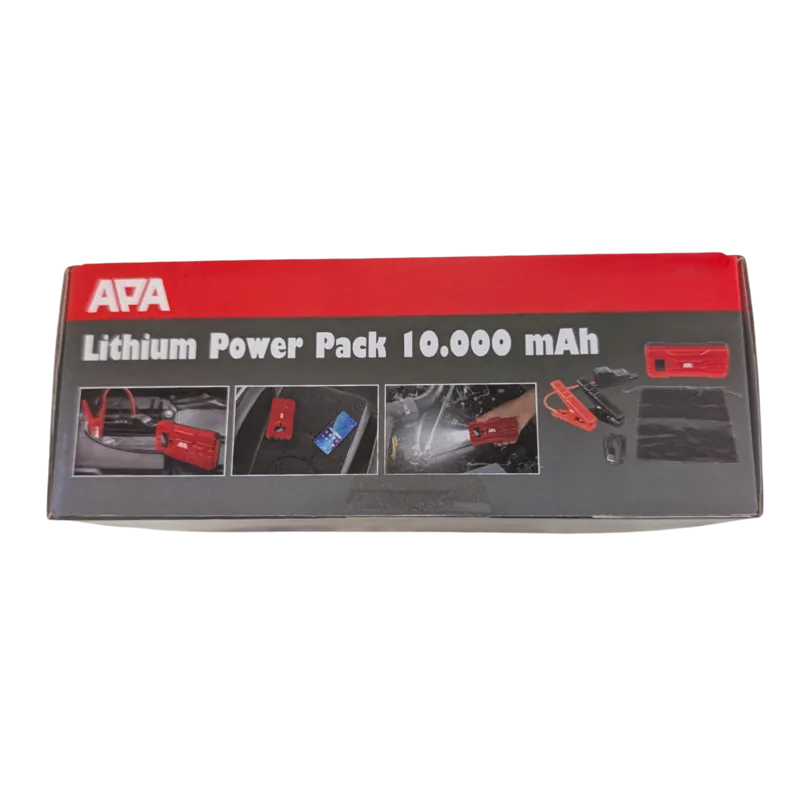
The package includes the Powerpack, a USB-C charging cable, a Smartbox jump lead with clamps, a carrying pouch and an operator manual. The Smartbox adds a layer of user safety with visual feedback (alternating red/green while preparing, steady green when ready) and audible signals to reduce incorrect connections. The unit’s temperature tolerance ranges from -20 °C to 65 °C, making it suitable for a wide variety of environments while observing safe operation rules.
Notes:
- Not a replacement for a deeply discharged or defective vehicle battery; intended as a starting aid only.
- Use only recommended accessories and follow vehicle-specific jump-start procedures in your car’s manual.
- Keep away from children and do not attempt internal repairs.
Search for 67,732 Manuals online


Type-in Brand or Model