
Ansmann Lithium 2 Manual
PDF manual · 24 Pages
English



Quick check
Incorrect answer, please try again.
Chat with your Ansmann Lithium 2 manual using AI
Get instant AI answers from your Ansmann Lithium 2 manual
Ask anything about the Ansmann Lithium 2. Answers come from this manual, with the pages they are based on.
Ask a Question
Do you recommend Lithium 2?
Yes NoFrequently Asked Questions
The charger supports 3.6/3.7V Li‑Ion cylindrical cells (e.g., 26650, 22650, 18650, 18500, 17670, 16340, 14500) and 1.2V NiMH AA and AAA cells. Only use rechargeable cells; do not insert non‑rechargeable batteries.
Is this answer helpful?
A 5V DC USB adapter with at least 2A output (10W) is recommended for full charging current (up to 1000mA per Li‑Ion slot). The charger will operate from a 1A USB port but charging current may be halved when two Li‑Ion cells are charged simultaneously.
Is this answer helpful?
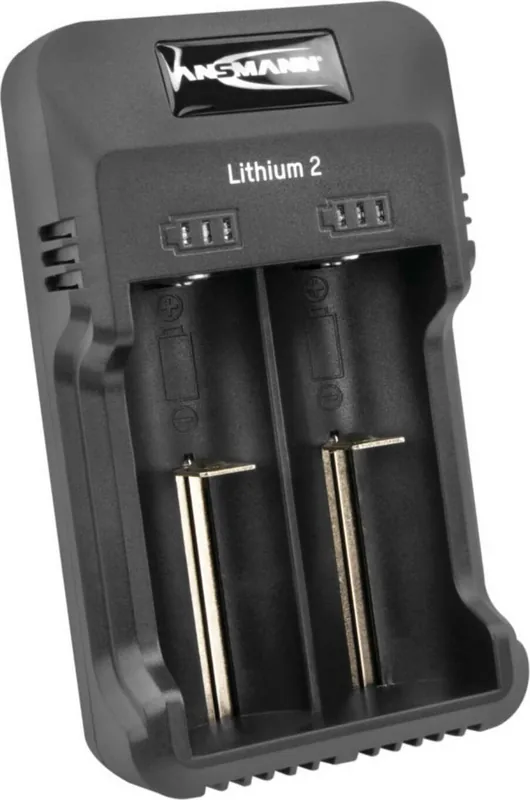
Each slot has three LEDs: one blinking LED indicates <30% charge, combinations of steady/blinking LEDs show mid‑level charge, three steady LEDs mean fully charged, and three blinking LEDs indicate reversed polarity—reinsert the battery correctly.
Is this answer helpful?
Yes. The Lithium 2 can charge one Li‑Ion and one NiMH simultaneously and independently; the unit automatically detects the battery type and applies the appropriate charging algorithm.
Is this answer helpful?
Only use recommended rechargeable batteries, observe polarity, keep the charger dry and indoors, disconnect power before cleaning, do not open the housing, and keep out of reach of children. Using damaged or low‑quality cells can cause leaks, damage or void the warranty.
Is this answer helpful?
The charger includes a three‑year warranty against manufacturing defects. The warranty does not cover damage caused by misuse, use of unsuitable or poor‑quality batteries, or physical damage from neglect.
Is this answer helpful?
Do not throw the charger or batteries into household waste. Return them to an authorized recycling center, dealer, or municipal collection point and follow local regulations for electronic and battery disposal.
Is this answer helpful?
Advantages and Disadvantages
Advantages

- Dual independent slots allow charging of two cells simultaneously, even different chemistries.
- Automatic detection and microprocessor control (CC‑CV for Li‑Ion, 0dV/‑dV for NiMH) simplifies safe charging.
- Compact USB power via micro‑USB makes it convenient to use with common adapters and power banks.
- Clear 3‑LED per‑slot indicators show charge progress and reversed‑polarity warnings.
- Three‑year warranty provides extended protection against manufacturing defects.
Disadvantages

- When powered from a 1A USB source, charging current is reduced and dual Li‑Ion charging is limited to 500mA each.
- Not suitable for non‑rechargeable batteries; incorrect battery types or poor‑quality cells can cause damage and void warranty.
- Requires a separate 5V USB adapter (not included) for optimal performance at 2A.
- No advanced features like adjustable current, USB‑C input, or battery capacity readout.
- Intended for indoor dry use only; not waterproof and must not be opened for repairs.
Product Specification
Compatibility
Mignon AA, Micro AAA, 14500, 16340, 17670, 18500, 18650, 22650, 26650
Charging bays
2x Round cell
Special features
USB input
Product Description
Ansmann Lithium 2 — Compact Dual-Slot Charger
The Ansmann Lithium 2 is a compact, USB-powered charger designed to handle one or two rechargeable cells independently. It supports a wide range of 3.6/3.7V Li‑Ion cylindrical cells (26650, 22650, 18650, 18500, 17670, 16340, 14500 and similar) as well as 1.2V NiMH AA and AAA cells. Supplied with a micro‑USB cable, the unit is built for straightforward, safe charging where each slot is monitored and controlled separately by a microprocessor for reliable performance.
Key features and operation
The charger automatically detects whether a Li‑Ion or NiMH cell is inserted and selects the appropriate charging regime (CC‑CV for Li‑Ion; 0dV/‑dV behavior for NiMH). Charging begins automatically once cells are inserted with the correct polarity; three LEDs per slot indicate charge progress and completion. When powered from a 5V USB source with at least 2A output, each Li‑Ion slot can deliver up to 1000mA; with only 1A input the per‑slot current may reduce (two Li‑Ion cells charged simultaneously will be limited to 500mA each). NiMH cells receive trickle maintenance after full charge.
Practical operation is simple: connect the included micro‑USB cable to a suitable USB adapter or port, insert cells observing the +/− markings, and monitor the LED indicators. The charger performs a brief self‑test at power up and protects against reversed polarity by signalling with all three LEDs blinking for the affected slot. The device is intended for indoor, dry use, and cleaning should be done only when disconnected from the power source.
Safety and care
Only use rechargeable Li‑Ion (3.6–3.7V) or NiMH (1.2V) cells of appropriate quality and rating. Avoid charging non‑rechargeable primary batteries. Keep the charger dry, do not open the housing, and remove from power when not in use. Poor‑quality or damaged cells can cause leaks or damage and may void warranty. Dispose of the charger and used batteries responsibly via recycling centers, not household waste.
Warranty and specs
The Lithium 2 comes with a three‑year warranty against manufacturing defects, subject to proper use and care. Technical inputs and outputs: 5V DC input (min. 1000mA; preferably 2000mA). Outputs vary by input: single Li‑Ion slot up to 1000mA, dual Li‑Ion 500mA each on lower input, NiMH up to 500mA per slot.
Notes
- The charger uses microprocessor control for safe, automated charging and full‑charge detection.
- LED patterns: single blinking LED = <30%; three steady LEDs = fully charged; three blinking LEDs = reversed polarity.
- Use high‑quality rechargeable cells to avoid damage and preserve warranty.
Search for 67,706 Manuals online


Type-in Brand or Model
Lena König
9 months ago
Do I need to buy an extra adapter for charging, and how easy is it to remove my 18650 cells? Also, what charging time should I expect?
Manual.ly
9 months ago
Many users find a separate connector/adapter is required depending on how you plan to power the charger (the charging cable/plug may be sold separately). Charging time varies with the battery capacity and with the specific charging plug used. The good news is the unit supports both Li and NiMH cells and uses controlled charging: it recognizes when batteries are full and ends charging (and can switch to maintenance/trickle for NiMH). For removal, make sure the cells are not still actively locked by the spring contacts: after charging completes and the process stops, gently push and lift the cells off the contact rail. If it feels stuck, double-check the correct seating described in the manual.