
Anker USB 3.0 7-Port Data & Charging Hub Manual
PDF manual · 16 Pages
English


Quick check
Incorrect answer, please try again.
Chat with your Anker USB 3.0 7-Port Data & Charging Hub manual using AI
Get instant AI answers from your Anker USB 3.0 7-Port Data & Charging Hub manual
Ask anything about the Anker USB 3.0 7-Port Data & Charging Hub. Answers come from this manual, with the pages they are based on.
Ask a Question
Do you recommend USB 3.0 7-Port Data & Charging Hub?
Yes NoDo you recommend USB 3.0 7-Port Data & Charging Hub?
Yes NoFrequently Asked Questions
It provides seven USB-A 3.0 ports for connecting compatible peripherals, storage devices, and accessories. Three ports also support PowerIQ charging.
Is this answer helpful?
The hub supports transfer rates up to 5 Gbps. Reaching that rate requires a USB 3.0-capable computer, cable, connected device, and software environment.
Is this answer helpful?
Yes. Connect the included power adapter without the USB data cable to use the three PowerIQ ports as a standalone charger for supported devices.
Is this answer helpful?
Yes. It is backward compatible with USB 2.0 and USB 1.1 devices, although those devices operate at their respective lower speeds.
Is this answer helpful?
The package includes the USB 3.0 seven-port data and charging hub, a 12V/5A power adapter, a 2.6 ft USB 3.0 cable, and a welcome guide.
Is this answer helpful?
Keep the combined device current below 10A when using the adapter. For incompatible wireless, MIDI, or USB 3.0 devices, try connecting directly to the computer or using USB 2.0.
Is this answer helpful?
Advantages and Disadvantages
Advantages

- Seven USB-A 3.0 ports expand connectivity for common desktop peripherals and storage devices.
- Supports data transfers up to 5 Gbps when the computer, cable, software, and accessories support USB 3.0.
- Three PowerIQ charging ports provide up to 2.1A each for supported devices.
- Horizontal port layout gives oversized USB connectors more space than tightly grouped designs.
- Includes a 12V/5A adapter, surge protection, hot-swapping support, and USB 2.0/1.1 backward compatibility.
Disadvantages

- Maximum 5 Gbps performance requires every part of the connection to support USB 3.0.
- Combined connected load should stay below 10A to avoid unstable connections or disconnections.
- Some 2.4 GHz wireless products, MIDI devices, and USB 3.0 accessories may not be supported.
- The stated driver-free operating system support is limited to older Windows versions and Mac OS X 10.2 or later.
Product Specification
Type
USB hub
Form factor
1x external wired
Connection
1x USB-B 3.0 (female, 5Gb/s), 1x USB-B 3.0 (male via cable, 5Gb/s, 31.5 in cable length)
Ports
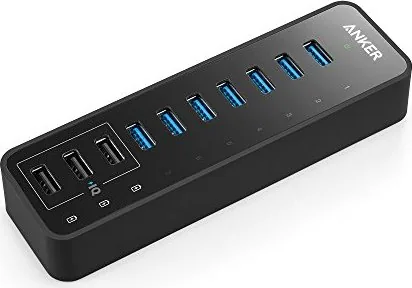
7x USB-A 3.0 (female), 3x USB-A charging port (female)
Transfer
7x USB-A 3.0 (female, 5Gb/s), 3x USB-A charging port (female, PowerIQ, 3x 5V/2.1A/10.5W), total USB power: 5V/10A/50W
Power supply
Power supply via connection only, power input (1x barrel connector), external power adapter required and included (1x barrel connector 12V/5A/60W)
Dimensions
1.73 x 0.87 x 5.71 in (W x H x D)
Weight
3.7 oz
Case color
black
Compatibility
universal
USB notation
Link
Product Description
Anker USB Hub, 7x USB-A 3.0, USB-B 3.0 [Socket] - Read, Download & Print Free
The Anker USB Hub is a compact desktop expansion solution designed for users who need more room for peripherals, storage devices, and everyday charging. It combines seven USB-A 3.0 ports with a USB-B 3.0 upstream connection, helping turn one compatible computer port into a more practical workspace. With transfer speeds of up to 5 Gbps, it can reduce waiting time when moving files between compatible USB 3.0 devices.
Built for data, charging, and organization
This hub is especially useful for desks that regularly handle keyboards, mice, cameras, flash drives, and portable hard drives. Its horizontally arranged ports provide extra spacing for larger connectors, so adjacent devices are less likely to block one another. The slim 145 x 44 x 22 mm housing also keeps the setup tidy without taking up much desk space.
Three of the ports support charging through Anker PowerIQ technology. PowerIQ identifies the connected device and adjusts charging delivery for efficient charging, with an output rated at up to 2.1A per charging port. When connected only to its power adapter, the hub can function as a standalone charger for supported devices. For simultaneous data transfer and charging, connect both the power adapter and the included USB cable.
Fast USB 3.0 connectivity
Compatible equipment can benefit from USB 3.0 data rates of up to 5 Gbps. Actual speed depends on the computer, cable, software, and connected accessories all supporting USB 3.0. The hub also maintains backward compatibility with USB 2.0 and USB 1.1 devices, making it suitable for mixed collections of newer and older accessories.
A built-in surge protector adds an extra layer of protection for connected devices and data, while hot-swapping support lets users connect or remove compatible peripherals without shutting down the system. Driver-free operation is supported for Windows XP, Vista, 7, and 8, plus Mac OS X 10.2 and later.
Power considerations
The package includes a 12V/5A power adapter and a 2.6 ft USB 3.0 cable. For stable performance with the adapter connected, the combined current draw of connected equipment should remain below 10A. High-demand accessories, including portable USB 3.0 hard drives, can draw significantly more power than a mouse or keyboard, so planning the connected load helps prevent instability.
Note: Some 2.4 GHz wireless devices, MIDI hardware, and certain USB 3.0 products may have compatibility limitations. If an accessory does not work reliably, connect it directly to the computer or try a USB 2.0 connection.
The Anker USB Hub offers a straightforward way to expand a compatible computer while keeping charging and peripheral connections in one compact, powered unit.
Search for 67,732 Manuals online


Type-in Brand or Model