

AMS Neve 1073 OPX Manual
PDF manual · 33 Pages
English



Quick check
Incorrect answer, please try again.
Chat with your AMS Neve 1073 OPX manual using AI
Get instant AI answers from your AMS Neve 1073 OPX manual
Ask anything about the AMS Neve 1073 OPX. Answers come from this manual, with the pages they are based on.
Ask a Question
Do you recommend 1073 OPX?
Yes NoFrequently Asked Questions
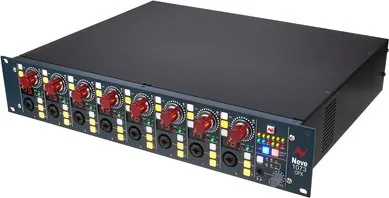
The 1073OPX is an eight-channel microphone, line, and instrument preamplifier featuring the classic Neve sound. It is housed in a 2U rackmount enclosure and offers optional digital interfaces for Dante and USB connectivity.
Is this answer helpful?
Yes, by installing the optional digital card, the unit functions as a USB audio interface for Mac and PC. It provides eight mono digital inputs and a stereo monitor return path for your DAW.
Is this answer helpful?
Connect the unit to your computer using a CAT5e or CAT6 ethernet cable plugged into the COMMS CTL port. You must assign a manual IP address or use DHCP to establish communication with the remote control software.
Is this answer helpful?
Yes, with the optional digital card installed, the 1073OPX can operate as a Dante-enabled device. It supports primary and secondary network connections for redundant audio-over-IP transmission.
Is this answer helpful?
The HP LEVEL knob controls the volume of the headphone and rear monitor outputs. Pressing it cycles through monitor sources like Mono, Channel 1-2, or Digital Monitor (DMON).
Is this answer helpful?
Press the +48V button on the front panel. This applies 48V phantom power to the selected microphone input. Note that phantom power automatically turns off if you switch to a Line or DI input source.
Is this answer helpful?
Advantages and Disadvantages
Advantages

- Legendary Neve sonic character with transformer-coupled mic preamps
- Optional Dante and USB interfaces for versatile connectivity
- Remote control software allows Total Recall of all settings
- Latency-free monitoring path for accurate overdubbing
- Supports up to eight units for massive channel expansion
Disadvantages

- Requires separate purchase for optional digital interface cards
- Manual IP address setup can be complex for some users
- Rack mounting requires careful attention to airflow and temperature
- USB mode limits usage to a single rack unit as primary interface
- Firmware updates require specific operating system compatibility
Product Description
The Legendary Neve Sound in a Modern 8-Channel Rack Unit
The AMS Neve 1073 is an iconic piece of audio history, renowned for its warm, rich tone that has defined countless hit records. The modern 1073OPX brings this legendary character into the digital age while maintaining the classic analog heart that engineers love. This eight-channel preamplifier features Marinair transformer-coupled microphone inputs, delivering the signature Neve sound with incredible depth and clarity. Whether you are recording vocals, guitars, or drums, the 1073OPX offers the flexibility to expand your studio capabilities without compromising on quality.
Designed for professional studios, broadcast environments, and live sound reinforcement, the 1073OPX sits in a compact 2U rack enclosure. It combines traditional analog circuitry with cutting-edge digital control options. The unit includes a dedicated DI input section with a transformer-less Class-A design, perfect for direct instrument connection. With Total Recall capability, every setting can be saved and retrieved instantly via the proprietary remote control software, ensuring your workflow remains seamless and efficient.
Versatile Connectivity and Control
One of the standout features of the 1073OPX is its optional digital card, which transforms the unit into a Dante-enabled Audio-over-IP device or a standalone USB audio interface. This allows for latency-free monitoring and flexible routing within complex networked systems. Users can connect up to eight units to a single computer, controlling all sixty-four channels from one central point. The front panel provides intuitive access to gain, phantom power, high-pass filters, and phase inversion, while the rear panel offers extensive I/O options including balanced line inputs and outputs on DB-25 connectors.
The monitoring system is equally impressive, allowing users to blend preamplifier signals directly with digital monitor returns. This feature supports both stereo and mono configurations, giving producers total control over their cue mixes and main output paths. The ability to sum multiple channels into a stereo bus makes this unit a powerful tool for analog summing workflows.
Key Features Summary
- Eight-channel microphone, line, and instrument preamplification.
- Classic Marinair transformer-coupled circuitry.
- Optional Dante and USB digital interface cards.
- Remote control software for Mac and PC integration.
- Latency-free monitoring and analog summing capabilities.
Important Notes
Always ensure the unit is grounded properly when installing in a rack assembly. Avoid blocking ventilation openings to prevent overheating. Use only the specified power adapter to maintain warranty validity. When connecting instruments, set the initial gain to +40dB and adjust as needed to avoid distortion.
Search for 67,732 Manuals online


Type-in Brand or Model