
Amewi AFX-135 Pro Manual
PDF manual · 28 Pages
English



Quick check
Incorrect answer, please try again.
Chat with your Amewi AFX-135 Pro manual using AI
Get instant AI answers from your Amewi AFX-135 Pro manual
Ask anything about the Amewi AFX-135 Pro. Answers come from this manual, with the pages they are based on.
Ask a Question
Do you recommend AFX-135 Pro?
Yes NoFrequently Asked Questions
No, this product is strictly for persons aged 14 and older. It is not a toy and contains small parts that pose a choking hazard for younger children.
Is this answer helpful?
It uses a 7.4V 2S LiPo battery with 1200mAh capacity included in the package.
Is this answer helpful?
Flight time is approximately 8 to 10 minutes depending on wind conditions and throttle usage.
Is this answer helpful?
Yes, but ensure the surface has texture. Avoid solid colors or water surfaces where the sensor cannot detect objects.
Is this answer helpful?
Hold the throttle stick in the lowest position for 3 seconds. Alternatively, pull both control sticks inward simultaneously.
Is this answer helpful?
Spare parts are listed within the manual documentation. You can also find lists online at the manufacturer website.
Is this answer helpful?
The system may lock to protect the cell. A critical warning signal sounds and the helicopter performs an automatic landing before shutting down.
Is this answer helpful?
Advantages and Disadvantages
Advantages

- Intelligent flight control system stabilizes beginner flights effectively.
- Dual brushless motors provide reliable power and thrust for 352mm frame.
- Optical sensor allows altitude hold without manual stick adjustment.
- Included LiPo battery supports 8 to 10 minutes of active flying.
- Realistic lighting effects enhance visual appeal during night flights.
Disadvantages

- Optical sensor altitude is limited to 8 meters during sensor mode usage.
- Not suitable for children under 14 years due to safety risks involved.
- Requires specific charger settings to prevent battery damage or fire.
- Performance drops on solid color surfaces without texture for sensing.
- Motor becomes very hot requiring cooling time after each flight session.
Product Specification
Type
Helicopter
Frequency
2.4GHz (6 Channel)
Scale
1:32
Drive
Electric Motor
Range
262.47 ft
Flight Time
8 min
Features
LED Lighting
Dimensions
16.54x5.91x11.42in (LxWxH)
Weight
0.62 lbs
Product Description
Amewi AFX-135 Pro Helicopter Overview
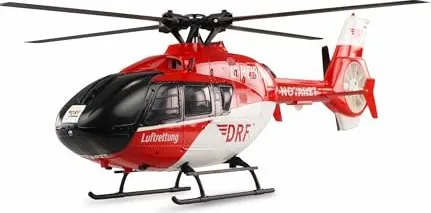
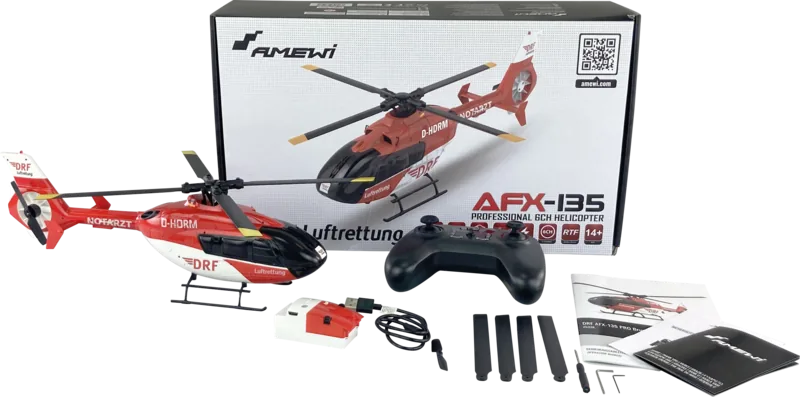
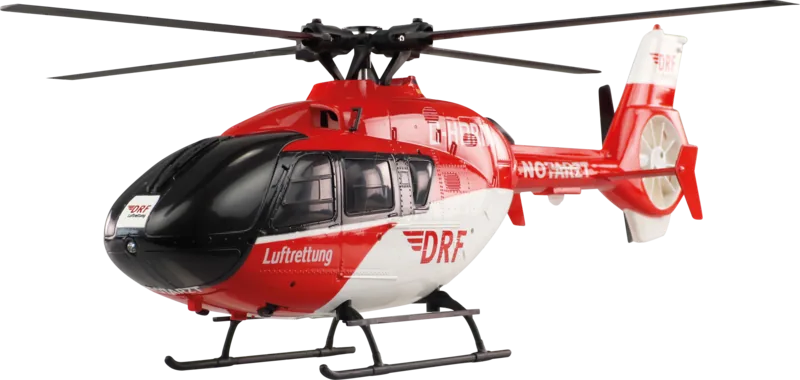
The Amewi AFX-135 Pro Helicopter is a sophisticated 1/32 scale replica of the DRF EC135 model. It features a realistic design with advanced lighting effects and intelligent flight controls. This aircraft utilizes a dual brushless motor drive system. The main motor model 2507 provides strong lift while the tail motor 1204 ensures stability. An optical sensor is integrated for positioning and altitude holding. These features make the model especially suitable for beginners who need help maintaining stability. However, experienced users can switch to manual modes for advanced maneuvers.
The package includes a 7.4V LiPo battery with 1200mAh capacity. This power source allows for approximately 8 to 10 minutes of flight time. Charging is completed using the provided USB Type-C cable. Users should use a 5V 2A adapter for faster charging times. The battery contains internal electronics to balance the cells. Safety warnings are strict regarding lithium batteries. Never charge unattended or leave children alone during the process. The motor gets hot during operation so allow cooling time before handling.
The remote control supports both Mode 1 and Mode 2 settings. Factory defaults are Mode 2 with the left throttle. Calibration involves specific joystick combinations. Dual rate buttons adjust the deflection size for easier handling. The optical sensor mode limits altitude to 8 meters safely. Manual flight mode removes this limit but requires more skill. One-key inverted flight allows for 3D aerobatics above 9 meters altitude.
Safety regulations state this product is not a toy. It is strictly for persons aged 14 and older. Do not operate near people or crowds. Signal interference can cause loss of control. Ensure you have a clear view of the model. Avoid water surfaces for the sensor. The model complies with European radio and safety directives. Always return used batteries to proper collection points. Maintenance involves checking screws and rotor blades. Proper storage of parts ensures longevity.
Binding requires holding trim buttons to activate the frequency. Gyroscope calibration needs a flat surface for accuracy. Troubleshooting tips include checking blades if vibrating occurs. Specific LED indicators show system status. Yellow blinking means system check while solid green means optical mode. Red lights indicate manual mode or low battery. Users must ensure correct polarity when installing batteries. Do not mix different battery types or capacities. Disposal of batteries must follow legal requirements. Do not place batteries in house hold waste. The manufacturer participates in recycling systems for packaging. This ensures environmental responsibility during production and disposal phases. This helicopter offers a balanced experience for new pilots seeking realistic RC flight fun. It operates effectively in wind levels up to 4. Always switch off the model before turning off the controller. This prevents accidental activation and loss of control.
Search for 67,706 Manuals online


Type-in Brand or Model