
AMD FirePro V4900 Manual
PDF manual · 40 Pages
English


Quick check
Incorrect answer, please try again.
Chat with your AMD FirePro V4900 manual using AI
Get instant AI answers from your AMD FirePro V4900 manual
Ask anything about the AMD FirePro V4900. Answers come from this manual, with the pages they are based on.
Ask a Question
Do you recommend FirePro V4900?
Yes NoFrequently Asked Questions
The V4900 provides two DisplayPort connectors and one dual-link DVI-I connector, allowing DisplayPort, DVI, HDMI (via adapters), and VGA (via active adapters). On supported OSes you can run up to three active displays. Adapter type (active vs passive) and clocking determine allowable combinations and resolutions.
Is this answer helpful?
Yes—MultiCard support lets each OpenGL application use the GPU associated with the display it was launched on. For best results, launch applications on displays connected to different cards. HydraVision APS can remember app positions so subsequent launches use the intended GPU. Load balancing for OpenGL is available on certain multi-GPU systems and OSes (notably Windows XP historically), subject to driver and hardware support.
Is this answer helpful?
Minimum requirements include an AMD Athlon or Intel Pentium 4 CPU, at least 512 MB RAM, a motherboard with an available ×16 PCI Express slot and compatible chipset driver, a CD/DVD drive or downloaded installer, and a certified power supply. Supported OSes include Windows 7, Vista, XP (with SP1+), and supported Linux distributions.
Is this answer helpful?
Uninstall existing graphics drivers first. With the card installed and the OS running, run the AMD installer (setup.exe) from the installation disc or downloaded package. Choose Express for typical installs or Custom to select components. Accept the license, complete installation, and reboot when prompted. Use Control Center to configure displays and GPU settings.
Is this answer helpful?
DisplayPort audio is supported when the graphics driver is up-to-date and the connected display device supports DisplayPort audio. Audio is enabled through the operating system; if supported, ensure drivers and display firmware allow audio over DisplayPort.
Is this answer helpful?
Verify the card is fully seated in the PCIe ×16 slot, confirm any required external power connectors are attached, ensure the monitor cable is secure, and disable on-board graphics if necessary. Boot into Safe Mode to troubleshoot drivers, and check monitor-supported resolutions/refresh rates. If problems persist, contact AMD Customer Care with system details.
Is this answer helpful?
Yes. Passive adapters rely on the card's clocking and may require connected monitors to share the same resolution/refresh. Active adapters convert signal types and often allow more flexible multi-monitor setups. The number of active displays the card can drive depends on clocks and connector combos.
Is this answer helpful?
Advantages and Disadvantages
Advantages

- 1GB GDDR5 memory offers responsive framebuffer performance for professional applications.
- Two DisplayPort outputs plus dual-link DVI enable up to three-display configurations on supported OSes.
- HydraVision suite (HydraGrid, Desktop Manager, Multi Desktop) improves multi-monitor window management.
- Automatic application detection provides optimized driver profiles for many CAD and DCC tools.
- Stable, workstation-focused drivers and Control Center for fine-tuning and performance monitoring.
Disadvantages

- 1GB VRAM may be limiting for very large textures or extremely complex modern datasets.
- Requires careful adapter selection (active vs passive) to achieve desired multi-monitor setups.
- Some advanced multi-GPU features (load balancing) are limited to specific OSes and configurations.
- Not designed for high-end gaming performance; optimized for workstation stability and compatibility.
- Older architecture and limited warranty/accessory durations compared with newer professional GPUs.
Product Specification
GPU
AMD FirePro V4900
Memory
1GB GDDR5, 128bit, 4Gbps, 1000MHz, 64GB/s
Base Clock
800MHz
Boost Clock
unknown
Overclocking
-
Cooling
1x Axial Fan (2.56 in)
TDP/TGP
75W (AMD)
Power Connectors
-
Connectors
1x DVI, 2x DisplayPort 1.2
Connection
PCIe 2.1 x16
Special Features
AMD Reference Design
Overall Height
Single Slot
Dimensions
6.42x4.33 in (LxW)
Form Factor
PCIe Card (full height)
Slot Bracket
full height
Compute Performance
N/A (FP16), 0.77 TFLOPS (FP32), N/A (FP64)
Chip Data
Chip Architecture
TeraScale 2 (from 2009/Q3)
Chip Designation
Turks XT GL
Chip Configuration
6CU (480SP / 24TMU / 8ROP), 256kB L2-Cache
Chip Manufacturing
TSMC 40nm
Chip Size
0.18 in^2, monolithic, 716 million transistors
Chip Features
10bit Color Channel Depth
API Support
DirectX 11.2 (11_0) / OpenCL 1.2 / OpenGL 4.4 / Shader Model 5.0
Transcoding Engine
UVD 3.1, Info
Encoding
-
Decoding
H.264, VC-1, MPEG-2, MPEG-1, H.263
Multi-GPU Connection
-
Introduction (Series)
11/01/2011
Graphics
AMD FirePro V4900 - 1GB GDDR5 - Desktop
Product Description
AMD FirePro V4900, 1GB GDDR5, DVI, 2x DP Manual
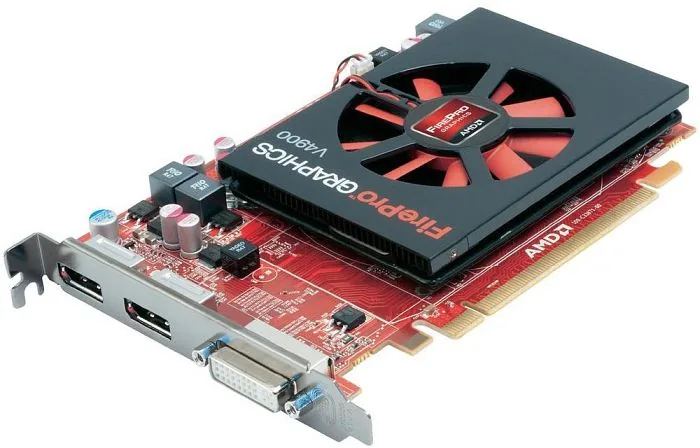
The AMD FirePro V4900 is a professional workstation graphics card built for multimonitor setups and stable 3D/OpenGL workflows. Equipped with 1GB of GDDR5 memory, a dual-link DVI port and two DisplayPort outputs, the V4900 targets designers, engineers, and visualization professionals who need reliable rendering, multi-display management, and compatibility with common CAD and content-creation applications.
Featuring robust driver and Control Center support, the FirePro V4900 focuses on stable, predictable behavior rather than gaming-style peak frame rates. Its drivers include HydraVision for advanced multi-monitor window management (HydraGrid, Desktop Manager, and Multi Desktop), automatic application detection and optimized profiles for widely used professional tools, and support for MultiCard and OpenGL load balancing on compatible systems.
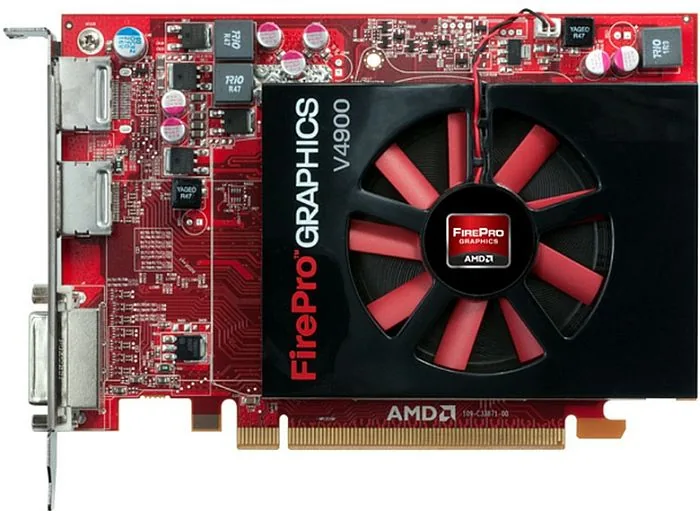
Hardware-wise, the V4900 installs into a PCI Express ×16 slot and may require supplementary power depending on the system. The card’s baseplate provides two DisplayPort connectors and one DVI-I (dual-link capable) connector, enabling up to three active displays on modern OSes (Windows 7/Vista or supported Linux distros). A variety of passive and active adapters allow conversion between DisplayPort, DVI, HDMI, and VGA, though adapter type and clocking affect which combinations and resolutions are possible.
Software installation is straightforward: uninstall previous display drivers, install the AMD FirePro drivers and Control Center via the installer (Express or Custom), and reboot. The Control Center offers Standard and Advanced views for display configuration, 3D/video tuning, and performance monitoring. DisplayPort audio support is available when both drivers and the display device support it. For multi-GPU systems, MultiCard support lets OpenGL applications use the GPU tied to the display where the app was launched; HydraVision APS can remember application positions so apps relaunch on the intended display.
The manual also covers system requirements (CPU, RAM, OS), safe installation practices, troubleshooting (no display, artifacts, driver issues, interrupts), customer care and warranty information, regulatory compliance, and a glossary of relevant terms.
Overall, the AMD FirePro V4900 is a capable, driver-centric workstation GPU suited for professional multi-display environments and stable OpenGL-based workloads.
Notes
- Supports up to three displays via 2x DisplayPort + 1x dual-link DVI on supported OSes.
- HydraVision tools improve productivity across multiple monitors with saved layouts and virtual desktops.
- Use active adapters when required; passive adapters may impose clock/limit constraints.
Search for 67,706 Manuals online


Type-in Brand or Model
Leon Weber
8 months ago
How loud is the fan during normal office use? Does it run at high speed even at low load, and what can I do to reduce the noise?
Manual.ly
8 months ago
Many users report that the fan can be noticeably loud, especially if it ramps up aggressively regardless of workload. Noise can also be influenced by GPU temperature, case airflow, and driver settings. For quieter operation, make sure your GPU drivers and system BIOS are up to date, and set the GPU to a quieter profile if your software provides one (for example, a silent or balanced fan mode). Check that the card is installed securely and that your PC has adequate intake and exhaust airflow. If the noise persists under low temperatures, contact support with your exact GPU model and current driver version so we can advise next steps. Avoid third-party hardware modifications unless we confirm warranty-safe options.