

Amazon Kindle Paperwhite 10th Generation Manual
PDF manual · 54 Pages
English



Quick check
Incorrect answer, please try again.
Chat with your Amazon Kindle Paperwhite 10th Generation manual using AI
Get instant AI answers from your Amazon Kindle Paperwhite 10th Generation manual
Ask anything about the Amazon Kindle Paperwhite 10th Generation. Answers come from this manual, with the pages they are based on.
Kindle Paperwhite 10th Generation Maintenance Schedule
Wipe the screen with a soft cloth. Do not use abrasive cleaning agents.
Use a case when carrying the Kindle in a bag or folder to avoid scratches.
Do not attempt to repair the device yourself if the battery is suspected of being damaged; contact Amazon Customer Service.
Ask a Question
Do you recommend Kindle Paperwhite 10th Generation?
Yes NoFrequently Asked Questions
It is designed for focused digital reading with an e-ink display, touch controls, adjustable lighting, library management, cloud syncing, and optional Bluetooth audio playback for Audible titles.
Is this answer helpful?
Yes. Its reflective electronic paper display is intended to keep text clear in bright sunlight, similar to reading printed ink on paper. The front light can be adjusted for darker environments.
Is this answer helpful?
Use the Aa display settings while reading. You can select fonts, change font size and boldness, adjust margins and line spacing, choose portrait or landscape orientation, set alignment, and control progress indicators.
Is this answer helpful?
Yes, it supports Audible audiobooks through Bluetooth headphones or speakers. The player provides play and pause controls, chapter selection, playback speed, volume adjustment, 30-second skips, and bookmarks.
Is this answer helpful?
Whispersync can synchronize eligible purchases, reading position, notes, highlights, and bookmarks across supported Kindle devices and Kindle reading apps using the same Amazon account.
Is this answer helpful?
Yes. Cloud Collections let you create named groups for books and personal documents. Library filters and sorting options also help organize content by format, title, author, recency, or collection.
Is this answer helpful?
Purchased cloud content can generally be downloaded again from your library. However, files transferred directly by USB are not automatically stored in the cloud and may be permanently removed if deleted from the Kindle.
Is this answer helpful?
Advantages and Disadvantages
Advantages

- High-resolution e-ink display stays readable in bright sunlight and supports adjustable front lighting.
- Flexible typography controls include font size, boldness, margins, line spacing, alignment, and orientation.
- Whispersync can keep reading position, notes, highlights, and bookmarks aligned across supported devices.
- Bluetooth support enables Audible playback and VoiceView accessibility with compatible headphones or speakers.
- Cloud library, filters, sorting, collections, and storage tools simplify content organization.
Disadvantages

- Charging and wired file transfer use the older Micro-USB connection rather than USB-C.
- Audible listening and VoiceView require a separate Bluetooth audio device.
- Some features, including Audible, X-Ray, Word Wise, and special offers, vary by country or title.
- Large downloads such as audiobooks and comics are best downloaded through Wi-Fi.
- Content copied directly by USB may be permanently deleted when removed unless separately backed up.
Product Specification
Technology
E-Ink Carta "Electronic Paper"
Display Size
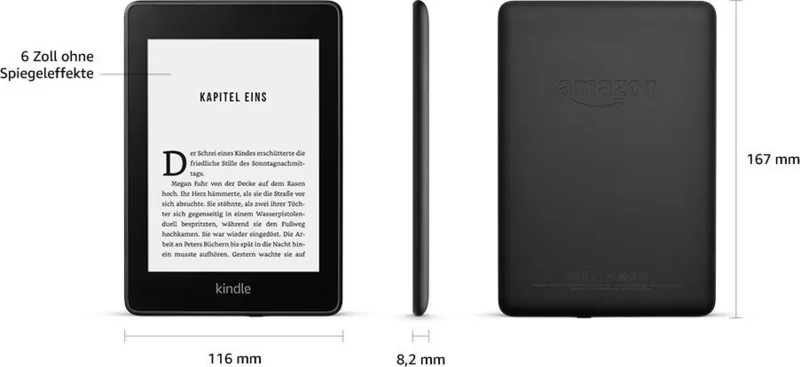
6 in, 16 grayscale levels, 300 ppi
Resolution
1,072 x 1,448
Card Reader
N/A
Ports
1x USB 2.0 Micro-B
Power Supply
Li-polymer battery
Dimensions
6.57 x 4.57 x 0.32 in
Manufacturer Warranty
one year
Product Description
Amazon Kindle Paperwhite 10th Generation 2018 Manual
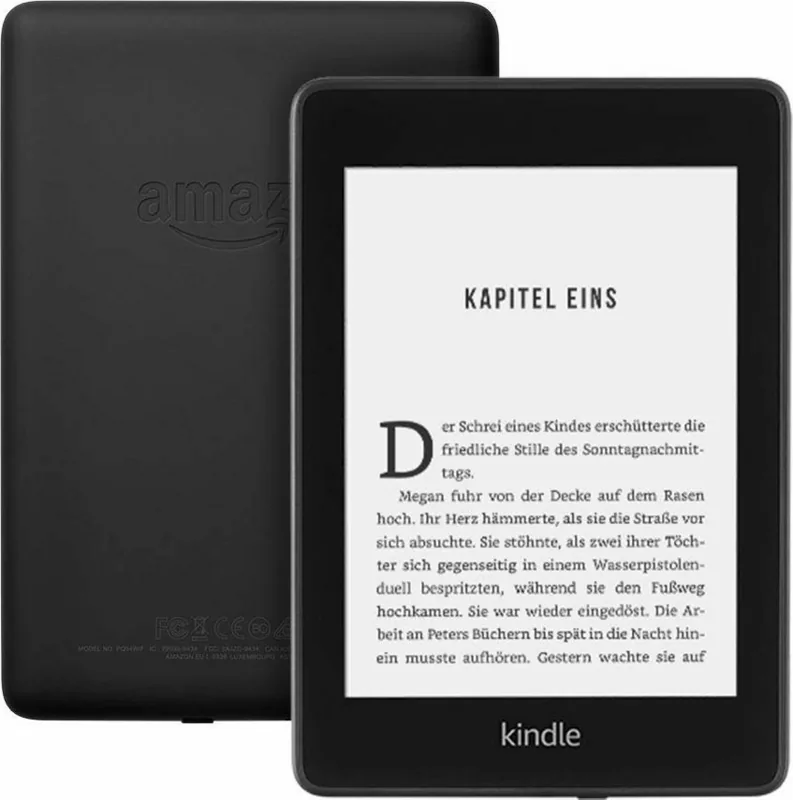
The Amazon Kindle Paperwhite 10th Generation 2018 is a dedicated eReader designed for comfortable, distraction-free reading at home, outdoors, and while traveling. Its high-resolution electronic paper display delivers sharp text with a paper-like appearance, remaining easy to read even in bright sunlight. Built-in adjustable lighting lets readers tailor screen brightness for day or night use.
Reading made personal
This Kindle Paperwhite offers extensive controls for shaping each reading session. Readers can change font style, size, boldness, line spacing, margins, alignment, and screen orientation. The progress display and reading clock can also be adjusted to suit individual preferences. EasyReach touch zones and swipe gestures support simple page turns whether the device is held in the left or right hand.
The Amazon Kindle Paperwhite 10th Generation 2018 Manual highlights useful reading tools beyond basic page navigation. Tap and hold words to view dictionary definitions, translations, Wikipedia information, and related X-Ray details when supported by a title. Notes, highlights, and bookmarks help preserve important passages, while Page Flip and Go To tools make it easy to preview, revisit, or jump between chapters without losing your place.
Library, shopping, and syncing
With Wi-Fi connectivity, the Kindle can download eBooks, magazines, newspapers, comics, and personal reading content. The library supports filtering by content type, sorting by title or author, and cloud collections for organizing books into custom groups. Purchased content is stored in the Amazon cloud and can be downloaded again when needed.
Whispersync helps keep reading progress, bookmarks, notes, and highlights aligned across compatible Kindle devices and reading apps registered to the same account. This is especially useful for readers who switch between a Kindle and a phone or tablet. Storage management options can remove downloaded items while keeping eligible purchases available from the cloud.
Audio and accessibility features
The 2018 Paperwhite also supports Audible listening through paired Bluetooth headphones or speakers. The Audible player includes chapter selection, playback speed controls, 30-second skip buttons, volume adjustment, and audio bookmarks. When both Kindle and Audible editions are available, readers can move between reading and listening.
Accessibility is supported through the VoiceView screen reader, which works with Bluetooth audio devices and gesture controls. Additional features include parental controls, Kindle FreeTime support in eligible regions, Word Wise for English learners, Vocabulary Builder, Goodreads integration, and a beta web browser.
Notes
- Audible, X-Ray, Word Wise, special offers, and mobile connectivity may vary by model, title, country, and account.
- The device charges through its Micro-USB port and can transfer compatible personal content from a computer.
- Airplane Mode disables wireless and Bluetooth connections for offline reading or travel.
Search for 67,706 Manuals online


Type-in Brand or Model