
Alphatronics SL DSBI+ Manual
PDF manual · 96 Pages
English



Quick check
Incorrect answer, please try again.
Chat with your Alphatronics SL DSBI+ manual using AI
Get instant AI answers from your Alphatronics SL DSBI+ manual
Ask anything about the Alphatronics SL DSBI+. Answers come from this manual, with the pages they are based on.
Ask a Question
Do you recommend SL DSBI+?
Yes NoFrequently Asked Questions
This product comes with a three-year warranty provided by the manufacturer. If any problems occur after purchase, you should contact your dealer for assistance.
Is this answer helpful?
Yes, the PVR function supports USB recording, but it is optional and may require activation. Note that not all USB sticks are compatible.
Is this answer helpful?
Navigate to the network settings in the menu. Select the WiFi option and choose your network from the list. Enter the password using the on-screen keyboard to connect.
Is this answer helpful?
Yes, the TV supports AirPlay for mirroring iPhone screens. Ensure both the TV and smartphone are connected to the same WiFi network for this feature.
Is this answer helpful?
Check if the device is plugged in and powered on. Adjust brightness and contrast settings. Ensure the input source is correct and verify all cables are securely connected.
Is this answer helpful?
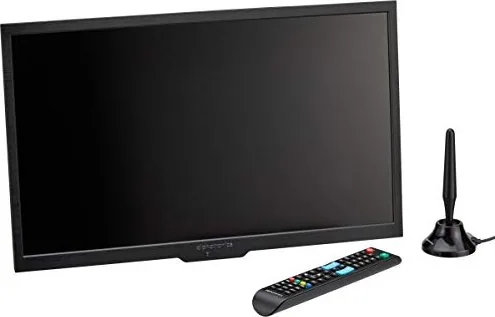
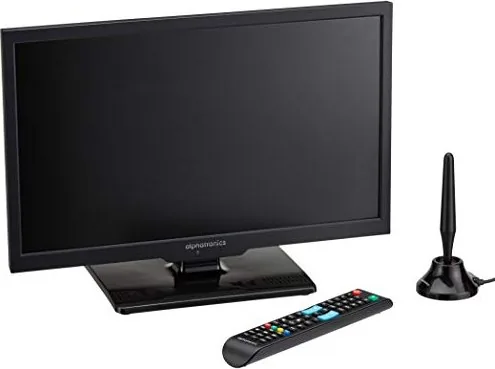
Yes, the remote control is included in the package contents along with the power adapter and connection cables. You will need two AAA batteries.
Is this answer helpful?
The device should operate between 10 and 45 degrees Celsius. Storage temperatures range from 20 to 60 degrees Celsius. Keep it in dry environments.
Is this answer helpful?
Advantages and Disadvantages
Advantages

- Pre-loaded channel list for DVB-S2
- Integrated Smart TV functionality
- Multiple HDMI and USB ports
- Three-year manufacturer warranty
- HDMI CEC support for device control
Disadvantages

- USB 3.0 storage compatibility issues
- Smart TV may require restart for DHCP
- Not suitable for high humidity areas
- Remote control batteries require frequent replacement
- DVD functionality limited to specific models
Product Specification
Panel
LCD
Backlight
LED, Edge-lit
HDR
No
Viewing Angle
178 deg/178 deg (H/V)
3D
No
Tuner
1x DVB-C/T/T2/S/S2 HEVC (H.265)
Video Inputs
2x HDMI, Component Video
Audio Inputs
Digital Audio Out (Coaxial), Headphones (3.5mm Jack)
Other Inputs
2x USB-A, 1x CI+ 1.3
Wireless
Bluetooth 4.2
Operating System
Linux
Audio Power Output
10W (2x 5W)
Features
Built-in DVD Player, Power Switch
Energy Efficiency Class (Old)
A (A+++ to D)
Color
Gray
Base
Center
Note
Information regarding DVB-T2 reception in Austria. Information regarding DVB-T2 reception in Germany
Product Description
Discovering the Alphatronics SL DSBI+ Experience
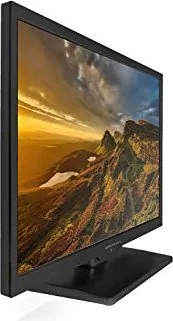
When evaluating your home entertainment setup, the Alphatronics SL DSBI+ series stands out as a robust choice for modern viewing needs. This LED television series brings together reliability and smart functionality designed to enhance your daily routine. The comprehensive information that accompanies this hardware, often referred to as the Alphatronics SL DSBI+ Manual, is essential for mastering every feature available to you. Whether you are setting up a living room center or a secondary viewing area, understanding the operational parameters ensures optimal performance and security.
Setting Up for Success
Installation begins with careful attention to safety and positioning. Ensuring proper air circulation around the back panel prevents overheating, which is critical for maintaining the lifespan of the unit. The television connects to various sources including HDMI, DVB-S2, and DVB-T2, offering versatility for different signal types. Upon powering on, users encounter a welcoming setup wizard that guides them through language selection, country settings, and network configuration. For satellite users, a pre-loaded channel list saves significant time during initial connection.
Smart Features and Connectivity
One of the standout capabilities is the integrated Smart TV function. By pressing the dedicated Smart button, you gain access to internet-based content. This includes streaming platforms like YouTube, where you can watch the latest videos directly without needing an external streaming device. Connectivity extends beyond wireless LAN options; the DLNA and AirPlay features allow seamless mirroring of smartphone screens. Whether you are using an Android or iOS device, sharing media becomes an intuitive process within your own home network.
Navigating the Interface
The on-screen display offers various menus for Picture, Sound, and Time adjustments. Picture modes include Standard, Dynamic, and Movie. Sound settings allow for personalized audio tuning with options for surround sound and Bluetooth audio input. For recording, the PVR function supports USB recording, though some storage devices may require checks. The system also supports HDMI CEC for easier control.
Media and Support
Beyond traditional broadcasting, this series supports local media playback via USB ports. Users can enjoy movies, music, and photo slideshows directly from external storage. Media files are sorted by type for easier access. The DVD player capability integrated into the SL line provides additional analog and digital disc playback without extra hardware. Navigation through these menus is straightforward using the provided remote control.
Regular cleaning requires only a soft, damp cloth on the screen. The troubleshooting section provides guidance for common problems like no signal. The manufacturer offers a three-year warranty for peace of mind. Always ensure the plug remains accessible. Controlled environment usage avoids humidity risks. Keep device away from magnetic interference for best signal reception.
Notes: Always store batteries safely. Ensure proper ventilation.
Search for 67,706 Manuals online


Type-in Brand or Model