

Allnet SG80 Manual
PDF manual · 5 Pages
English



Quick check
Incorrect answer, please try again.
Chat with your Allnet SG80 manual using AI
Get instant AI answers from your Allnet SG80 manual
Ask anything about the Allnet SG80. Answers come from this manual, with the pages they are based on.
Ask a Question
Do you recommend SG80?
Yes NoFrequently Asked Questions
The Allnet SG80 provides a total PoE+ power budget of 240 Watts. This allows you to power various compatible devices such as IP phones, Wi-Fi access points, and CCTV cameras directly through the Ethernet cables without needing external power supplies.
Is this answer helpful?
The switch comes equipped with two SFP slots. These ports support Gigabit speeds and allow for fiber optic connections, enabling longer transmission distances and integration into backbone networks or connecting to other switches via fiber.
Is this answer helpful?
Yes, the Allnet SG80 is designed with a rackmount form factor. It fits securely into standard 19-inch equipment racks, making it easy to integrate into existing data center or server room setups while keeping cabling organized and accessible.
Is this answer helpful?
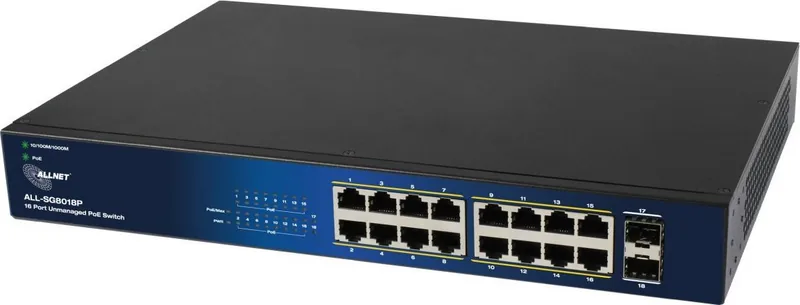
Green indicates a connection at 1000Mbps, while orange signifies a 100Mbps link. Blinking lights show active data transmission. For SFP ports, green means a valid gigabit connection, and blinking indicates data activity. No light usually means no link or power issue.
Is this answer helpful?
Yes, the device complies with the RoHS directive. It restricts the use of hazardous substances like lead, mercury, and cadmium. Specific limits are enforced for these materials to ensure safe disposal and recycling processes are followed effectively.
Is this answer helpful?
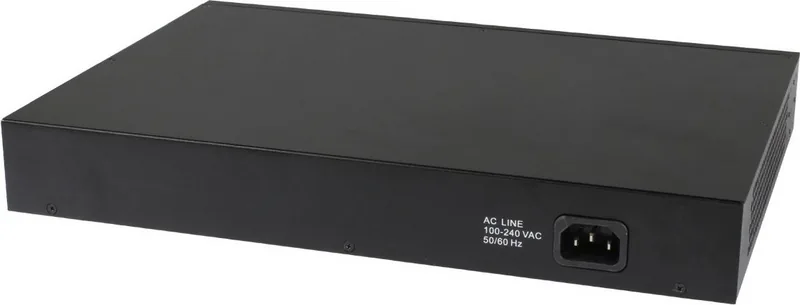
The power input accepts a wide range of 100 to 240 Volts AC. This universal voltage capability ensures the switch can operate reliably in most regions worldwide without requiring additional voltage converters or transformers.
Is this answer helpful?
Advantages and Disadvantages
Advantages

- High PoE+ budget of 240W powers multiple devices simultaneously
- Dual SFP ports offer flexible fiber optic connectivity options
- Clear LED indicators simplify network monitoring and troubleshooting
- RoHS compliant construction ensures environmental safety and compliance
- Rackmount form factor saves valuable desk or floor space
Disadvantages

- Limited to 16 copper ports which may require expansion for large networks
- No mention of advanced management features like SNMP or CLI access
- PoE budget might be insufficient for high-power enterprise devices
- Fanless design could lead to noise issues in quiet offices if overheated
- Basic indicator system lacks detailed port statistics visibility
Product Specification
Function
Switch
Type
Standalone
Network Connections
16x RJ-45, 2x SFP
Speeds
16x RJ-45 (10/100/1000Base-T), 2x SFP (1Gb/s)
PoE
16x RJ-45 PoE+ (16x 30W), total: 240W
Backplane
36Gb/s, 18.6Mpps, 10KB Jumboframes, 4.1MB packet buffer, 8K MAC addresses
Officially Supported Standards
802.3, 802.3ab, 802.3af, 802.3at, 802.3az, 802.3u, 802.3x, 802.3z
Configuration
unmanaged
Cooling
passive
Dimensions (WxDxH)
13.0x1.7x9.1 inches, 1HE
Color
anthracite
Features
metal enclosure
Product Description
Allnet SG80 Rackmount Gigabit Switch Overview
The Allnet SG80 Rackmount Gigabit Switch is a robust networking solution designed for small to medium-sized businesses requiring reliable connectivity and power delivery. This device features sixteen RJ-45 ports capable of speeds up to 1000Mbps, ensuring fast data transfer for standard wired devices. Additionally, it includes two SFP slots for fiber optic connections, providing flexibility for long-distance links or backbone upgrades. The switch supports a total PoE+ budget of 240W, making it ideal for powering IP phones, wireless access points, and security cameras directly through the network cable.
Performance and Reliability
With its intelligent LED indicators, users can quickly diagnose port status. Green lights indicate active connections at full speed, while orange signals suggest 100Mbps operation. Blinking lights confirm active data transmission. The SFP ports follow similar logic, showing green for gigabit links and blinking during data flow. This visual feedback simplifies troubleshooting in busy server rooms. The unit operates on standard 100-240V AC input, ensuring compatibility with global power standards. It also adheres to RoHS directives, meaning it contains restricted hazardous substances below legal limits, promoting environmental safety.
Ideal Deployment Scenarios
This switch excels in environments where space is limited but performance is critical. Its rackmount design allows for neat installation in standard equipment cabinets. The combination of copper and fiber ports makes it versatile for hybrid networks. Whether expanding an office LAN or upgrading existing infrastructure, the SG80 delivers consistent throughput. The 240W PoE capacity ensures that connected devices remain operational without needing separate power adapters, reducing cable clutter and improving aesthetics.
Important Notes
Always verify cable categories before deployment to ensure maximum speed. Ensure adequate ventilation around the unit to prevent overheating during peak load conditions.
Search for 67,732 Manuals online


Type-in Brand or Model