

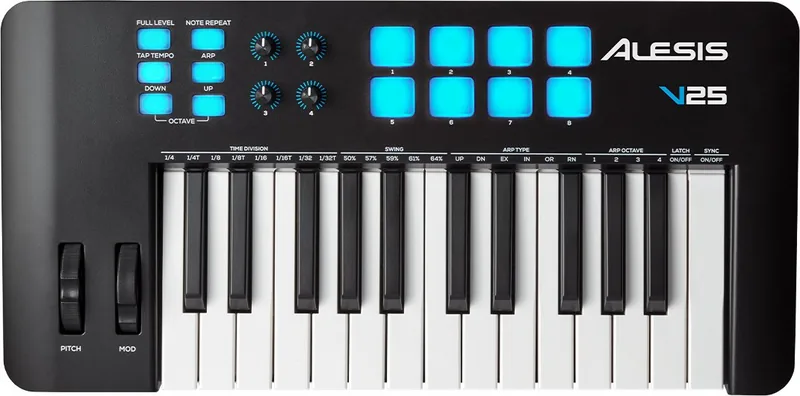

Alesis V61 MKII Manual
PDF manual · 24 Pages
English



Quick check
Incorrect answer, please try again.
Chat with your Alesis V61 MKII manual using AI
Get instant AI answers from your Alesis V61 MKII manual
Ask anything about the Alesis V61 MKII. Answers come from this manual, with the pages they are based on.
Ask a Question
Do you recommend V61 MKII?
Yes NoFrequently Asked Questions
Use a standard USB cable to connect the device to your computer. If using a USB hub, ensure it is powered. Select V MKII as your hardware controller in your DAW's preferences.
Is this answer helpful?
The V MKII requires a computer to function as a MIDI controller. It does not have internal sounds but sends MIDI data to software instruments running on a connected device.
Is this answer helpful?
The second USB port is dedicated to transferring data between the controller and the V MKII Editor software, allowing for easier customization of pads and knobs.
Is this answer helpful?
No, the sustain pedal is sold separately. You must connect a compatible 1/4 inch TS pedal to the Sustain input on the rear panel.
Is this answer helpful?
Press and hold both the Octave Down and Octave Up buttons while turning the power switch to the ON position to restore default settings.
Is this answer helpful?
Yes, the V MKII is a class-compliant USB device and works with both macOS and Windows operating systems without needing additional drivers.
Is this answer helpful?
Advantages and Disadvantages
Advantages

- Velocity-sensitive 49-note keyboard with octave shifting capabilities
- Built-in arpeggiator with multiple modes and customizable settings
- Dual USB ports for separate MIDI and Editor data transfer
- Free V Editor software for deep customization of controls
- Bus-powered design eliminates need for external power adapter
Disadvantages

- No aftertouch support on the keys
- Pads are not backlit which may hinder visibility in low light
- Requires a powered USB hub if using multiple devices
- No included sustain pedal
- Limited to 270-degree rotation on assignable knobs
Product Specification
Type
MIDI Keyboard
Pads
8
Knobs
4
Fader
No
Other Controllers
Modulation, Pitch Bend
Connections
USB-B (USB to Host), Sustain Pedal
Features
Arpeggiator
Product Description
Discover the Alesis V MKII - Your Gateway to Creative Music Production
The Alesis V MKII stands as a versatile MIDI controller designed to bridge the gap between your creative ideas and digital audio workstations. With its compact yet robust design, this 49-key keyboard offers velocity-sensitive keys that respond dynamically to your touch, allowing for expressive performances across various genres. Whether you are a beginner learning the ropes of music production or an experienced producer looking for a reliable companion, the V MKII provides the tools necessary to bring your sound to life.
At the heart of the V MKII is its comprehensive feature set. The unit includes two assignable knobs and four velocity-sensitive pads, giving you immediate control over drum hits, samples, and software parameters. The built-in arpeggiator is a standout feature, offering multiple modes such as Up, Down, Inclusive, Exclusive, Order, and Random. You can customize time divisions ranging from quarter notes to thirty-second note triplets, adjust swing percentages, and even latch patterns for hands-free operation. This level of control allows for complex rhythmic sequences to be generated on the fly.
Connectivity is seamless thanks to the dual USB ports. One port handles standard MIDI communication with your DAW, while the dedicated EDITOR port facilitates easy data transfer for customizing pad assignments and knob functions via the free V Editor software. Powering the device is effortless, as it draws energy directly from a USB connection, eliminating the need for external power adapters. The inclusion of a sustain pedal input and a Kensington lock connector further enhances its utility for both studio and live performance environments.
To get the most out of your V MKII, we recommend exploring the V Editor software available online. This intuitive tool allows you to visualize and edit the MIDI messages sent by your controller, ensuring every button and pad performs exactly as you intend. From adjusting modulation wheel defaults to setting specific gate lengths for arpeggios, the customization options are vast. Embrace the flexibility of the Alesis V MKII and elevate your music creation workflow today.
Search for 67,706 Manuals online


Type-in Brand or Model