
Alesis Prestige Manual
PDF manual · 56 Pages
English



Quick check
Incorrect answer, please try again.
Chat with your Alesis Prestige manual using AI
Get instant AI answers from your Alesis Prestige manual
Ask anything about the Alesis Prestige. Answers come from this manual, with the pages they are based on.
Ask a Question
Do you recommend Prestige?
Yes NoFrequently Asked Questions
The Alesis Prestige comes pre-loaded with 10 classic demo songs, ranging from Fantaisie-Impromptu to Wedding March, providing excellent examples of the instrument's capabilities.
Is this answer helpful?
Yes, there are two headphone outputs available: a standard 1/4-inch stereo jack and a smaller 1/8-inch stereo jack. Connecting headphones automatically mutes the internal speakers.
Is this answer helpful?
Pedal Resonance simulates the reverberation of notes when the sustain pedal is pressed on an actual piano, reproducing rich harmonics and unique sound characteristics for a more authentic experience.
Is this answer helpful?
Yes, the unit features a USB Type-B port that allows for the transfer of MIDI data to a computer, enabling integration with digital audio workstations and other music software.
Is this answer helpful?
You can adjust the touch sensitivity by holding the Key Function button and pressing specific keys to select Fixed, Soft, Medium, or Hard response levels according to your preference.
Is this answer helpful?
No, the metronome feature cannot be used during the playback of demo songs. It is designed to assist with practicing user songs or silent play.
Is this answer helpful?
Advantages and Disadvantages
Advantages

- 88 graded hammer-action keys provide realistic acoustic piano touch
- Powerful 50-watt speaker system with micro-array technology
- 16 versatile voices including pianos, organs, and synths
- Built-in recording mode for user songs
- Pedal Resonance enhances realism during sustain pedal use
Disadvantages

- Cannot layer two voice variations from the same category
- Lesson Mode disables Layer and Split functions automatically
- Metronome cannot be used during demo song playback
- No touchscreen interface for navigation
- Internal memory may fill up during long recordings
Product Specification
Type
Digital piano
Stand
No
Keys
88
Polyphony
128-note
Tone Colors
16
Styles
No
Pedals
1
Speakers
2x 25W (2 speakers)
Functions
Metronome, Dual/ Layer, Split, Duet, MIDI Recorder
Audio Connections
AUX In (3.5mm jack), Stereo Line Out (6.35mm jack), 2x Headphones (3.5mm jack, 6.35mm jack)
Other Connections
USB-B (USB to Host), Sustain Pedal
Features
Integrated effects
Color
Black
Dimensions
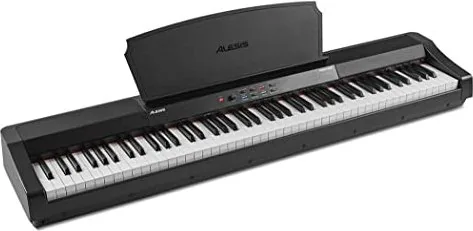
52.0 x 5.9 x 11.7 in (WxDxH)
Weight
28.22 lbs
Product Description
Discover the Alesis Prestige Digital Piano
The Alesis Prestige stands as a premier choice for musicians seeking an authentic piano experience combined with modern versatility. This instrument features 88 graded hammer-action keys that replicate the touch and feel of an acoustic grand piano, ensuring a natural playing style for both beginners and advanced players. With a powerful 50-watt speaker system utilizing micro-array technology, the Prestige delivers rich, room-filling sound that brings your music to life.
One of the standout features of the Alesis Prestige is its extensive sound library. Users can choose from 16 distinct voices across four categories: Piano, Electric Piano, Organ, and Strings/Synth. Each category offers four variations, allowing for deep customization of tone. Whether you need the warmth of a Grand Piano Mark I, the punch of a Suitcase Rock Organ, or the depth of a Synth Bass, this keyboard covers it all. The instrument also supports Layer Mode, enabling you to blend two voices simultaneously for a fuller, richer texture, and Split Mode, which divides the keyboard into two zones for different sounds per hand.
Practicality meets creativity with built-in recording capabilities. You can record your own performances directly to internal memory, perfect for capturing ideas or practicing without external gear. The included metronome offers adjustable tempo and time signatures to aid in disciplined practice sessions. Additional features like Pedal Resonance simulate the complex harmonics of a real piano when using the sustain pedal, while Lesson Mode splits the keyboard into identical zones for teacher-student interaction. Connectivity is seamless via USB-MIDI, allowing integration with computer software, and multiple headphone outputs ensure private practice at any time.
Search for 67,706 Manuals online


Type-in Brand or Model