
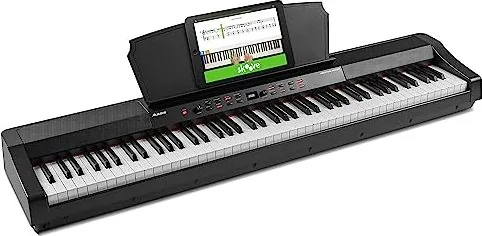
Alesis Prestige Artist Manual
PDF manual · 60 Pages
English



Quick check
Incorrect answer, please try again.
Chat with your Alesis Prestige Artist manual using AI
Get instant AI answers from your Alesis Prestige Artist manual
Ask anything about the Alesis Prestige Artist. Answers come from this manual, with the pages they are based on.
Ask a Question
Do you recommend Prestige Artist?
Yes NoFrequently Asked Questions
Press the Lesson button once to activate the mode. The LED will light up, dividing the keyboard into two zones with the same pitch for simultaneous playing.
Is this answer helpful?
The instrument supports 256 notes of polyphony, allowing for complex layers and arpeggios without dropping notes.
Is this answer helpful?
Yes, there are two headphone outputs: a standard 1/4 inch jack and a smaller 1/8 inch jack. Connecting either will mute the internal speakers.
Is this answer helpful?
Press the Record button, then play your song on the keys. Press Record again or Start/Stop to finish. Press Start/Stop to play it back.
Is this answer helpful?
Yes, the tempo ranges from 30 to 280 beats per minute, and you can adjust the time signature and volume via the settings menu.
Is this answer helpful?
The recording will automatically stop and save the current session, and the display will indicate "Memory Full".
Is this answer helpful?
Advantages and Disadvantages
Advantages

- 88 graded hammer-action keys provide authentic acoustic piano feel
- 30 diverse voices across six categories offer extensive sonic variety
- Dedicated Lesson Mode facilitates easy teacher-student collaboration
- Powerful 50W speaker system ensures clear and loud audio output
- USB-MIDI connectivity enables direct integration with music software
Disadvantages

- Cannot use the same voice in both Split and Layer modes simultaneously
- Lesson Mode automatically disables Layer and Split functionalities
- Metronome cannot be used while playing Demo songs
- Internal memory may fill up quickly if recording many long user songs
- Split point selection requires holding a button and pressing a key
Product Specification
Type
Digital Piano
Stand
No
Keys
88
Polyphony
256-note
Tone Colors
30
Styles
No
Pedals
1
Speakers
2x 25W (2 speakers)
Display
OLED
Features
Metronome, Dual/Layer, Split, Duet, MIDI Recorder
Audio Connections
AUX In (3.5mm jack), Stereo Line Out (6.35mm jack), 2x Headphones (3.5mm jack, 6.35mm jack)
Other Connections
USB-B (USB to Host), Sustain Pedal
Special Features
Integrated Effects
Color
Black
Dimensions
52.0x5.9x11.7in (WxHxD)
Weight
28.22lbs
Product Description
Discover the Alesis Prestige Artist: Your Ultimate Digital Piano Experience
The Alesis Prestige Artist stands as a premier choice for musicians seeking a blend of professional features and accessibility. This digital piano is designed to inspire creativity with its comprehensive suite of sounds and intuitive controls. Whether you are a student, an educator, or an experienced performer, this instrument offers the tools necessary to elevate your musical journey.
At the heart of the Prestige Artist lies a robust 88-key graded hammer-action keyboard that mimics the feel of an acoustic grand piano. The sound engine delivers 30 distinct voices across six categories, including Grand Pianos, Electric Pianos, Organs, Orchestral instruments, Synths, and Basses. Each category offers five variations, providing a rich palette for any genre. The built-in speaker system utilizes a micro-array configuration with dual 25-watt amplifiers, ensuring powerful and clear audio output through four woofers and four passive radiators.
Learning has never been more engaging with the dedicated Lesson Mode. This feature splits the keyboard into two identical zones, allowing teachers and students to play side-by-side on the same keys without interruption. For those who enjoy recording, the User Song Mode lets you capture your performances directly to internal memory. You can also explore the Arpeggiator for instant rhythmic patterns or utilize the Metronome to maintain precise timing during practice sessions.
Connectivity is seamless, thanks to the USB-MIDI port which allows for easy integration with computer software. The rear panel includes Line Outputs for connecting to external amplifiers or mixers, an Aux Input for backing tracks from mobile devices, and multiple headphone jacks for private practice. With features like Layer and Split modes, you can combine sounds or divide the keyboard for complex arrangements. The Alesis Prestige Artist is not just a keyboard; it is a complete musical workstation ready for home studios and stage performances alike.
Search for 67,706 Manuals online


Type-in Brand or Model