
Alesis MultiMix 10 Wireless Manual
PDF manual · 24 Pages
English



Quick check
Incorrect answer, please try again.
Chat with your Alesis MultiMix 10 Wireless manual using AI
Get instant AI answers from your Alesis MultiMix 10 Wireless manual
Ask anything about the Alesis MultiMix 10 Wireless. Answers come from this manual, with the pages they are based on.
Ask a Question
Do you recommend MultiMix 10 Wireless?
Yes NoFrequently Asked Questions
Power on the mixer and press the Pair button. Search for Alesis MultiMix on your device settings. Enter code 0000 if requested to complete connection successfully.
Is this answer helpful?
Yes, use the Insert jacks on channels one through four to send a clean preamp signal directly to a multitrack recorder before it reaches EQ and faders.
Is this answer helpful?
Yes, a switch on the rear panel provides +48V phantom power to the XLR microphone inputs for condenser microphones that require it.
Is this answer helpful?
The unit includes a selector switch compatible with 115V or 230V regions. Change this only when traveling to prevent equipment damage.
Is this answer helpful?
Connect to line inputs or use a direct box to match impedance if the sound is dull due to low impedance inputs.
Is this answer helpful?
Yes, the Ext In accepts RCA connections for consumer-level devices like CD players or MP3 players at -10dBV levels.
Is this answer helpful?
Yes, a stereo 1/4 inch Phones/Monitor output sends signal to headphones and monitors controlled by the appropriate knob.
Is this answer helpful?
Advantages and Disadvantages
Advantages

- Built-in Bluetooth allows wireless stereo streaming from mobile devices and computers for flexibility.
- Phantom power support enables the use of condenser microphones for superior studio quality audio capture.
- Dual aux sends enable separate monitor mixes and external effects processing for custom solutions.
- Insert jacks allow sending clean preamplified signals directly to multitrack recorders before EQ.
- Voltage selector switch supports multiple regional power standards from 115 to 230 volts.
Disadvantages

- Line inputs possess low impedance which may dull sound for high impedance instruments like guitars.
- Clipping LEDs warn of distortion but must be managed actively to protect speakers effectively.
- Rear mic inputs disable when front panel mics are in use on channels one and two only.
- Direct connection of electric guitars requires a direct box for optimal tone transfer performance.
Product Specification
Subgroups
no
Product Description
Revolutionize Your Audio Studio With Alesis MultiMix
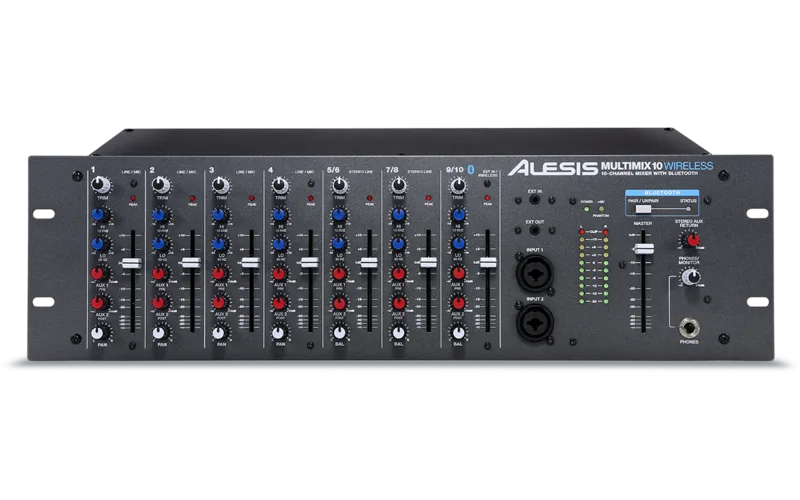
The Alesis MultiMix 10 Wireless stands as a robust solution for musicians and producers seeking flexibility in their setup. This mixer combines analog power with modern digital connectivity, allowing for seamless integration into any performance or recording environment. Its compact design does not compromise on essential features required for professional audio mixing tasks.
One of the standout capabilities is the built-in Bluetooth receiver. You can wirelessly stream audio from smartphones, tablets, or computers directly into the mixer. To pair your device, simply power on the unit and press the Pair button. The status LED confirms when the connection is active. This feature is ideal for backing tracks or wireless music playback during breaks.
Connectivity options are extensive with multiple input choices. Channels one through four support XLR and quarter-inch combo inputs for dynamic or condenser microphones. Phantom power is available for condenser mikes, ensuring clear vocal capture. Additional line inputs accommodate instruments like keyboards or guitars. Channels nine and ten offer stereo external RCA inputs for consumer-level devices such as CD players.
Recording enthusiasts will appreciate the Insert jacks on the first four channels. These allow you to send a clean preamplified signal directly to a multitrack recorder without affecting the main mix signal. This setup simplifies tracking sessions by providing high-quality recordings while maintaining control over the final output levels. Effect sends are also available via auxiliary knobs, enabling custom monitor mixes for performers on stage.
Safety and power management are prioritized in the design. A voltage selector switch ensures compatibility with different regional power standards ranging from 115 to 230 volts. However, users should exercise caution when changing settings if traveling abroad to prevent equipment damage. The Peak LED warns users when signals are clipping, helping to avoid amplifier distortion and speaker failure.
To maximize audio quality, the mixer features high-quality equalization controls. Each channel provides Hi EQ and Lo EQ knobs, offering up to 15dB of boost or cut for specific frequency ranges. This allows precise tone shaping for different instruments and vocals before the signal reaches the main outputs. The Master Fader controls overall volume, encompassing microphone, line, and external Bluetooth inputs.
Monitoring capabilities are also robust with dedicated outputs for speakers and headphones. The Phones/Monitor knob regulates the signal level sent to personal monitoring systems. This ensures that performers hear their own mix clearly without interference from the audience output. Additionally, the rear panel includes Main Out and Monitor Out jacks for connecting to external amplification systems.
Users should note a specific impedance consideration regarding electric guitars. The line-level inputs operate at relatively low impedance. Connecting high-impedance instruments directly might dull the sound. In such cases, using a direct box is recommended to bridge the impedance gap effectively. This ensures the instrument retains its natural tonal character during playback.
Setting up the system requires following a specific power-on and power-off sequence. Always turn on audio sources before the mixer and reverse the order when shutting down. This protects equipment from potential power surges and ensures stable operation. Following these guidelines extends the lifespan of both the mixer and connected peripherals.
Overall, this mixer delivers a powerful mix of analog warmth and wireless convenience. It serves well for live performances, rehearsal spaces, or home studios. Comprehensive guides like the Alesis MultiMix Manual outline proper pairing sequences and safety protocols. Whether you are recording or performing live, the versatility of the system makes it a reliable companion for audio professionals looking for clean dynamics and easy control.
Search for 67,706 Manuals online


Type-in Brand or Model