

Akko 3068B Plus Manual
PDF manual · 25 Pages
English



Quick check
Incorrect answer, please try again.
Chat with your Akko 3068B Plus manual using AI
Get instant AI answers from your Akko 3068B Plus manual
Ask anything about the Akko 3068B Plus. Answers come from this manual, with the pages they are based on.
Ask a Question
Do you recommend 3068B Plus?
Yes NoFrequently Asked Questions
Unplug the keyboard or switch the rear power to ON, then long-press Fn+E/R/T until the key’s LED flashes quickly. Select the corresponding Akko 3068BT-* or AKKO 3068 BT3.0 device on your host to complete pairing.
Is this answer helpful?
Yes. Full key remapping and advanced lighting customization require connecting the keyboard in wired mode and installing the Akko Cloud driver available at en.akkogear.com. Wired mode also enables music-synced lighting effects.
Is this answer helpful?
The keyboard supports multiple Bluetooth profiles (three Bluetooth 5.0 slots and one Bluetooth 3.0) plus a 2.4GHz profile, and lets you quickly switch between paired devices using Fn+E/R/T (or Fn+Y for the fourth slot).
Is this answer helpful?
Remove the Akko 3068 entries from your host device’s Bluetooth list to clear cached pairings, then re-pair the keyboard using long-press Fn+E/R/T. A restart of Bluetooth on your host may also help.
Is this answer helpful?
Yes. The keyboard includes Mac system commands via Fn combinations for tasks like brightness control, Mission Control, Siri, and media functions; modifier mappings (Command, Option) are available via Fn key combinations.
Is this answer helpful?
Akko provides a one-year warranty against non-human-caused defects in mainland China. Warranty coverage and repair fees for other regions depend on the seller or distributor. Self-disassembly voids warranty.
Is this answer helpful?
Turn off the power switch on the keyboard’s back when unused. The keyboard automatically sleeps after idle time and wakes by pressing any key. Note that OS power-saving settings can affect wake behavior, especially on Windows.
Is this answer helpful?
Advantages and Disadvantages
Advantages

- Multi-mode connectivity: Bluetooth 5.0/3.0, 2.4GHz wireless, and wired Type-C for broad device compatibility.
- Compact 68-key 65% layout saves desk space while retaining dedicated media and function shortcuts.
- Extensive backlight system with 20 effects, RGB single-color options, and driver-enabled music-synced lighting.
- Stored multi-device pairing and quick switching via Fn+E/R/T for seamless multi-host workflows.
- Durable PBT keycaps and full N-key rollover for reliable typing and gaming performance.
Disadvantages

- Advanced key and lighting customization requires wired mode and the Akko Cloud driver.
- Self-disassembly voids warranty; physical or liquid damage is excluded from free service.
- Some host devices may only detect Bluetooth 5.0 profile, limiting access to the BT3.0 option.
- Battery life subject to usage and system power-saving features may affect wake timing on Windows.
- Learning Fn combos for pairing, switching, and advanced functions can be initially confusing.
Product Specification
Layout
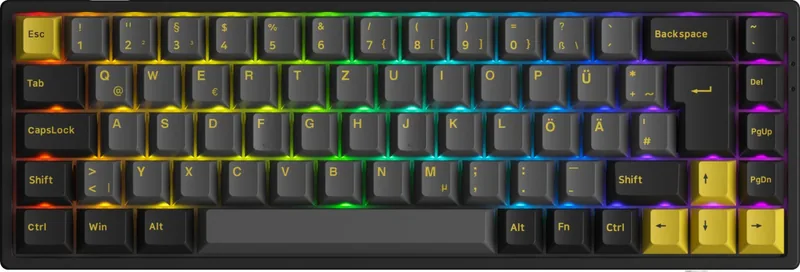
DE
Type
mechanical
Backlighting
RGB
Keycap Level
regular, with frame
Keycap Format
regular
Keycap Profile
concave
Numpad
N/A
Arrow keys
offset
Control keys
proprietary
Function keys
N/A
Enter key
Standard
Delete key
Standard
Palm rest
N/A
Case
Plastic
Connection
wired (5.91ft), USB-A 3.0 or wireless (2.4GHz), USB-A 3.0 (USB-A 3.0 receiver) or wireless (Bluetooth 5.0), cable detachable (USB-C port)
Power supply
Battery (built-in, 1800mAh)
Dimensions (WxHxD)
12.44x1.54x4.21in
Weight
1.54lb
Features
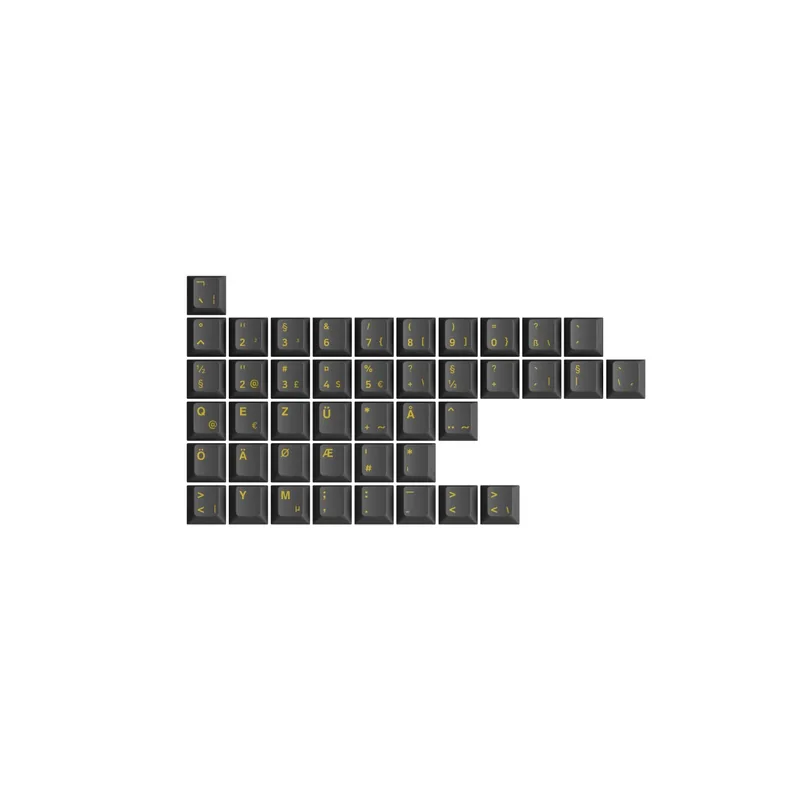
Anti-Ghosting (N-Key-Rollover), 20x additional keycaps included, switch changeable (Hot-Swap), FN-key, sound-dampened (foam, silicone)
Switch manufacturer
Akko
Tactile feedback
none
Dampening
none
Lifespan
60 million
Product Description
Akko 3068B Plus, DE Manual
The Akko 3068B Plus is a compact 65% mechanical keyboard engineered for versatile multi-device use and rich customization. Sporting a 68-key layout, PBT keycaps, and a robust 1800mAh battery, it supports Bluetooth 5.0/3.0, 2.4GHz wireless, and wired Type-C connections. Its compact footprint (approx. 316 × 107 × 39 mm) and 0.64kg weight make it portable while retaining dedicated multimedia and function-row shortcuts for productivity.
Connectivity is a highlight: three Bluetooth profiles (Akko 3068BT-1/2/3 for BT5.0 and AKKO 3068 BT3.0 for BT3.0) plus a 2.4GHz dongle allow seamless switching between multiple devices. Pairing is handled with long-press Fn combinations (Fn+E/R/T) and quick device toggles (short Fn+E/R/T). The keyboard stores paired devices and supports instant reconnection, plus a sleep mode to conserve battery.
The Akko 3068B Plus offers extensive onboard controls and system commands for both Windows and macOS. Fn-combinations enable system switching, media controls, brightness adjustment, Win key locking, and restoring factory defaults. There are also options to remap keys like swapping WASD and arrow keys, turning Ctrl into Menu, and locking or unlocking the Windows key for uninterrupted gaming.
Lighting and customization are made flexible through built-in backlight modes and the Akko Cloud driver. Users can select from 20 lighting effects (constant, breath, neon, wave, ripple, star, and many themed patterns), adjust animation speed, brightness, direction, and set seven single-color or RGB loop modes. Full key/lighting remapping requires wired mode and the official driver, which also enables music-synced lighting effects.
Ergonomics and daily usage are considered: multimedia keys and full N-key rollover ensure responsive typing and gaming, while an included Type-C to USB cable supports wired connection and customization. The keyboard includes RF safety compliance and RF exposure considerations for portable use.
Akko backs the product with warranty and service guidelines: a one-year non-human-damage warranty in mainland China, with repair options and fees detailed for out-of-warranty cases. Users are cautioned that self-disassembly voids warranty and that physical damage (liquid, drops, cable abuse) is excluded. Official drivers and support resources are available at the Akko website and social channels.
Notes:
- For full key/lighting customization, use wired mode with the Akko Cloud driver (download at en.akkogear.com).
- Bluetooth pairing uses Fn+E/R/T; short press reconnects, long press initiates pairing.
- To reset pairing, remove saved 3068 devices from your host’s Bluetooth list.
Search for 67,732 Manuals online


Type-in Brand or Model