
Akasa Internal Multi-Slot Card Reader Manual
PDF manual · 1 Pages
English


Quick check
Incorrect answer, please try again.
Chat with your Akasa Internal Multi-Slot Card Reader manual using AI
Get instant AI answers from your Akasa Internal Multi-Slot Card Reader manual
Ask anything about the Akasa Internal Multi-Slot Card Reader. Answers come from this manual, with the pages they are based on.
Ask a Question
Do you recommend Internal Multi-Slot Card Reader?
Yes NoFrequently Asked Questions
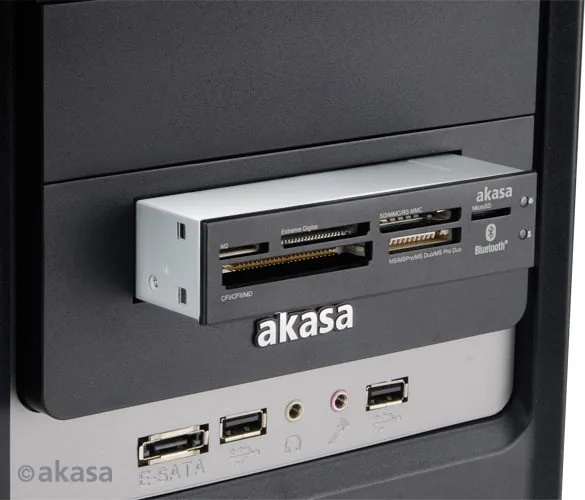
Switch off system power and open the case. Remove the cover from an empty 3.5-inch drive bay. Insert the reader until aligned with the front panel. Secure with screws. Connect the USB cable to the motherboard pin header and boot the system.
Is this answer helpful?
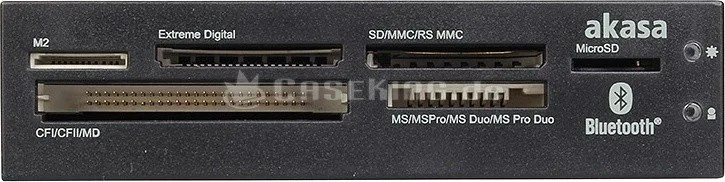
It supports Compact Flash, Memory Stick, Secure Digital including SDXC and SDHC, Extreme Digital X, Memory Stick Micro M2, and microSD. Maximum capacity is 64 GB for SDXC and 32 GB for SDHC.
Is this answer helpful?
No. To use Bluetooth, double-click the icon on your desktop or in the system tray. Follow the on-screen instructions to pair your device with the internal card reader hardware unit properly.
Is this answer helpful?
Electrostatic discharge can damage components. Use an ESD controlled workstation. If unavailable, wear an antistatic wrist strap or touch an earthed surface before handling any PC components.
Is this answer helpful?
The unit supports up to 64 GByte for SDXC cards. It also handles 32 GByte for SDHC cards. All other types depend on their individual manufacturer specifications and capacity.
Is this answer helpful?
This reader handles formats without needing additional external software drivers. The connection is plug and play to the motherboard using standard USB protocols for easy data access.
Is this answer helpful?
Yes, it works with device connectors like PDAs and mobile phones utilizing headset ports or internal card slots for seamless transfer between camera or phone and storage.
Is this answer helpful?
Advantages and Disadvantages
Advantages

- Six-slot design allows simultaneous reading of different memory card types for efficient workflow
- Bluetooth connectivity provides wireless data transfer options alongside standard wired connections
- Wide compatibility supports Compact Flash, SDHC, SDXC, Memory Stick, and microSD formats
- Internal installation saves desk space compared to external USB card readers
- Uses USB 2.0 9-pin socket for reliable connection to standard motherboards
Disadvantages

- Installation requires opening the PC case which voids warranties for some users
- Risk of electrostatic discharge damage if proper safety protocols are not followed
- Bluetooth setup requires manual configuration in the operating system environment
- Physical slots may require specific card orientations to avoid force insertion
- Limited to 3.5-inch drive bay sizes in some computer chassis designs
Product Specification
Type
WPAN Adapter, Card Reader
Form Factor
1x Plug-in Module (3.5", with removable front panel)
Interface
1x USB 2.0 9-Pin Socket (Connector via cable, 480Mb/s)
Connectivity
1x Bluetooth, 1x microSD, 1x SD Card, 1x xD-Picture Card, 2x Memory Stick, 1x CompactFlash
Data Transfer
1x Bluetooth, 1x microSD (microSD), 1x SD Card (SD Card, RSMMC), 1x xD-Picture Card, 1x Memory Stick (Memory Stick PRO Duo, Memory Stick Duo, Memory Stick PRO, MagicGate), 1x Memory Stick (Memory Stick Micro), 1x CompactFlash (Type I, Type II/Microdrive)
Power Supply
Power supply via interface only
Chassis Color
gray, black
Compatibility
Universal
USB Marking
Left
Product Description
Akasa Internal Multi-Slot Card Reader Overview
The Akasa Internal Multi-Slot Card Reader transforms how you manage digital media on your desktop. Designed for enthusiasts, this device integrates seamlessly into your system without occupying extra desk space. It features Bluetooth connectivity and a USB 2.0 connection via a 9-pin socket. This internal solution offers ultimate convenience for users who frequently transfer data between cards and the main system. It is particularly useful for professionals handling large volumes of raw images or video footage daily.
Installation and Setup Procedures
Installing this card reader requires accessing the inside of your PC case carefully. First, switch off the system power completely. Remove the metal cover from an empty 3.5-inch external drive bay slot. Caution is advised regarding electrostatic discharge risks. Wear an antistatic wrist strap or touch a grounded metal surface. Insert the reader until it aligns with the chassis front panel. Secure the unit with screws or mounting system.
Connectivity and System Configuration
Connect the internal USB cable directly to the appropriate USB pin header on your motherboard. You can find specific pin location details by consulting your specific motherboard manual. To utilize the built-in Bluetooth functionality effectively, you must adjust your PC operating settings carefully. Double-click the Bluetooth icon located on your desktop or within the system tray menu. Follow the on-screen instructions step by step to configure and pair your compatible wireless devices. This capability allows wireless transfer options alongside standard wired USB connections for maximum flexibility.
Supported Media Formats and Capacity
This reader handles a wide variety of memory card formats without needing additional external software drivers. It supports Compact Flash, Memory Stick variants, and Secure Digital cards including SDXC and SDHC standards. Additional formats like Extreme Digital X card and memory Stick Micro M2 are also fully compatible. It accommodates storage capacities up to 64 GB for SDXC and 32 GB for SDHC cards. It works seamlessly with modern devices such as PDAs and mobile phones utilizing headset ports or internal card slots.
Safety and Final Recommendations
This hardware significantly improves workflow efficiency for photographers and data miners working daily. Ensure you follow safety warnings during all installation steps to prevent damage. The combination of wired and wireless capabilities makes it a versatile addition to any custom PC build. Upgrade your local storage access with this robust internal unit for professional computing needs.
Notes
Ensure power is disconnected before opening the case. ESD protection is mandatory during installation. Check Bluetooth settings in OS before use.
Search for 67,732 Manuals online


Type-in Brand or Model
Tom Hall
6 months ago
Does this card reader require specific drivers for Windows 10 and does the internal Bluetooth feature work right away?
Manual.ly
6 months ago
No drivers are typically required for Windows 10, 8, and 7 as the system recognizes the device automatically. The Bluetooth module is also supported without additional software. If the device fails to work or slows the computer as reported by some users, please contact support for a replacement as standard driver troubleshooting should apply. The mounting fits standard bays though thread alignment may vary slightly by case model.