
AirLive Desktop PoE Injector Manual
PDF manual · 2 Pages
English



Quick check
Incorrect answer, please try again.
Chat with your AirLive Desktop PoE Injector manual using AI
Get instant AI answers from your AirLive Desktop PoE Injector manual
Ask anything about the AirLive Desktop PoE Injector. Answers come from this manual, with the pages they are based on.
Ask a Question
Do you recommend Desktop PoE Injector?
Yes NoFrequently Asked Questions
It uses a standard 48V output to power network devices effectively. This is suitable for most PoE compliant hardware.
Is this answer helpful?
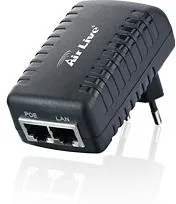
There are two main RJ45 ports, one for LAN and one for POE output.
Is this answer helpful?
Yes, it is designed to work with PoE Access Points and similar equipment.
Is this answer helpful?
LAN connects to the network switch, POE connects to the powered device.
Is this answer helpful?
Yes, a standard wall outlet powers the unit to inject power into the cable.
Is this answer helpful?
Yes, it complies with relevant European directives and safety regulations.
Is this answer helpful?
Refer to the PoE Manual included with the hardware package for steps.
Is this answer helpful?
Advantages and Disadvantages
Advantages

- Simple installation process with clear port labeling for quick deployment.
- 48V power output ensures efficient data transmission and electricity delivery.
- Compliant with international safety and electromagnetic compatibility standards.
- Minimizes physical clutter on desktops or server racks effectively.
- Supports standard 1x RJ45 format for typical network connections.
Disadvantages

- Specific 48V requirement may limit compatibility with 5V or 12V devices.
- Desktop footprint might be large for extremely compact rack setups.
- Requires additional physical power connection separate from data line.
Product Specification
Function
PoE Injector (1x Data, 1x Data/PoE)
Type
Standalone
Network Ports
1x RJ-45
Speeds
1x RJ-45 (10/100Base-T)
PoE
1x RJ-45 Passive PoE (1x 19.2W, 48V)
Officially Supported Standards
802.3, 802.3u
Configuration
unmanaged
Cooling
passive
Dimensions (WxHxD)
1.77x3.35x2.76in
Weight
3.35oz
Color
Black
Product Description
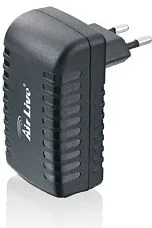
AirLive Desktop PoE Injector 1x RJ45 Overview
Network professionals often seek efficient ways to power remote devices without adding extra electrical infrastructure to every location. The AirLive Desktop PoE Injector provides a robust and reliable solution for integrating Power over Ethernet seamlessly into existing setups. This unit supports the standard 1x RJ45 format required for typical network connections and hardware configurations. It ensures that critical devices like wireless access points and security cameras receive stable electricity without needing additional electrical outlets nearby. This simplifies installation and reduces cable clutter significantly.
Installation Guide and Setup
Proper installation is essential for optimal performance and longevity of the system. Users must follow specific steps found in the PoE Manual included with the hardware package. First, connect the power inlet to a standard wall outlet to supply electricity safely. Then, attach the LAN port to a compatible Ethernet switch to handle data transmission correctly. Finally, link the POE port to the target Powered Device to complete the circuit. This order guarantees that power flows correctly to the equipment while data travels simultaneously without interference.
Port Configuration Details
The device features distinct ports for different technical tasks within the network. The POE port functions as the primary RJ45 Ethernet interface for transmitting power and information to PoE devices effectively. This capability allows for streamlined cabling in busy office environments and warehouses. Meanwhile, the LAN port connects directly to the local network infrastructure, such as an Ethernet switch, providing the upstream connection. Understanding this distinction prevents potential connectivity issues and ensures security protocols are maintained properly during setup.
Reliability and Industry Standards
Safety is a top priority for all network equipment deployed in commercial settings. This product complies with strict European directives regarding electromagnetic compatibility and safety. The 48V output ensures high efficiency for long-distance transmission over Cat cables. Users benefit from a design that minimizes physical clutter on desktops or server racks. The hardware is built for durability and consistent operation in various environmental conditions.
Maintenance and Documentation
Consulting the documentation ensures full utilization of all features and troubleshooting options. The PoE Manual offers detailed instructions for resolving common issues encountered by technicians. With its simple design and clear labeling on the ports, users can deploy this injector quickly without specialized training. It serves as an essential component for modern LAN expansions requiring power delivery. This tool empowers network administrators to maintain secure and powered networks efficiently while adhering to industry best practices for deployment and safety standards.
Search for 67,732 Manuals online


Type-in Brand or Model