
Advance Paris WTX-StreamPro Manual
PDF manual · 22 Pages
English



Quick check
Incorrect answer, please try again.
Chat with your Advance Paris WTX-StreamPro manual using AI
Get instant AI answers from your Advance Paris WTX-StreamPro manual
Ask anything about the Advance Paris WTX-StreamPro. Answers come from this manual, with the pages they are based on.
Ask a Question
Do you recommend WTX-StreamPro?
Yes NoVideo Manual
$60 Hifi Hack makes WIIM Ultra Destroy Gear 3X the Price
Frequently Asked Questions
The WTX-StreamPro uses a 24‑bit Wolfson WM8740 DAC and supports Hi‑Res audio up to 192 kHz. It delivers low distortion (<0.005%) and wide frequency response (20 Hz–45 kHz). Playback format support depends on the source and app capabilities.
Is this answer helpful?
Use the Advance Playstream app and follow the WPS pairing procedure when prompted, or connect directly to the unit’s temporary Wi‑Fi AP and open http://10.10.10.254 to enter your router credentials. Alternatively, use a wired Ethernet CAT5+ connection.
Is this answer helpful?
Yes. The WTX-StreamPro can access streaming services via the Advance Playstream app; some services require a subscription (e.g., Spotify Premium) and availability depends on app integrations and updates.
Is this answer helpful?
Bluetooth playback requires the optional X‑FTB01 AptX/AAC receiver dongle. Once connected, Bluetooth audio can be received and routed to the analog outputs; AptX provides improved Bluetooth quality.
Is this answer helpful?
Use the RCA Line Out for analog connection to an amplifier, or the optical/coaxial digital outputs to feed an amplifier with a built‑in DAC or an external DAC. Note digital outputs do not include the analog Line‑In signal.
Is this answer helpful?
Install the Advance Playstream app from the App Store or Google Play. The app and device firmware receive updates through those stores; enable updates and follow in‑app prompts to apply new features and improvements.
Is this answer helpful?
The unit uses a 5V/1A micro USB adapter compatible with 100–240V mains. Ensure ventilation, avoid moisture and heat, protect power cords, unplug during long non‑use periods, and use qualified service personnel for repairs.
Is this answer helpful?
Advantages and Disadvantages
Advantages

- Audiophile Wolfson WM8740 DAC supporting high‑resolution playback
- Multiple outputs: optical, coaxial, RCA analog and 3.5mm headphone
- App control with multiroom, streaming service integration and updates
- Compact design with universal 100–240V USB power adapter
- AirPlay and DLNA compatibility for broad device support
Disadvantages

- Bluetooth requires optional X‑FTB01 dongle for AptX/AAC functionality
- Wi‑Fi limited to 2.4GHz (no 5GHz band support)
- USB input limited to FAT32 and maximum 128 GB storage
- Digital optical/coaxial outputs do not handle the analog Line‑In
- Some features rely on the Advance Playstream app and updates
Product Specification
Type
Streaming Player
D/A Converter
24bit/192kHz
Tuner
Internet Radio
Streaming Clients
Apple AirPlay, Pandora, Qobuz, Spotify, Tidal
Audio Connections
Stereo Line In (RCA), Digital Audio Out (coaxial), Digital Audio Out (optical), Stereo Line Out (RCA), Headphones (3.5mm jack)
Other Connections
USB-A, RJ-45
Wireless
Wi-Fi 4 (WLAN 802.11b/g/n)
Features
Remote Control
Color
black
Dimensions
5.16x1.65x4.45in (WxHxD)
Weight
1.17 lb
Product Description
Advance Paris WTX-StreamPro — High‑Resolution Network Audio Player
The Advance Paris WTX-StreamPro is a compact, audiophile-grade network audio player designed for effortless integration into home Hi‑Fi systems. Powered by the Wolfson WM8740 DAC and supporting 24‑bit/192kHz conversion, the StreamPro delivers clear, detailed playback from networked and local sources. It connects via Wi‑Fi (2.4GHz, 802.11b/g/n) or Ethernet, and offers optical and coaxial digital outputs plus analog RCA line‑out and a 3.5mm headphone jack for versatile hookup to amplifiers, soundbars, or powered speakers.
Key features and usage
Plug & play setup makes the WTX-StreamPro easy to add to an existing audio setup. Use the Advance Playstream app (iOS/Android) for device setup, playback, and multiroom control. The player supports AirPlay and DLNA, and allows streaming from local storage (USB A up to 128 GB, NAS, PC/Mac) and popular services like Spotify, Tidal, Qobuz via the app. WPS simplifies Wi‑Fi pairing, or you can configure the unit manually via its temporary wireless AP at 10.10.10.254. Firmware and app updates extend functionality over time.
Controls and connections
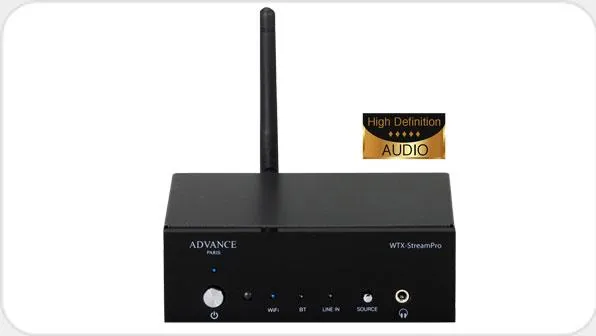
Front panel controls include power, source selector (Wi‑Fi, Bluetooth via optional X‑FTB01 dongle, Line In) and an IR remote sensor. The rear panel exposes USB storage input, optical and coaxial digital outputs, stereo RCA line‑out, analog line‑in, Ethernet port, Wi‑Fi antenna connector, 5V micro USB power input and a WPS button. Optical/coaxial outputs bypass the analog line‑in and fix app volume for digital output; Bluetooth requires the optional AptX receiver.
Performance and specs
Technical highlights include a frequency response up to 45 kHz (+/-3dB), distortion <0.005%, channel separation >80dB, S/N >98dB, and a 1.8V unbalanced output level. The unit is small and lightweight (approx. 131×113×42 mm, 0.53 kg) and supports 2.4GHz Wi‑Fi with EIRP <20dBm. Power is supplied via 5V/1A USB adapter (100–240V compatible).
Installation and safety notes
Position the unit with adequate ventilation and keep it away from water and heat sources. Use proper grounding and avoid using adapters or extension cords that leave prongs exposed. Protect power cords from damage and unplug the unit during long non‑use periods. For service or repairs, consult qualified personnel. Recycle responsibly according to local EU rules.
Pros and cons
Pros:
- Audiophile DAC (Wolfson WM8740) for high‑resolution playback
- Flexible connectivity: Wi‑Fi, Ethernet, optical/coaxial digital, RCA analog
- App control with multiroom and streaming service integration
- Compact, low‑power design with universal 100–240V support
- AirPlay and DLNA compatibility for broad device support
Cons:
- Bluetooth requires optional X‑FTB01 dongle for AptX support
- Wi‑Fi limited to 2.4GHz (no 5GHz support)
- USB storage limited to FAT32 and 128 GB
- Optical/coaxial outputs do not handle analog Line‑In
- App‑dependent features may vary with software updates
Notes
- Use the WPS button when prompted by the Advance Playstream app for easier Wi‑Fi pairing.
- For manual Wi‑Fi setup, connect to the unit’s AP and open http://10.10.10.254.
- Keep magnetic‑sensitive items at least 50 cm away to avoid interference.
- Employ a surge protector to prevent AC disturbances from affecting the unit.
FAQ
Q: What audio resolutions does the WTX-StreamPro support? A: The player uses a 24‑bit Wolfson WM8740 DAC supporting up to 192 kHz sample rates and Hi‑Res audio playback; specs list a frequency response up to 45 kHz and very low distortion.
Q: How do I connect the unit to my network? A: Use WPS from the Advance Playstream app for easy pairing, connect via Ethernet (CAT5+) for a wired link, or manually join the unit’s Wi‑Fi AP and configure your router through http://10.10.10.254.
Q: Which streaming services and protocols are supported? A: The device works with AirPlay and DLNA and can stream from services accessible through the Advance Playstream app such as Spotify, Tidal and Qobuz (some services require subscriptions).
Q: Can I use Bluetooth with the WTX-StreamPro? A: Yes, but Bluetooth requires the optional Advance X‑FTB01 AptX/AAC receiver dongle for high‑quality BT streaming and digital outputs.
Q: What outputs are available for connecting to an amplifier? A: It provides analog RCA Line Out, optical and coaxial digital outputs; note digital outputs do not route the analog Line‑In signal.
Q: Are firmware or app updates available? A: Yes. The Advance Playstream app and device firmware are upgradable through the App Store and Google Play to add services and improvements.
Q: What power supply does the StreamPro use? A: It uses a 5V/1A micro USB power input; the included adapter supports 100–240V mains.
Search for 67,706 Manuals online


Type-in Brand or Model