
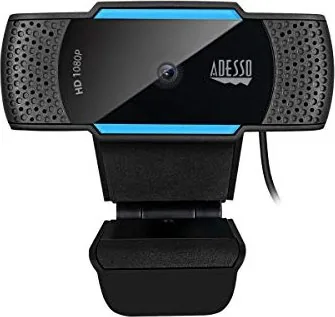
Adesso CyberTrack H5 Manual
PDF manual · 8 Pages
English



Quick check
Incorrect answer, please try again.
Chat with your Adesso CyberTrack H5 manual using AI
Get instant AI answers from your Adesso CyberTrack H5 manual
Ask anything about the Adesso CyberTrack H5. Answers come from this manual, with the pages they are based on.
Ask a Question
Do you recommend CyberTrack H5?
Yes NoFrequently Asked Questions
Simply place the webcam on your monitor or tripod, then plug the USB cable into your computer. The device will be detected automatically by your operating system and work immediately with any camera app.
Is this answer helpful?
Yes, the CyberTrack H5 includes a built-in privacy shutter cover that can slide over the lens to physically block the camera when you are not using it.
Is this answer helpful?
Yes, by downloading the advanced driver from adesso.com/downloads, you can customize settings including brightness, contrast, saturation, sharpness, zoom, and image orientation.
Is this answer helpful?
Yes, the webcam features a standard tripod attachment point, allowing you to mount it on most common camera tripods or stands for stable positioning.
Is this answer helpful?
The Adesso CyberTrack H5 supports 1080P HD resolution, providing high-quality video suitable for professional calls and streaming.
Is this answer helpful?
Advantages and Disadvantages
Advantages

- Delivers sharp 1080P HD video quality with auto-focus technology
- Includes dual built-in microphones for clear audio capture
- Features a physical privacy shutter to protect user security
- Offers flexible mounting with clip and tripod attachment options
Disadvantages

- Advanced driver settings require separate download and installation
- No built-in ring light for low-light environment enhancement
- Cable length may be insufficient for some distant setups
Product Specification
Type
Webcam
Image Sensor
1x CMOS 2.0 MP
Resolution
1920x1080 Pixels (30fps)
Viewing Angle
80 degrees
Compression/Codecs
MJPEG, H.264, YUY2
Wireless
N/A
Focusing
Autofocus
Camera Cover
Present
Microphone
Integrated (stereo)
Speaker
N/A
Lighting
N/A
Cable Length
5.9 feet
Power Supply
Via USB
Mounting
Clip mount, with 1/4 inch thread
Dimensions
3.0x3.0x1.3 inches
Weight
3.0 ounces
Product Description
Adesso CyberTrack H5: Elevate Your Video Experience
The Adesso CyberTrack H5 is a premium 1080P HD auto-focus webcam designed to bring crystal-clear visuals to your digital interactions. Whether you are hosting professional webinars, engaging in remote work meetings, or streaming content, this device ensures you look your best with minimal effort. Its sleek design integrates seamlessly into any workspace, offering both functionality and style.
At the heart of the CyberTrack H5 is its high-definition lens, which delivers sharp, detailed video quality. The built-in dual microphones capture audio with impressive clarity, reducing background noise so your voice comes through loud and clear. For added peace of mind, the privacy shutter cover allows you to physically block the lens when not in use, ensuring your security remains paramount.
Flexibility is a key feature of this webcam. It comes equipped with a versatile clip that attaches easily to monitors, laptops, or desktops. Additionally, it features a standard tripod mount, giving you the freedom to position the camera at eye level on a stand or desk for the perfect angle. Setting up is effortless; simply plug the USB cable into your computer, and the operating system will automatically detect the device, making it ready to use with any camera application instantly.
For users seeking more control, an advanced driver is available for download from the Adesso website. This software allows you to fine-tune settings such as brightness, contrast, saturation, sharpness, zoom levels, and image orientation. These customization options ensure that the video output matches your specific lighting conditions and personal preferences perfectly.
Key Highlights
- 1080P HD resolution for crisp video.
- Dual built-in microphones for superior audio.
- Privacy shutter for security.
- Flexible mounting options including tripod support.
- Customizable settings via dedicated driver software.
Important Notes
Ensure your computer meets basic USB requirements for optimal performance. Always check the official website for the latest driver updates to maintain compatibility with new operating systems.
Search for 67,732 Manuals online


Type-in Brand or Model