
Adesso CyberTrack H4 Manual
PDF manual · 8 Pages
English



Quick check
Incorrect answer, please try again.
Chat with your Adesso CyberTrack H4 manual using AI
Get instant AI answers from your Adesso CyberTrack H4 manual
Ask anything about the Adesso CyberTrack H4. Answers come from this manual, with the pages they are based on.
Ask a Question
Do you recommend CyberTrack H4?
Yes NoFrequently Asked Questions
Yes, the webcam supports plug-and-play functionality. Once you connect the USB cable, your operating system will detect the device, and it will work automatically with all standard camera applications without needing extra software.
Is this answer helpful?
The Adesso CyberTrack H4 supports Full HD 1080P resolution, providing clear and detailed video for video conferencing, streaming, and recording purposes.
Is this answer helpful?
Yes, by installing the optional advanced driver from the Adesso website, you can easily adjust settings such as brightness, contrast, saturation, sharpness, zoom in/out, and image orientation to suit your preferences.
Is this answer helpful?
Yes, the CyberTrack H4 comes with a built-in microphone, allowing you to capture audio directly through the webcam without needing to purchase separate audio equipment.
Is this answer helpful?
You can download the necessary driver software from the official Adesso website at adesso.com/downloads to access full customization features for your webcam.
Is this answer helpful?
Advantages and Disadvantages
Advantages

- Delivers sharp 1080P HD video quality for professional-looking calls
- Plug-and-play USB connectivity requires no manual driver installation for basic use
- Flexible clip design accommodates various monitor and laptop screens
- Built-in microphone simplifies setup by removing need for external audio gear
- Advanced driver allows precise control over brightness, zoom, and color settings
Disadvantages

- Advanced feature customization requires downloading additional software drivers
- Audio quality may not match dedicated high-end external microphones
- Fixed focal length limits versatility compared to auto-focus models
- USB cable length may be restrictive for some desk setups
- Driver interface might require learning curve for first-time users
Product Specification
Type
Webcam
Image Sensor
1x CMOS 2.0 MP
Resolution
1920x1080 Pixels (30fps)
Viewing Angle
80 degrees
Compression/Codecs
MJPEG, YUY2
Wireless
N/A
Focus
Manual
Camera Cover
N/A
Microphone
Integrated (stereo)
Speaker
N/A
Lighting
N/A
Cable Length
4.92 ft
Power Supply
Via USB
Mount
Clip mount, with 1/4" thread
Dimensions
2.99x3.35x1.26 in
Weight
3.53 oz
Product Description
Elevate Your Video Experience with the Adesso CyberTrack H4
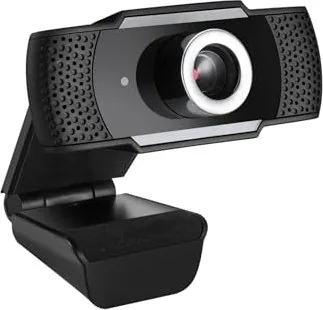
The Adesso CyberTrack H4 is a versatile 1080P HD USB webcam designed to bring crystal clear visuals to your digital interactions. Whether you are hosting important business meetings, engaging in online classes, or streaming content for an audience, this device ensures you look your best. The sleek design features a flexible clip and base that allows for effortless mounting on computer monitors, desktops, or laptops, ensuring stability during every session.
Equipped with a built-in microphone, the CyberTrack H4 captures audio clearly alongside high-definition video, eliminating the need for external sound devices in many scenarios. Plug-and-play functionality means you can start using it immediately without complex configurations. Simply connect the USB cable to your computer port, and the operating system will automatically detect the device, making it compatible with all standard camera applications right out of the box.
For users seeking full control over their visual output, the advanced driver software offers a suite of customization options. You can fine-tune brightness, contrast, saturation, and sharpness to match your specific lighting conditions. The driver also enables zoom capabilities and image orientation adjustments, giving you the flexibility to frame your shots exactly as desired. This level of control transforms a simple webcam into a professional-grade tool suitable for various demanding environments.
Key Features
- High Definition Quality: Delivers crisp 1080P resolution for sharp images.
- Universal Compatibility: Works seamlessly with major operating systems via USB.
- Adjustable Design: Flexible clip fits securely on most monitor sizes.
- Integrated Audio: Built-in microphone reduces setup clutter.
- Customizable Settings: Driver software allows detailed image tuning.
Important Notes
Ensure you visit the official download page for the latest driver updates to access all optimization features. Regular maintenance of the lens area will help maintain optimal image clarity over time.
Search for 67,732 Manuals online


Type-in Brand or Model