
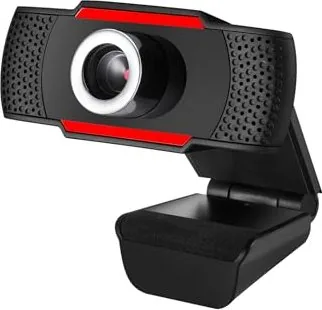
Adesso CyberTrack H3 Manual
PDF manual · 8 Pages
English



Quick check
Incorrect answer, please try again.
Chat with your Adesso CyberTrack H3 manual using AI
Get instant AI answers from your Adesso CyberTrack H3 manual
Ask anything about the Adesso CyberTrack H3. Answers come from this manual, with the pages they are based on.
Ask a Question
Do you recommend CyberTrack H3?
Yes NoFrequently Asked Questions
No, the webcam operates automatically via plug-and-play when connected to a USB port. Drivers are only needed if you want to customize settings like brightness or zoom.
Is this answer helpful?
The CyberTrack H3 supports a maximum resolution of 720p HD, which is ideal for standard video conferencing and online meetings.
Is this answer helpful?
Yes, the optional advanced driver allows you to change image orientation, along with adjusting brightness, contrast, saturation, and sharpness.
Is this answer helpful?
Yes, the device is universally compatible with most operating systems including Windows and macOS due to its standard USB interface.
Is this answer helpful?
You can download the driver directly from adesso.com/downloads. Once installed, it unlocks additional settings for image optimization.
Is this answer helpful?
Advantages and Disadvantages
Advantages

- Plug-and-play functionality works automatically with all major camera apps
- Includes advanced driver for adjusting brightness, contrast, zoom, and sharpness
- Flexible clip base fits securely on monitors, laptops, and desktops
- Built-in microphone captures clear audio for video calls
- Affordable 720p HD resolution suitable for daily communication needs
Disadvantages

- Maximum resolution is limited to 720p rather than 1080p or 4K
- Requires optional driver download for full feature customization
- No automatic low-light correction technology included
- Microphone quality may struggle in very noisy environments
- Fixed focal length limits close-up macro photography capabilities
Product Specification
Type
Webcam
Image Sensor
1x CMOS 0.9 MP
Resolution
1280x720 Pixels (30fps)
Viewing Angle
80°
Compression/Codecs
MJPEG, YUY2
Wireless
N/A
Focus
manual
Camera Cover
N/A
Microphone
integrated (mono)
Speaker
N/A
Lighting
N/A
Cable Length
5 feet
Power Supply
via USB
Mount
Clip mount
Dimensions
3x3x1 inches
Weight
3.5 ounces
Product Description
Adesso CyberTrack H3 Webcam Review
The Adesso CyberTrack H3 is a versatile 720p HD USB webcam designed for seamless video communication. This device features a built-in microphone and a flexible clip base, allowing it to attach securely to monitors, laptops, or desktops. The setup process is incredibly straightforward; simply plug the USB cable into your computer, and the operating system will automatically detect the device without requiring complex installation procedures.
Advanced Customization
While the webcam functions immediately upon connection, users can enhance their experience by downloading the advanced driver from the official Adesso website. This software provides granular control over image quality settings. You can easily adjust brightness, contrast, saturation, sharpness, zoom levels, and image orientation to suit your specific lighting conditions and preferences. Whether you are conducting professional meetings or casual chats, the CyberTrack H3 delivers clear visuals and audio.
Ideal for Everyday Use
This webcam is perfect for remote work, online learning, and streaming. Its plug-and-play nature ensures compatibility with most camera applications instantly. The flexible design allows for precise positioning, ensuring your face is always in the frame. With its compact form factor and reliable performance, the CyberTrack H3 stands out as an essential tool for anyone needing high-quality video capabilities on a budget.
Search for 67,732 Manuals online


Type-in Brand or Model