

Acer Veriton N4 N4680GT Manual
PDF manual · 50 Pages
English


Quick check
Incorrect answer, please try again.
Chat with your Acer Veriton N4 N4680GT manual using AI
Get instant AI answers from your Acer Veriton N4 N4680GT manual
Ask anything about the Acer Veriton N4 N4680GT. Answers come from this manual, with the pages they are based on.
Ask a Question
Do you recommend Veriton N4 N4680GT?
Yes NoFrequently Asked Questions
It is positioned as a practical desktop for office, education, and home productivity. It is well suited to web use, communications, data tasks, document work, peripheral connectivity, and multi-display workspace setups.
Is this answer helpful?
Available video connections may include HDMI, DisplayPort, VGA, or DVI, depending on the specific configuration. Connect the monitor while both devices are off, then power on the monitor before the computer for automatic display detection.
Is this answer helpful?
Yes, Bluetooth can pair with compatible devices such as keyboards, headsets, phones, and tablets when Bluetooth hardware is available and enabled. Each new device must be paired once before later reconnections.
Is this answer helpful?
Use strong passwords, BIOS and boot protection where appropriate, and Acer ProShield features if included. ProShield may offer a secure drive, encryption tools, credential management, and permanent data removal.
Is this answer helpful?
Recovery options include creating a backup, preserving WLAN and LAN drivers, resetting Windows while keeping personal files, or removing everything for a fresh start. Back up important data before starting any recovery process.
Is this answer helpful?
Use the Windows eject option before disconnecting a USB device or removing an SD card. This helps prevent data loss and reduces the risk of damage to files or connected storage devices.
Is this answer helpful?
Advantages and Disadvantages
Advantages

- Business-oriented desktop design supports organized daily productivity.
- Multiple display, USB, audio, Ethernet, WLAN, and Bluetooth connection options may be available.
- Acer ProShield can provide password, encryption, secure-drive, and data-removal tools.
- Recovery tools support backups, driver preservation, file-retaining resets, and full system resets.
Disadvantages

- Exact ports, wireless capability, and ProShield modules vary by configuration.
- A full reset can erase personal files, applications, settings, and potentially drivers.
- Secure data erasure is irreversible and requires careful file selection.
- Fast startup can use a small amount of power even while the computer is shut down.
Product Specification
Form factor
Mini PC
HDD
N/A
Flash
N/A
Rear ports
2x USB-A 3.0 (5 Gbps), 2x USB-A 2.0 (480 Mbps), 1x HDMI, 1x DisplayPort, 1x RJ-45 1 Gb LAN, 1x DC-in barrel jack (power connector)
Front/side ports
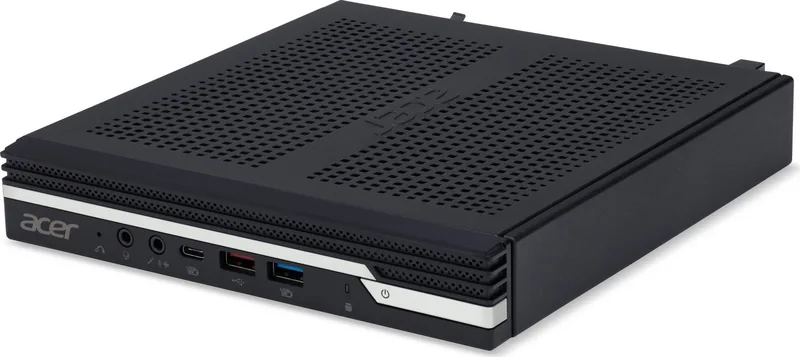
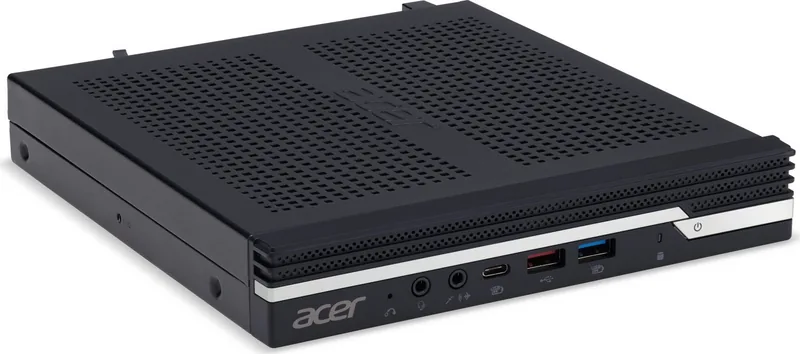
1x USB-C 3.1 (10 Gbps, BC), 1x USB-A 3.1 (10 Gbps), 1x USB-A 3.0 (5 Gbps, BC), 2x 0.14 in jacks
Wireless
Wi-Fi 6 (WLAN 802.11a/b/g/n/ac/ax, Intel), Bluetooth 5.2
Optical drive
N/A
Camera
N/A
Dimensions
7.56 x 1.31 x 8.03 in (W x H x D)
Weight
3.53 lb
Volume
0.34 gal (calculated)
Color
black
USB notation
Link
Product Description
Acer Veriton N4 N4680GT - Read, Download & Print Free
The Acer Veriton N4 N4680GT is a business-focused desktop computer designed for dependable daily work in office, education, and home environments. Its practical tower-oriented design supports a productive workspace while providing the flexibility needed for peripherals, displays, storage devices, and network connections. This model is a useful choice for users who value straightforward operation, security tools, and accessible system maintenance.
Built for Everyday Productivity
The Veriton N4 N4680GT is suited to routine computing tasks such as document creation, web research, communications, data management, and multimedia playback. Windows 10 features help users organize applications, personalize the desktop, manage notifications, and keep the system current through built-in update settings. Clear guidance for startup, shutdown, sleep mode, and display configuration makes everyday use easier for both new and experienced users.
Connectivity for a Flexible Workspace
A broad selection of connection options helps the desktop adapt to changing work requirements. Depending on the configuration, users can connect monitors through HDMI, DisplayPort, VGA, or DVI, while USB ports support keyboards, mice, external drives, and charging-compatible devices. USB Type-C connectivity adds a reversible option for compatible accessories, displays, and storage. Audio connections support headphones, microphones, speakers, and selected headset combinations.
Network access can be established through wired Ethernet or wireless LAN, making the system suitable for fixed desks and more flexible office layouts. Bluetooth support can also connect compatible wireless accessories, including headsets, keyboards, tablets, and phones. These options help create a clean, efficient setup without unnecessary adapters.
Security and Recovery Support
Acer ProShield provides security-oriented features for protecting credentials, sensitive information, and stored data. Available tools may include password management, a personal secure drive, file and folder encryption, and secure data removal. BIOS password settings and boot protection can add further layers of access control.
Recovery features help users prepare for unexpected software issues. The system supports creating recovery backups, saving wireless and LAN drivers, reinstalling Windows while retaining personal files, or performing a full reset when needed. Regular backups remain important, especially before major changes or recovery actions.
Notes
- Available ports, security modules, and wireless features can vary by configuration.
- Use approved power equipment and safely eject USB or SD storage before removal.
- Keep Windows, drivers, and security software updated for reliable performance and safer online use.
Search for 67,706 Manuals online


Type-in Brand or Model