
Acer Nitro N50-640 Manual
PDF manual · 51 Pages
English


Quick check
Incorrect answer, please try again.
Chat with your Acer Nitro N50-640 manual using AI
Get instant AI answers from your Acer Nitro N50-640 manual
Ask anything about the Acer Nitro N50-640. Answers come from this manual, with the pages they are based on.
Ask a Question
Do you recommend Nitro N50-640?
Yes NoFrequently Asked Questions
Log in to www.acer.com/myproducts using your Windows email address. If the record is missing, visit www.acer.com/register-product, sign in with an Acer ID, and enter your serial number.
Is this answer helpful?
Yes. Use the Recovery Management tool in the Start menu, select Restore, and choose the option to keep my files. This reinstalls Windows but preserves personal data.
Is this answer helpful?
It features USB 3.2 Gen 1 (blue) and USB 3.2 Gen 2 (red) ports, as well as a reversible USB Type-C port supporting up to 10 Gbps transfer speeds.
Is this answer helpful?
Go to Settings > Devices > Bluetooth & other devices. Toggle the switch to enable it, then click Add Bluetooth or other device to pair new gadgets.
Is this answer helpful?
Yes, select models come with pre-installed Norton Security to protect against viruses, spyware, and online threats right out of the box.
Is this answer helpful?
If normal shutdown fails, press and hold the power button for ten seconds to force a restart. Wait two seconds before powering it back on.
Is this answer helpful?
Advantages and Disadvantages
Advantages

- High-performance hardware suitable for gaming and productivity
- Multiple USB 3.2 Gen 1 and Gen 2 ports for fast data transfer
- Built-in Wi-Fi and Bluetooth for wireless convenience
- Comprehensive security features including Norton antivirus
- Easy-to-use Recovery Management for system backups and resets
Disadvantages

- No pre-installed mechanical hard drive mentioned in basic specs
- BIOS password management requires careful handling to avoid lockouts
- Fast startup feature may consume slightly more power if not disabled
- Some advanced features depend on specific operating system versions
- Requires regular driver backups for optimal long-term stability
Product Specification
Flash
N/A
Rear connections
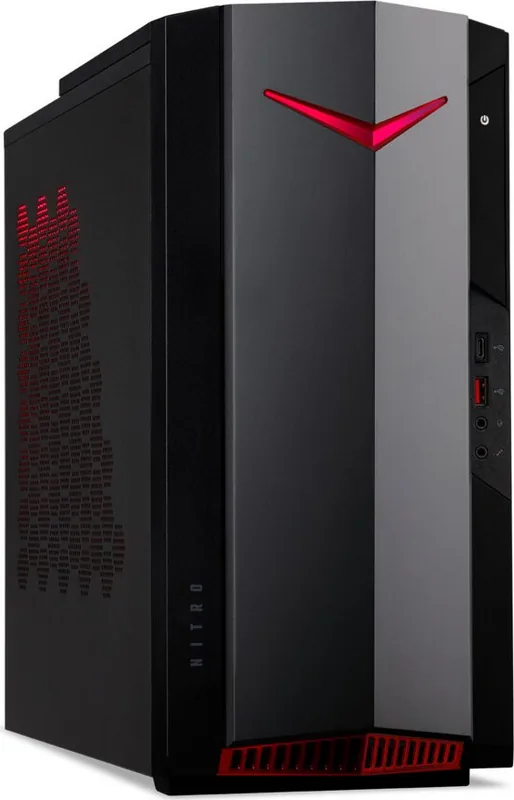
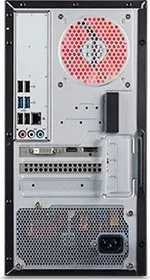
2x USB-A 3.0 (5Gb/s), 4x USB-A 2.0 (480Mb/s), 3x 3.5mm jack, 1x RJ-45 1Gb LAN, 1x AC-In C13 (power inlet)
Front/side connections
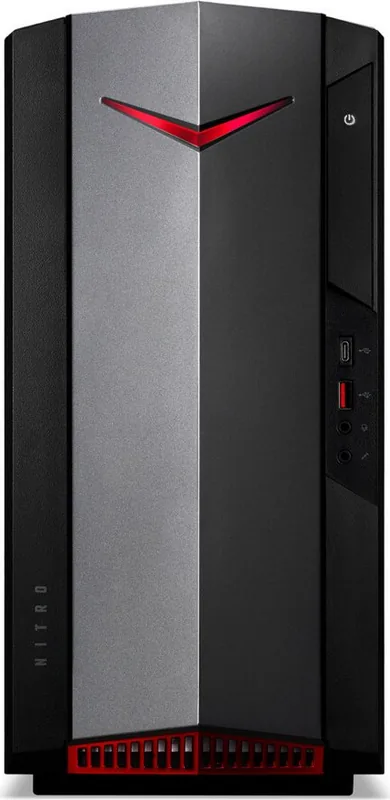
1x USB-C 3.1 (10Gb/s), 1x USB-A 3.1 (10Gb/s), 2x 3.5mm jack
Optical drive
N/A
Camera
N/A
Dimensions
6.9x15.4x15.2in (WxDxH)
Volume
1.62cu ft (calculated)
Features
LED lighting (red), mouse included, keyboard included
Color
black
Warranty
two years
USB spelling
Link
Product Description
Acer Nitro N50-640 Desktop Computer Review
The Acer Nitro N50-640 is a powerful desktop tower designed for users who demand high performance for gaming, creative work, and multitasking. This machine combines sleek aesthetics with robust internal components to deliver an exceptional computing experience. Whether you are building a home office setup or looking for a dedicated gaming rig, the Nitro series offers reliability and speed.
Performance and Design
At the heart of the Nitro N50-640 lies a potent processor capable of handling demanding applications with ease. The tower design ensures efficient airflow, keeping temperatures low even during intense sessions. The system supports multiple USB standards including USB 3.2 Gen 1 and Gen 2, allowing for rapid data transfer speeds when connecting external drives or peripherals. Users can also enjoy seamless connectivity via HDMI, DisplayPort, and a versatile SD card reader for photographers and content creators.
Connectivity and Expansion
Connectivity is a strong suit for this model. It features built-in Wi-Fi and Bluetooth capabilities, enabling wireless connections to routers, headsets, and keyboards without cluttering your desk with cables. The rear panel includes a variety of audio jacks for surround sound setups, while the front I/O provides quick access to USB ports and the power button. For those needing more storage or memory, the open chassis design facilitates easy upgrades.
Security and Maintenance
Security is paramount, and the Nitro N50-640 comes equipped with tools to manage user passwords at both the BIOS and Windows levels. The system includes pre-installed Norton Security software to protect against viruses and malware. Regular maintenance is simple; the manual advises cleaning with a soft cloth and avoiding exposure to moisture or extreme temperatures. In case of software issues, the Recovery Management tool allows users to create backups or reset the PC to factory defaults easily.
Key Notes
- Supports USB Type-C for reversible connectivity.
- Includes a recovery drive creation feature for system restoration.
- Compatible with Windows 10 and later updates.
Search for 67,706 Manuals online


Type-in Brand or Model