
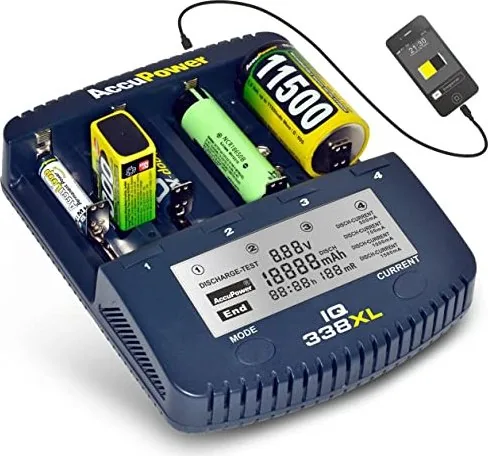


AccuPower IQ338XL Manual
PDF manual · 7 Pages
English



Quick check
Incorrect answer, please try again.
Chat with your AccuPower IQ338XL manual using AI
Get instant AI answers from your AccuPower IQ338XL manual
Ask anything about the AccuPower IQ338XL. Answers come from this manual, with the pages they are based on.
Ask a Question
Do you recommend IQ338XL?
Yes No
Lukas Schmid
9 months ago
My charger/power adapter failed on first use (no display, adapter LED on/off) and later I saw reports of a slot being powered even with no battery inserted. Is it safe, and what should I do?

Manual.ly
9 months ago
If you notice flickering power, a dead display, repeated on/off behavior, smoke/burning smell, or a slot shows voltage with no battery installed, stop using the charger immediately. Unplug the power adapter from the wall, remove any batteries, and do not try to operate an affected slot. For safety, do not open the device and do not rely on further measurements while it is powered. Check that you are using the included (or correctly rated) power adapter and a properly working wall outlet. Then contact customer support for warranty/inspection and replacement. If batteries feel hard to insert, ensure correct alignment so the contacts fully engage, but any electrical fault symptoms should still be handled as a warranty case.
Frequently Asked Questions
It supports Li-Ion and LiMnO2 cells at 3.6V-3.7V, plus NiMH and NiCd rechargeable batteries at 1.2V. The supported formats include many common sizes such as AA, AAA, 18650, and 9V.
Is this answer helpful?
Yes. The charger has six independent slots, so you can use multiple batteries at once. If the batteries need different settings, you can adjust them individually by slot.
Is this answer helpful?
Charge-Test discharges a battery first, then charges it again to measure capacity. Discharge-Test starts with a charge, then discharges and charges again for a deeper battery health check.
Is this answer helpful?
Yes. The display can show program mode, battery voltage, capacity, elapsed time, internal resistance, charging current, and channel number. It gives a detailed view of the charging process.
Is this answer helpful?
Yes, but only with charge function. The 9V slots use a low charging current of about 30mA, and they do not provide the same detailed display information as the main slots.
Is this answer helpful?
No. It is intended for dry, closed indoor rooms only. The manual also recommends using it on a non-flammable surface and never leaving batteries unattended while charging.
Is this answer helpful?
Advantages and Disadvantages
Advantages

- Six independent slots make it easy to charge multiple batteries with separate settings.
- Supports a wide range of Li-Ion, NiMH, and NiCd sizes, from AA/AAA to large cylindrical cells.
- Charge-Test and Discharge-Test modes help measure capacity and refresh older batteries.
- Clear display shows voltage, current, capacity, time, and internal resistance for better monitoring.
Disadvantages

- 9V slots are charge-only and work at a much lower current, so they are slower and less versatile.
- The charger is intended for indoor, dry environments only, which limits portable use.
- Users must choose the correct current and chemistry carefully; it is not a set-and-forget device.
- It cannot be used with alkaline or other non-rechargeable battery systems.
Product Specification
Compatibility
A (R23), AA, AAA, C, D, 9V block, Sub-C, 10440, 14500, 16340, 17355, 17500, 17670, 18490, 18500, 18650, 18700, 22650, 26650, 26700, 33700
Charging slots
4x round cell, 2x 9V block
Charging current
500-1500mA
Features
USB output, Display
Dimensions
6.77x5.51x1.57in (LxWxH)
Weight
1.43lb
Product Description
AccuPower IQ-338 XL: Smart Charging for Everyday Cells
The AccuPower IQ-338 XL is a practical charger for people who use a mix of rechargeable batteries and want more insight than a simple plug-in unit can provide. According to the AccuPower IQ-338 XL Manual, it is designed for Li-Ion, LiMnO2, NiMH, and NiCd cells, covering a wide range of common battery sizes from AA and AAA to larger formats like 18650 and even 9V batteries. That flexibility makes it a useful companion for home electronics, flashlights, cameras, and other battery-powered gear.
One of its strongest points is the independent slot design. Each channel can be managed separately, so users can handle different cells without forcing the same setting on every battery. The charger also gives helpful live data on the display, including voltage, capacity, elapsed time, internal resistance, and charging current. For anyone who likes to understand battery condition instead of just waiting for a green light, this level of detail is a real advantage.
The IQ-338 XL offers three useful programs: Charge, Charge-Test, and Discharge-Test. Charge mode is the straightforward option for daily use, while Charge-Test helps measure how much energy a battery can store after a discharge and recharge cycle. Discharge-Test goes a step further and is especially useful for checking battery health or comparing older cells. These modes make the charger more than a power accessory; they turn it into a compact battery management tool.
The device is also built with safety in mind. It should be used indoors, on a non-flammable surface, and with the correct charging current for the battery type. That careful approach is important because rechargeable cells can heat up during use. A 5W USB output adds extra convenience, giving the charger a small bonus function beyond battery charging. For users who value control, monitoring, and mixed-battery support, the AccuPower IQ-338 XL stands out as a thoughtful everyday solution.
Notes
- Best results come from matching the charging current to the battery specification.
- Use only supported rechargeable chemistries and keep the unit in dry indoor spaces.
- Test modes are especially helpful when checking the condition of older batteries.
Search for 67,706 Manuals online


Type-in Brand or Model
Lukas Richter
9 months ago
Some reviewers report the charger or a slot malfunctioning, even with the display flickering and dangerous 12V on a defective slot. Is this safe, and what should I do if my unit shows similar behavior? Also, can I charge AAA (min current seems 500mA)?
Manual.ly
9 months ago
Safety first. If you notice flickering display/LEDs, abnormal behavior on one slot, or any sign that a slot appears to be powered without a cell inserted, stop using the charger immediately, unplug the power supply, and do not leave it unattended. Inspect for visible damage and try only with known-good batteries; if the issue persists on the same slot, contact support for warranty inspection or replacement. For AAA: verify the charger specification for the minimum charge/discharge current. If the device only supports a minimum around 500mA, AAA cells may not be suitable (especially if you need lower rates). In that case, use a charger that supports lower currents or charge different cell sizes supported by the device.