
AC Infinity Multifan S3 Manual
PDF manual · 20 Pages
English



Quick check
Incorrect answer, please try again.
Chat with your AC Infinity Multifan S3 manual using AI
Get instant AI answers from your AC Infinity Multifan S3 manual
Ask anything about the AC Infinity Multifan S3. Answers come from this manual, with the pages they are based on.
Ask a Question
Do you recommend Multifan S3?
Yes NoFrequently Asked Questions
Plug the fan into a standard USB port rated 500 mA or higher. For stronger performance, use the optional AC Infinity Boost Adapter (sold separately) to power from an outlet and increase speed up to 25%.
Is this answer helpful?
Yes. Up to four fans can be daisy-chained from a single USB port. Using a Boost Speed Adapter or a Thermostat Fan Controller (sold separately) allows up to six fans to be chained. Ensure power capacity meets total demand.
Is this answer helpful?
No. The fan requires airflow in and out of the cabinet. Ensure cabinets have ventilation holes or open fronts/backs. For rear-exhaust blower setups, place ventilation at the rear to expel hot air properly.
Is this answer helpful?
The inline 3-speed controller on the cord lets you switch between off, low, medium, and high. When fans are daisy-chained, the controller changes the speed of all connected fans; set the fan closest to the power source to high for proper chain operation.
Is this answer helpful?
Detach or reattach silicone feet as needed; remove to save space or attach to reduce vibration. Use a dedicated USB port with sufficient current. Avoid exposing the fan to water, physical abuse, or incorrect voltage to keep warranty coverage valid.
Is this answer helpful?
Possibly. Some electronics supply active USB power even when powered off, which will keep the fan running. If this is undesirable, use an outlet-powered adapter with a switch or disconnect the USB when not needed.
Is this answer helpful?
AC Infinity offers a one-year limited warranty from the date of purchase covering defects in materials and workmanship. The warranty excludes damage from misuse, physical abuse, water submersion, incorrect installation, and normal wear.
Is this answer helpful?
Advantages and Disadvantages
Advantages

- Quiet operation with anti-vibration silicone feet and adjustable 3-speed inline controller.
- USB-powered with added USB pass-through; daisy-chain up to four fans from one port.
- Compact 120mm form factor suitable for tight spaces and targeted cooling.
- Durable dual ball bearings for longer lifespan and reliable performance.
- Optional Boost Adapter increases speed up to 25% for higher cooling needs.
Disadvantages

- Not suitable for fully enclosed cabinets—requires ventilation holes or open panels.
- May run continuously if host USB ports supply standby power when device is off.
- Boost Adapter and advanced controllers sold separately, adding extra cost.
- Daisy-chaining many fans may demand higher power than some USB ports provide.
- Silicone feet removal reduces vibration isolation and can increase noise on hard surfaces.
Product Specification
Type
Fan
Product Description
AC Infinity Multifan S3 USB Mini, 120mm Manual
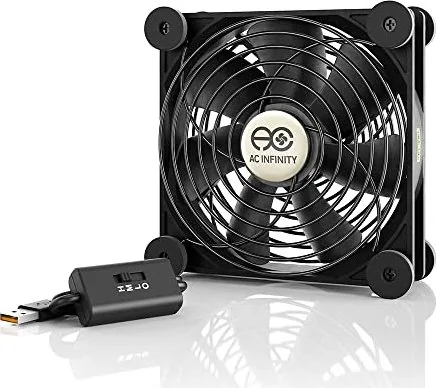
The AC Infinity Multifan S3 USB Mini, 120mm is a compact, USB-powered cooling fan designed for home theater, AV cabinets, and small electronics. Built to accelerate airflow and dissipate heat from receivers, DVRs, gaming consoles, and other devices, this fan balances performance with quiet operation. Its 120mm size provides a strong airflow footprint while remaining small enough to fit into tight spaces and atop components.
Design and Features
The Multifan S3 includes an inline 3-speed controller on the cord for easy adjustments between off, low, medium, and high settings. It uses dual ball bearings for longevity and dual fan guards for safety. Anti-vibration silicone feet reduce noise and protect delicate surfaces; feet can be removed or reattached to save space or adapt to different mounting needs. Each fan also features an additional USB port that allows up to four fans to be daisy-chained from a single USB source, and up to six when used with optional Boost Speed adapters or thermostat controllers.
Power and Compatibility
Powering is straightforward: plug the USB connector into any standard USB port rated 500 mA or higher. For increased performance, the optional AC Infinity Boost Adapter (sold separately) can raise fan speed up to 25%. Note that some host devices supply constant USB power even when turned off, which may keep the fan running. The Multifan S3 is not suitable for fully sealed enclosures—cabinets must allow air to flow in and out, with rear exhaust models requiring rear ventilation to properly direct hot air.
Applications
This fan excels at top-exhaust cooling for devices with top vents and targeted cooling when positioned upright to aim airflow at hotspots. It can circulate air inside narrow spaces like AV racks or desks and is useful when paired with blowers for rear-exhaust setups. The Multifan S3 suits hobbyist setups, media centers, and any small electronics environment where steady, quiet cooling is needed.
Notes
- Use a dedicated USB port rated at 500 mA or higher for reliable performance.
- Removing silicone feet can save space but may increase vibration on hard surfaces.
- Boost Adapter and advanced thermal controllers are sold separately to expand capabilities.
Search for 67,706 Manuals online


Type-in Brand or Model