
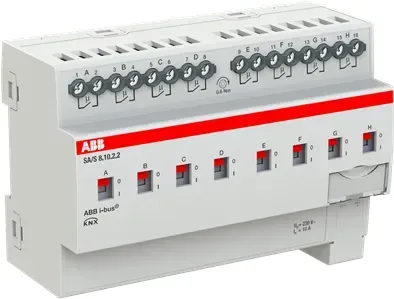
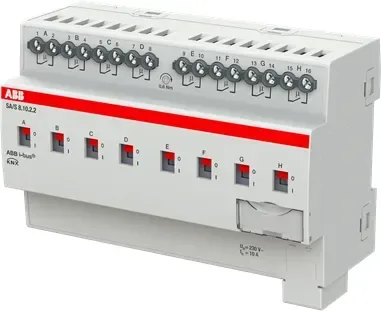
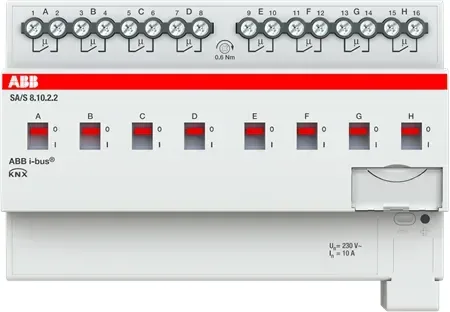
ABB SA/S x.x.2.2 Manual
PDF manual · 214 Pages
English



Quick check
Incorrect answer, please try again.
Chat with your ABB SA/S x.x.2.2 manual using AI
Get instant AI answers from your ABB SA/S x.x.2.2 manual
Ask anything about the ABB SA/S x.x.2.2. Answers come from this manual, with the pages they are based on.
Ask a Question
Do you recommend SA/S x.x.2.2?
Yes NoFrequently Asked Questions
It is a family of ABB i-bus KNX switching actuators for switching electrical loads in automated residential, commercial, and building-control installations. Individual relay outputs can be integrated into KNX scenes, central commands, schedules, and automation logic.
Is this answer helpful?
The range includes versions with 2, 4, 8, or 12 independent relay outputs. This allows a project to use compact units for small panels or higher-density models where many circuits must be controlled from one DIN rail device.
Is this answer helpful?
SA/S.X.2.2 models are available with 6 A, 10 A, or 16 A rated outputs. The correct version depends on the connected load, its operating current, inrush characteristics, switching category, and local installation requirements.
Is this answer helpful?
Yes. Each relay channel has a front switching lever that indicates whether the contact is open or closed and permits local on or off control. Manual switching overrides KNX operation and its position is not automatically restored after a bus return or ETS download.
Is this answer helpful?
No. The actuator electronics are supplied through the KNX bus. Loads are connected separately to the relay output screw terminals, while the KNX connection is made through the front bus terminal.
Is this answer helpful?
Configuration can include central switching, status feedback, safety priorities, forced operation, load shedding, scenes, switching delays, staircase lighting, blinking, logic operations, threshold monitoring, and behavior after bus voltage loss or restoration.
Is this answer helpful?
Advantages and Disadvantages
Advantages

- Available in 2, 4, 8, and 12 channel versions for scalable KNX projects.
- Choose 6 A, 10 A, or 16 A output ratings to match application requirements.
- Manual front levers provide local switching and visible relay contact status.
- Supports scenes, delays, logic, threshold functions, safety priorities, and load shedding.
- Bus-powered design avoids a separate auxiliary supply for actuator electronics.
Disadvantages

- Manual lever operation overrides KNX control and is not automatically restored after bus return or ETS download.
- Installation and ETS programming require qualified electrical and KNX personnel.
- High channel count versions occupy more space in the distribution board.
- Load limits vary by load type, especially for LED, fluorescent, and motor applications.
- The actuator must be installed in a closed electrical enclosure and within specified environmental limits.
Product Specification
Type
Actuator
Standard
KNX
Function
Switch actuator (on/off)
Topology
Bus
Special features
IP20
Product Description
ABB SA/S.X.2.2 Manual: Flexible KNX Switching for Modern Buildings
The ABB SA/S.X.2.2 range brings reliable load switching to ABB i-bus KNX installations. Designed as DIN rail mounted switching actuators, these devices control electrical loads in single-phase or multi-phase networks while keeping every circuit connected to a centralized building automation system. The ABB SA/S.X.2.2 Manual keyword is especially relevant for planners and installers comparing channel counts, current ratings, wiring requirements, and configurable functions across the range.
Available with 2, 4, 8, or 12 relay channels, the series makes it practical to select a model that suits anything from a compact residential distribution board to a larger commercial control panel. Versions are offered with 6 A, 10 A, or 16 A rated outputs, enabling a tailored approach to lighting groups, selected motor loads, and other electrical consumers. Each channel can be controlled independently through KNX communication objects, creating flexible room-based, zone-based, or central switching strategies.
Control, Visibility, and Manual Operation
A key benefit of the SA/S.X.2.2 family is its direct manual control. Front-mounted switching levers show the relay contact position and allow each output to be switched on or off locally. This can be useful during commissioning, servicing, or a KNX bus voltage failure. Manual operation overrides KNX control, so the system should be checked after bus voltage returns or programming changes are applied.
The actuators receive their operating supply from the KNX bus and do not require an additional auxiliary supply. A front bus connection terminal, programming button, programming LED, and screw terminals for load circuits help create an orderly panel layout. The units fit standard 35 mm DIN rails and are intended for use inside closed electrical enclosures.
Intelligent KNX Functions
Beyond basic on and off commands, the SA/S.X.2.2 range supports extensive automation logic. Depending on configuration, functions include central switching, status feedback, safety priorities, forced operation, load shedding, scenes, time delays, staircase lighting behavior, blinking, logic gates, and threshold monitoring. These options help installers build responsive control behavior without adding separate devices for every task.
ETS is used to assign physical addresses, configure parameters, and connect communication objects to group addresses. The platform also supports many group addresses and associations, providing scope for detailed integration into larger KNX projects. Careful commissioning is essential, particularly where safety functions, load shedding priorities, or restoration behavior after bus voltage loss are required.
Note: Installation, wiring, commissioning, and maintenance must be performed by qualified electrical personnel. Select output ratings according to the connected load type, inrush current, and applicable electrical standards.
Search for 67,706 Manuals online


Type-in Brand or Model