uniquement par des personnes qualifiées en électro-
technique. Lors de la planification et de la construc-
tion d’installations électriques, les normes, directives,
réglementations et dispositions applicables doivent
être respectées.
– Protéger l'appareil contre la poussière, l'humidité et
les risques de dommages lors du transport, du stoc-
kage et de l'utilisation.
– N'utiliser l'appareil que dans le respect des don-
nées techniques spécifiées.
– N'utiliser l'appareil que dans un boîtier fermé
(coffret de distribution). L'appareil ne doit pas être
ouvert.
En cas de modification ou d'extension de l'installation,
il est indispensable de mettre hors tension tous les
équipements de l'installation afin d'éviter tout risque de
contact avec un élément ou un conducteur sous tension.
Nettoyage
L'appareil doit être mis hors tension avant le nettoyage.
Les appareils encrassés peuvent être nettoyés avec un
chiffon sec ou un chiffon humidifié dans une solution
savonneuse. L'usage d'agents caustiques ou de solvants
est absolument proscrit.
Maintenance
L'appareil ne nécessite aucun entretien. En cas de
dommages (provoqués p. ex. pendant le transport ou
le stockage), aucune réparation ne doit être effectuée.
L'ouverture de l’appareil entraîne l'annulation de la
garantie !
Datos técnicos (fragmento)
Tensión auxiliar12...30 V CC (+10 % /
-15 %)
o
PoE (IEEE 802.3 af clase 1)
Potencia disipadaMáx. 1,8 W
Consumo de corriente
Tensión auxiliarMáx. 120 mA con 12 V
KNX< 10 mA
Rango de temperaturas
En servicio- 5 °C…+ 45 °C
Almacenamiento - 25 °C…+ 55 °C
Transporte- 25 °C…+ 70 °C
Tipo de protecciónIP 20 según DIN EN 60 529
Clase de protecciónII según DIN EN 61 140
Categoría de sobretensión
III según DIN EN 60 664-1
Grado de contaminación2 según DIN EN 60 664-1
Condiciones ambientales
Humedad máxima del
aire
95%, no admite rocío
Presión del aireAtmósfera hasta 2 000 m
Conexión KNXMediante borne de conexión
de bus
Conexión LAN10/100 BaseT, IEEE 802.3
Mediante conector RJ45
Peso0,1 kg
Conexión del aparato
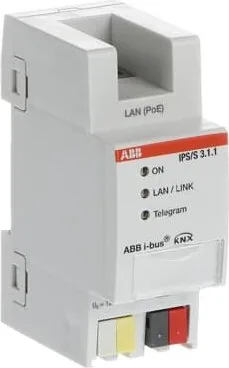
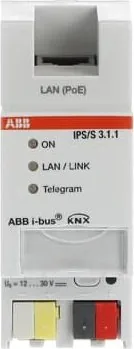
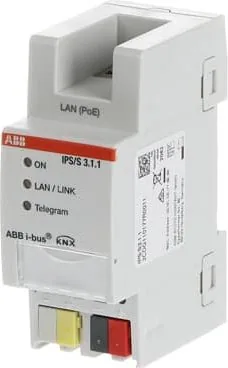
a LED ON (verde)
b LED LAN/LINK (amarillo)
c LED Telegrama (amarillo)
d Conexión tensión auxiliar
e Conexión KNX
LED Programar (rojo)
Tecla Programar
Portaletreros
Conexión LAN
Tapa
Descripción del aparato
La interfaz IP convierte los telegramas del KNX (par
trenzado, TP) en telegramas IP de la red IP según la
configuración del ETS. De este modo se pueden inter-
cambiar datos entre el KNX y las redes IP. La interfaz
IP sigue las especificaciones del estándar KNXnet/IP.
Junto con el ETS, la interfaz IP puede programar apa-
ratos a través de una LAN.
Montaje
El aparato está diseñado para el montaje en distribui-
dores o pequeñas carcasas para montaje rápido en
raíles de 35 mm, según DIN EN 60715.
Debe garantizarse la accesibilidad del aparato para
operarlo, comprobarlo, inspeccionarlo, realizar su
mantenimiento y repararlo.
Conexión
La conexión eléctrica se efectúa con bornes sin tor-
nillo. La denominación de los bornes se encuentra en
la carcasa. La conexión KNX se realiza mediante los
bornes de conexión de bus suministrados.
La conexión a la red IP se efectúa mediante una cone-
xión con conector RJ45.
Puesta en marcha
La puesta en marcha se efectúa con el Engineering
Tool Software (ETS).
Manejo e indicación
ON
Después de conectar la tensión auxiliar, el LED se ilu-
mina primero de forma permanente. Después de 40 s,
el LED comienza a parpadear hasta que el proceso de
inicio finaliza por completo.
LAN/LINK
El LED se ilumina cuando hay tensión auxiliar y el rou-
ter está conectado a una red IP.
El LED se ilumina si existe tráfico de datos.
Telegrama
El LED se ilumina cuando hay tensión auxiliar y el rou-
ter está conectado a una red KNX una vez que haya
finalizado el proceso de inicio.
El LED se ilumina si existe tráfico de datos.
En la documentación técnica del aparato encontrará
una descripción detallada de la parametrización y de
la puesta en marcha. También debe asegurarse de que
se utiliza la aplicación más reciente. Estos datos están
disponibles para su descarga en www.abb.com/knx.
Indicaciones importantes
¡Atención! ¡Tensión peligrosa! La instalación deberá
ser realizada únicamente por electricistas especializa-
dos. Para planificar y montar instalaciones eléctricas
deben observarse las normas, directivas, reglamentos
y disposiciones correspondientes.
- El aparato debe protegerse contra la humedad, la su-
ciedad y los daños durante el servicio, el transporte y
el almacenamiento.
– El aparato debe funcionar solo respetando los da-
tos técnicos especificados.
– El aparato solo debe funcionar dentro de la carca-
sa cerrada (distribuidor). El aparato no debe abrir-
se.
Para evitar la peligrosa tensión de contacto causada
por el retorno de diferentes conductores exteriores,
es necesario desconectar todos los polos en caso de
ampliación o modificación de la conexión eléctrica.
Limpieza
Antes de la limpieza debe desconectarse la tensión del
aparato. Los aparatos sucios pueden limpiarse con un
paño seco o con un paño humedecido en una solución
jabonosa. Está prohibido utilizar productos cáusticos
o disolventes.
Mantenimiento
El aparato no requiere mantenimiento. En caso de daños,
(p. ej., durante el transporte, almacenamiento) no está
permitida su reparación.
Al abrir el aparato se extingue el derecho a garantía.
IP20
-5 °C
+45 °C
/2
%
Quick check
I'm not a robot
Incorrect answer, please try again.
Chat with your ABB IPS/S 3.1.1 manual using AI
Get instant AI answers from your ABB IPS/S 3.1.1 manual
Ask anything about the ABB IPS/S 3.1.1. Answers come from this manual, with the pages they are based on.
Ask a Question
0/1000
Do you recommend IPS/S 3.1.1?
YesNo
Frequently Asked
Questions
A
It accepts auxiliary voltage between 12 and 30 volts DC or Power over Ethernet IEEE 802.3 af class 1.
Is this answer helpful?
A
Yes, combined with the Engineering Tool Software, you can program devices via the LAN connection using this interface.
Is this answer helpful?
A
No, it has an IP20 rating and must be installed inside a closed housing like a distribution cabinet.
Is this answer helpful?
A
Opening the device voids the warranty claim immediately. Only authorized personnel should attempt repairs.
Is this answer helpful?
A
No, the device is maintenance-free. Cleaning only requires a dry cloth or one with mild soap solution.
Is this answer helpful?
A
Commissioning and parameterization are done using the Engineering Tool Software or ETS applications.
Is this answer helpful?
A
Operation is valid from minus 5 degrees Celsius to plus 45 degrees Celsius at atmospheric pressure.
Is this answer helpful?
M: QW-35-FL
Advantagesand
Disadvantages
Advantages
Supports both 12-30V DC and Power over Ethernet
Compatible with KNXnet/IP standards for easy integration
Clear LED indicators simplify troubleshooting and monitoring
Compact design fits standard 35mm DIN rails efficiently
Enables remote programming via LAN using ETS software
VS
Disadvantages
Requires closed housing installation preventing outdoor use
Warranty becomes void if the device casing is opened
Must be operated within specific temperature ranges
Sensitive to moisture and requires protection from condensation
Installation must be performed by qualified electricians only
M: QW-35-FL
Product
Specification
Type
Hardware Control Unit
Standard
KNX, LAN
Function
Gateway
Topology
Bus
Dimensions
1.42x3.54x2.54 inches
Features
IP20
M: QW-35-FL
Product
Description
Revolutionize Your Smart Building With KNX Integration
Managing modern smart buildings requires seamless communication between different network protocols. The ABB IPS/S3.1.1 KNX IP Interface, 30V, 2TE REG serves as a critical bridge in this vast ecosystem today. By converting telegrams on the KNX bus into IP telegrams, this device enables robust data exchange between local control networks and broader internet protocol systems easily. It is essential for any facility seeking to unify physical automation with digital infrastructure seamlessly without latency issues arising.
Seamless Network Compatibility
The interface adheres strictly to the KNXnet/IP standards. This ensures that your automation system remains compatible with the latest engineering tools globally. You can utilize the Engineering Tool Software to program devices directly via LAN connections. This capability simplifies the commissioning process significantly for technicians working in complex industrial environments consistently. Whether you need real-time status updates or remote configuration capabilities, this unit delivers high performance across wired connections safely. It utilizes a standard RJ45 connector for stable Ethernet networking up to 100 BaseT speeds very reliably.
Robust Physical Design
Designed for DIN rail installation, the unit fits securely onto standard 35 millimeter rails following international safety standards. It supports auxiliary voltage ranging from 12 to 30 volts DC or Power over Ethernet options. This flexibility allows installation in diverse settings without requiring additional external power adapters for every node nearby. The device operates reliably within temperatures between minus five degrees Celsius and plus forty-five degrees Celsius during active use continuously. It also features clear LED indicators for power, network links, telegram traffic, and programming status clearly. These visual cues help in quick diagnostics during setup phases very efficiently.
Safety and Maintenance Guidelines
Operational safety is paramount for any electrical component used in public or private buildings. The interface is rated IP20 and must be installed within a closed housing like a distribution unit. Access to internal components is restricted to authorized personnel only. Opening the casing invalidates the warranty claim immediately upon inspection by authorities. Cleaning requires disconnecting power before wiping with a dry cloth or slightly dampened soapy cloth. Harsh solvents are strictly prohibited to prevent damage to the plastic casing effectively during any cleaning tasks.
Important Installation Notes
Always engage a qualified electrician for all connections to avoid hazardous voltages in areas. Ensure the environment remains dry with no condensation allowed during operation periods. Maximum air humidity is capped at ninety-five percent for safe operation conditions. Remember that the warranty expires if the device is tampered with by unauthorized individuals. Regular checks on application software versions ensure optimal functionality throughout the entire lifecycle. For full parameterization details, consult the technical resources online regularly for guidance. This ABB IPS/S3.1.1 KNX IP Interface, 30V, 2TE REG Manual guide outlines the full scope of operation for installers globally.