

Free 70mai Manuals – Read, Download & Print
1 Manuals
Manuals
Categories

Comprehensive Guide to 70mai Manuals
Introduction to 70mai Documentation Resources
The world of automotive electronics has expanded rapidly, with dash cams becoming essential safety tools for drivers everywhere. Among the leading brands in this sector is 70mai, a company renowned for producing high-quality smart dash cameras and related accessories. Whether you are a new owner who just unboxed your device or an experienced user looking to optimize your settings, having access to accurate documentation is crucial. The 70mai manuals serve as the primary bridge between the hardware capabilities and the user's ability to utilize them effectively. These documents cover a wide array of products, from basic recording units to advanced models featuring built-in GPS, Wi-Fi connectivity, and parking monitoring systems.
Understanding how to navigate these resources can significantly enhance the driving experience. A well-written manual does more than just list button functions; it explains the underlying technology, troubleshooting steps, and best practices for maintenance. For 70mai users, the availability of detailed guides ensures that every feature, such as voice control, night vision enhancement, and cloud storage integration, can be leveraged to its full potential. This guide will explore the various aspects of 70mai manuals, their importance, and how they help users get the most out of their devices.
Types of 70mai Products Covered by Manuals
The scope of 70mai documentation is vast because the brand offers a diverse lineup of products tailored to different needs and budgets. The manuals are categorized based on the specific product line, ensuring that users find information relevant to their exact model. One major category includes the standard single-lens dash cams. These devices focus on core functionality like front-facing video recording, loop recording, and G-sensor collision detection. The manuals for these units provide step-by-step instructions on installation, SD card formatting, and basic menu navigation.
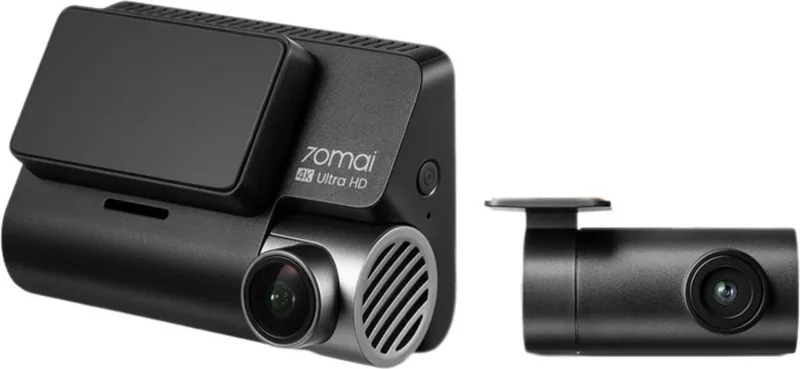
Another significant category covers dual-lens systems. These advanced models record both the front road view and the interior cabin or rear view simultaneously. The corresponding manuals must explain how to configure the two lenses, manage separate file storage, and synchronize time stamps. Users often need guidance on cable management and power supply connections when installing dual-camera setups, which are detailed thoroughly in these documents.
Furthermore, 70mai produces specialized devices like the Pro series, which include built-in GPS modules for tracking speed and location data. The manuals for these models delve into map settings, route history, and how to interpret the GPS overlay on recorded footage. There are also compact models designed for discreet mounting, and their manuals emphasize stealth installation techniques and battery backup options. Additionally, the brand offers smart mirrors and parking monitors, each requiring unique setup procedures found within their respective user guides.
Key Features Explained in User Guides
A primary function of any 70mai manual is to demystify the technical features of the camera. Modern dash cams come equipped with sophisticated sensors and software algorithms that might confuse an average user without proper explanation. The manuals break down complex terms into understandable language. For instance, the concept of HDR (High Dynamic Range) is explained in detail, helping users understand how the camera balances exposure in high-contrast situations like tunnels or bright sunlight.
Night vision capabilities are another critical topic addressed in the documentation. The guides describe the aperture size and sensor sensitivity, explaining why certain models perform better in low-light conditions. Users learn about the infrared LED lights used for night mode and how to adjust the sensitivity to avoid glare while maintaining clarity. Parking mode is also a heavily featured subject. The manuals explain how to set up voltage protection to prevent battery drain while the car is off, ensuring the vehicle remains safe from theft or vandalism even when parked.
Connectivity features are increasingly important in modern dash cams. The 70mai app allows users to view live feeds, download videos, and update firmware wirelessly. The manuals provide comprehensive tutorials on pairing the camera with smartphones via Wi-Fi. They cover troubleshooting common connection issues, such as password errors or signal interference. Voice control is another highlighted feature in newer models, allowing hands-free operation. The guides list all supported commands and demonstrate how to activate and customize voice responses.
Installation and Setup Procedures
Proper installation is vital for the performance and longevity of a dash cam. The 70mai manuals prioritize clear, step-by-step installation instructions to minimize user error. They begin with unpacking the device and identifying all included components, such as the suction cup mount, adhesive pad, power cables, and USB adapters. The guides offer visual aids, though text descriptions are precise enough to follow independently.
Power connection is a frequent point of confusion for new users. The manuals distinguish between using the cigarette lighter adapter for temporary use and hardwiring the device for permanent installation. Detailed diagrams illustrate fuse box locations and wiring paths for hardwire kits. This section often includes warnings about electrical safety, advising users to disconnect the car battery before making permanent connections. Cable routing tips are provided to ensure wires remain hidden and do not obstruct the driver's view.
Mounting position is equally critical. The guides recommend placing the camera near the rearview mirror to capture the widest possible field of view without blocking visibility. They advise cleaning the windshield surface with alcohol wipes before applying the adhesive mount to ensure a strong bond. Instructions on adjusting the lens angle are given to prevent overexposure from the sun or underexposure at night. Some manuals also include calibration steps to align the horizon correctly in the video feed.
Troubleshooting and Maintenance Tips
Even the most reliable devices can encounter issues, and this is where the troubleshooting section of the 70mai manual becomes indispensable. Common problems such as the camera failing to turn on, SD card errors, or video freezing are addressed systematically. The guides suggest checking power connections first, then verifying the SD card compatibility and format. If the issue persists, the manual provides factory reset procedures to restore default settings.
Maintenance advice is also included to extend the life of the device. Users are instructed on how to clean the lens regularly using microfiber cloths to remove dust and fingerprints. The manuals warn against using harsh chemicals that could damage the coating. Battery care is emphasized for models with internal batteries, recommending regular usage to keep the cells active. Firmware updates are discussed as a necessary maintenance task to fix bugs and add new features. The guides explain how to download the latest version from the official website and install it via the app or computer.
Customer support contact information is prominently displayed in the back of the manual. Users are encouraged to reach out if their problem is not resolved through the provided steps. This section lists email addresses, phone numbers, and links to online forums where community members share solutions. By combining self-help troubleshooting with professional support options, the manuals ensure that users feel supported throughout the lifecycle of their 70mai device.
Conclusion: Maximizing Value Through Documentation
In conclusion, 70mai manuals are far more than simple instruction booklets; they are comprehensive resources that empower users to master their dash cam technology. From initial unboxing to long-term maintenance, these documents cover every aspect of the user journey. They translate complex engineering concepts into actionable advice, ensuring that safety features work as intended. By following the guidelines in these manuals, drivers can enjoy peace of mind knowing their vehicle is being monitored effectively. Whether dealing with basic recording needs or advanced smart features, the 70mai manual remains the definitive source of truth for optimal device performance. Investing time in reading these guides pays dividends in reliability, clarity, and overall satisfaction with the product.
Search for 67,706 Manuals online


Type-in Brand or Model