

233621 Zen II Manual
PDF manual · 124 Pages
English



Quick check
Incorrect answer, please try again.
Chat with your 233621 Zen II manual using AI
Get instant AI answers from your 233621 Zen II manual
Ask anything about the 233621 Zen II. Answers come from this manual, with the pages they are based on.
Ask a Question
Do you recommend Zen II?
Yes NoFrequently Asked Questions
Check whether the earbud has no power and charge it in time. If the issue persists, try restarting the earbud by placing it back into the charging box and picking it up again. Confirm if the charging contacts are clean.
Is this answer helpful?
Restart the earbud by resetting it in the box. Check compatibility and call quality of the mobile phone. Confirm whether the connected device is too far away or if there is interference in the surrounding environment that affects signals.
Is this answer helpful?
The Bluetooth switch of the mobile phone might have been touched by mistake causing it to turn off. The area might be in an environment with strong electromagnetic interference. Verify if the earbud is set to mute mode intentionally or accidentally.
Is this answer helpful?
Confirm whether it is caused by environmental interference and suggest using WiFi equipment at another place to reduce interference. Try putting the earbud back into the charging box, closing the cover for five seconds, opening it and reconnecting to the phone.
Is this answer helpful?
There may be problems with the sound source itself so try to switch to other sound sources. The earbud might have entered water accidentally so place it in a ventilated environment to remove moisture. Check if the outlet is blocked by dirt requiring removal.
Is this answer helpful?
Accent and pronunciation affect the recognition rate significantly. Noise of the surrounding environment affects the recognition rate negatively. Speak too fast or too slowly impacts accuracy. Ensure the earbud is not worn improperly or does not fit the ear well enough.
Is this answer helpful?
Advantages and Disadvantages
Advantages

- Supports aptX Adaptive codec for high quality audio streaming and lower latency connections
- Long total endurance reaching twenty-three hours with the inclusion of the charging case unit
- Intelligent active noise cancellation reduces environmental sounds effectively for focus
- IPX4 water resistance rating protects against sweat and light rain during workouts
- Bluetooth version 5.2 ensures stable connection and quick pairing with mobile phones
Disadvantages

- Touch controls may require practice to master different gestures for specific functions
- Battery performance limited if stored in temperatures below five degrees Celsius
- Charging case indicators can sometimes be confusing regarding exact percentage levels
- Pairing process needs reset if multiple devices are connected previously
- Earbud fit relies heavily on selecting correct ear tip size for best seal
Product Specification
Type
In-Ear Headphones
Design
True Wireless, No Ear Hooks
Acoustic Principle
Sealed
Microphone
Built-in
Wireless Connectivity
Bluetooth 5.2, aptX, aptX Adaptive, Multipoint
Controls
Touch Control, Auto-Pause/Play
Battery Life
7 h, 23 h (with Charging Case)
Charging & Battery
USB-C Charging Port, Charging Case (500mAh), Fast Charging (5 min for 1 h Battery Life)
Frequency Response
20Hz-20kHz
Impedance
32 Ohms
Sensitivity
100 dB
Driver Size
10 mm (0.39 in)
Features
Active Noise Cancellation (ANC), Ambient Mode, Water Resistant (IPX4)
Software Features
Voice Assistant
Color
Black
Weight
0.22 oz (per Earbud), 1.48 oz (Charging Case)
Product Description
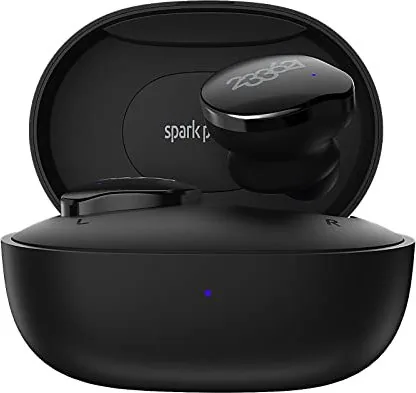
Unlock Audio Potential with the 233621 Zen II Wireless Headphones
Navigating the vast market of personal audio devices can be overwhelming for many consumers. However, the 233621 Zen II stands out by offering robust features at an accessible level. This compact set integrates sophisticated engineering designed to enhance your daily listening experience significantly. From high-fidelity audio transmission to intelligent noise management, this device caters to both serious audiophiles and casual listeners who demand quality without compromise.
Advanced Connectivity and Specifications
Powered by the highly reliable QCC5141 Bluetooth chip, these earbuds connect via Bluetooth version 5.2 technology. This ensures stable transmission within the 2400-2483.5MHz frequency range consistently. Users benefit from supported audio codecs including SBC and Aptx Adaptive for superior data transfer. The speakers feature a size of 10mm with power handling optimized for clarity. When paired correctly, you enjoy instant access to music and calls without latency issues affecting your enjoyment. Instructions for initial setup are often summarized in the 233621 Zen II Manual resources to assist new owners.
Intelligent Control Scheme
Interaction happens directly through capacitive touch pads located on both left and right units effortlessly. You can tap once to play, pause, or skip tracks smoothly. Holding the button activates the voice assistant system embedded in your phone seamlessly. Call management is equally straightforward, allowing you to pick up, hang up, or reject incoming communications instantly. For those switching environments dynamically, Noise Cancellation Mode filters out background chatter effectively while Ambient Mode lets in outside sounds when necessary for safety. Switching between these modes requires just a few seconds of interaction usually.
Battery Life and Charging Details
Sustainability matters greatly in modern electronics design today. These units house rechargeable polymer lithium ion batteries inside the housing. A single charge offers roughly seven and a half hours of continuous playtime reliably. The carrying case adds significant power capacity, capable of recharging the buds twice over entirely, totaling twenty-three hours of usage combined. Charging utilizes a USB-C connector which is fast and convenient for most users today. LED lights on the case indicate remaining power levels very accurately. Blue light signifies charging progress clearly, while red indicates low power conditions visually. Full charge is confirmed when the blue light illuminates briefly before turning off automatically.
Safety and Care Recommendations
To ensure longevity of your equipment, avoid exposing the electronics to dust or humidity beyond the IPX4 rating standard. Clean the ear tips periodically to prevent buildup and infection risks. Store the device between 5C and 35C to preserve battery performance optimally. Keep at least 15cm away from implantable medical devices like pacemakers due to radio wave interference risks identified. Adhering to these precautions protects your investment well. Do not use near open flames or heat sources strictly.
Final Thoughts
Ultimately, balancing comfort, technology, and price makes this a strong contender for anyone buying wireless audio gear now. Regular firmware updates may further improve functionality over time. We hope this overview helped you understand what to expect from purchasing this item successfully.
Notes
- Ensure proper fit for optimal sound isolation.
- Replace ear tips if they become damaged over years.
Search for 67,732 Manuals online


Type-in Brand or Model