
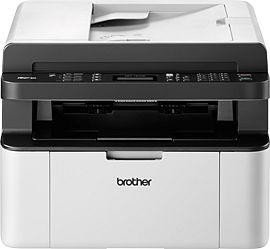


Brother MFC-1910W Laser Monochrome Manual
PDF manual · 124 Pages
English


Advantages and Disadvantages
Advantages

- Compact all-in-one design combining printing, scanning, copying and fax in a small footprint.
- Wireless connectivity with a dedicated Wi‑Fi button and easy setup via Brother Utilities.
- Clear on-screen menu and control panel for straightforward on-device programming.
- Toner Save and configurable Replace Toner options help lower operating costs.
- Extensive online support: drivers, guides and FAQs available from Brother Solutions Center.
Disadvantages

- Monochrome only — no color printing or color scanning output.
- Advanced network and software features require reading additional Software and Network Guide.
- Fax and voice features limited to MFC variants; some functions vary by model.
- Print density and Toner Save trade off quality for lower toner usage.
- No automatic duplex printing mentioned; manual handling needed for double-sided jobs.
Ask a Question
Frequently Asked Questions
The MFC-1910W is a monochrome multifunction device offering printing, copying and scanning. MFC variants also provide fax and basic voice features. It supports wireless connectivity on Wi‑Fi models and includes on-screen menus for easy operation.
Is this answer helpful?
Wireless models include a Wi‑Fi button that launches the wireless installer on your computer. Follow the on-screen instructions in the Quick Setup Guide or use Brother Utilities to select your model and configure network settings. The Wi‑Fi LED indicates connection status.
Is this answer helpful?
Brother provides drivers, software, user guides and FAQs via the Brother Solutions Center at support.brother.com. Product registration and local customer service contacts are available on brother.com for technical help and service center locations.
Is this answer helpful?
Toner Save reduces the toner usage per page to extend cartridge life, producing lighter print output. It’s useful to lower running costs for draft or internal documents but may not be suitable when darker, high-quality prints are required.
Is this answer helpful?
MFC variants support multiple receive modes (Fax Only, Fax/Tel, External TAD), memory receive when paper runs out, ring delay and F/T ring time adjustments, resolution settings (Standard, Fine, Super Fine, Photo) and transmission reports including a Fax Journal.
Is this answer helpful?
Yes. Wireless models support mobile print/scan with Brother iPrint&Scan and a Mobile Print/Scan Guide. You can scan from the device to mobile devices over Wi‑Fi when configured correctly.
Is this answer helpful?
You can configure Replace Toner behavior to either Continue printing until toner is exhausted or Stop printing when the message appears. Replace the toner cartridge when prompted for reliable print quality; consult the guide for replacement steps and safety notes.
Is this answer helpful?
Product Description

Brother MFC-1910W Laser Monochrome Manual
The Brother MFC-1910W is a compact monochrome multifunction laser designed for small offices and home users who need reliable printing, copying, scanning and basic fax capabilities. It emphasizes straightforward setup, practical features and network flexibility — especially for wireless environments — while keeping running costs reasonable through toner-saving options and straightforward maintenance.
Overview and key functions
This model combines a laser printer engine with an integrated flatbed scanner and fax functionality (for MFC variants). The control panel provides an LCD with clear on-screen programming and direct keys for common operations: Fax, Scan, Copy, Start and Stop. Wireless-enabled variants include a dedicated Wi‑Fi button to simplify connection setup using the included installer tools. Built-in utilities (Brother Utilities and ControlCenter) give quick access to scanning, driver setup and device settings on Windows and Mac platforms via the Brother Solutions Center.
The MFC-1910W supports a sensible range of paper sizes (A4, Letter, Legal, A5 and more) and offers adjustable print density, copy resolution and scan area. Fax features include multiple receive modes (Fax Only, Fax/Tel, External TAD), memory receive for when paper runs out, ring delay settings and options to adjust resolution and reduction for incoming documents. The device also provides address book speed dials, transmission reports and voice/telephone features on supported variants.
Setup and documentation
Users are guided through initial setup by a Quick Setup Guide and a more detailed User’s Guide. Additional Software and Network documentation covers advanced printer, scanner, PC‑Fax and networking functions (including Wi‑Fi setup). Brother provides downloadable drivers, utilities and FAQs through the Brother Solutions Center and offers product registration and customer service contacts for technical support.
Practical operation and maintenance
Menu-driven on-screen programming makes changing defaults simple — from Date & Time and Dial Mode to Toner Save and Auto Daylight adjustments. Ecology options such as Toner Save extend cartridge life at the cost of lighter print. When Replace Toner appears, you can choose whether printing stops or continues until toner is exhausted. Routine maintenance topics include clearing paper jams (ADF and tray), cleaning procedures and troubleshooting common error messages.
Notes:
- Wireless setup is streamlined via a Wi‑Fi button on compatible models; indicator lights show connection status.
- The machine supports PC-based scanning tools and mobile print/scan utilities for on-the-go workflows.
- Replacement toner behavior is configurable; Toner Save reduces print darkness but increases yield.
Search for 1 Mio. Manuals online


Type-in Brand or Model